• Home
  • News
  • Software
  • Knowledge
  • MMO
  • Tips
  • Security
  • Network
  • Office
AnonyViet - English Version
  • Home
  • News
  • Software
  • Knowledge
  • MMO
  • Tips
  • Security
  • Network
  • Office
No Result
View All Result
  • Home
  • News
  • Software
  • Knowledge
  • MMO
  • Tips
  • Security
  • Network
  • Office
No Result
View All Result
AnonyViet - English Version
No Result
View All Result

How to fix the error of Wireguard Client not being able to access the Internet when NAT twice

AnonyViet by AnonyViet
November 20, 2025
in Network
0

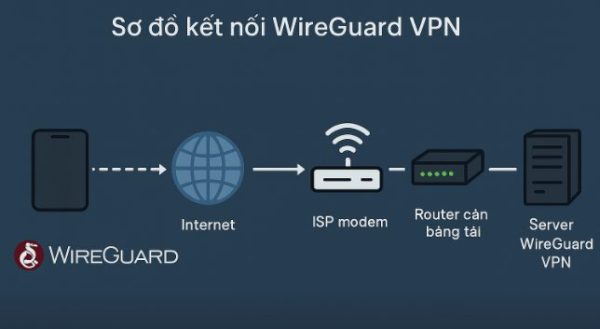
In case my house is NATed twice: that is, Internet model -> Network Router -> Load Balancing Router -> VPN Server. When the Client connects to Wireguard, there is traffic (bytes sent and bytes received) but the Client cannot go to the Internet.

Join the channel Telegram belong to AnonyViet 👉 Link 👈

How to fix the error of Wireguard Client not being able to access the Internet when NAT twice

Ways to fix the error of Wireguard Client not being able to access the Internet when Nating twice are as follows:

On the Wireguard server execute the command: ip -o -4 route show to default

Check the results to see what network card you are using? In my case, the result will be:

default via 192.168.1.1 dev wlan0 proto dhcp src 192.168.1.32 metric 600

So you are using the card wlan0. If your Server is another Card, remember the Card name

Next enter the following commands (replace wlan0 with your card)

# Thêm NAT cho subnet WireGuard
sudo iptables -t nat -A POSTROUTING -s 10.113.141.0/24 -o wlan0 -j MASQUERADE

# Cho phép traffic từ wg0 đi ra LAN/Internet
sudo iptables -A FORWARD -i wg0 -o wlan0 -j ACCEPT

# Cho phép traffic ngược lại (gói trả về) đi vào wg0
sudo iptables -A FORWARD -i wlan0 -o wg0 -m state --state RELATED,ESTABLISHED -j ACCEPT

10.113.141.0/24 is the IP range given to the Client by Wireguard. Please check the actual range on your computer and fill in correctly. Open the config file in the /home/USER/configs/ directory and see the line Address =  to know the IP range.

However, when rebooting the server, the configuration will be lost. To save the configuration, execute the following command:

sudo apt install iptables-persistent -y

# Thêm NAT cho subnet WireGuard
sudo iptables -t nat -A POSTROUTING -s 10.113.141.0/24 -o wlan0 -j MASQUERADE

# Cho phép traffic từ wg0 đi ra LAN/Internet
sudo iptables -A FORWARD -i wg0 -o wlan0 -j ACCEPT

# Cho phép traffic ngược lại (gói trả về) đi vào wg0
sudo iptables -A FORWARD -i wlan0 -o wg0 -m state --state RELATED,ESTABLISHED -j ACCEPT

sudo netfilter-persistent save


A little note when doing Lab, especially at home, often NAT twice when going through network Router -> Wifi Router -> PC, you need to pay attention when doing this.


Tags: accessClienterrorfixInternetNATWireguard
Previous Post

How to configure dynamic IP as static IP with Cloudflare to do Lab at home

Next Post

How to stop Facebook from tracking you completely

AnonyViet

AnonyViet

Related Posts

Save image as Type contains malicious code: Remove immediately before losing money unfairly!
Network

Save image as Type contains malicious code: Remove immediately before losing money unfairly!

March 19, 2026
Instructions on how to register a .co.uk domain name for free for 1 year
Network

Instructions on how to register a .co.uk domain name for free for 1 year

March 12, 2026
How to Setup Paperclip AI: Create a Company for AI Agent
Network

How to Setup Paperclip AI: Create a Company for AI Agent

March 12, 2026
Compilation of free and cheap APIs to run OpenClaw stably
Network

Compilation of free and cheap APIs to run OpenClaw stably

March 10, 2026
3 Services to Determine IP Location for Website (IP Geolocation API)
Network

3 Services to Determine IP Location for Website (IP Geolocation API)

March 10, 2026
How to buy a .STORE domain name for 1 USD (2026): Detailed instructions from A–Z
Network

How to buy a .STORE domain name for 1 USD (2026): Detailed instructions from A–Z

March 3, 2026
Next Post
How to stop Facebook from tracking you completely

How to stop Facebook from tracking you completely

0 0 votes
Article Rating
Subscribe
Login
Notify of
guest

guest

0 Comments
Oldest
Newest Most Voted
Inline Feedbacks
View all comments

Recent News

How to intercept traffic using Burp Suite to analyze HTTP/HTTPS

How to intercept traffic using Burp Suite to analyze HTTP/HTTPS

April 18, 2026
How to avoid Adblock detection on Youtube with 4 good tips

How to avoid Adblock detection on Youtube with 4 good tips

April 17, 2026
How to transfer ChatGPT data to Claude is extremely simple

How to transfer ChatGPT data to Claude is extremely simple

April 16, 2026
How to authenticate the owner’s SIM on VNeID from April 15

How to authenticate the owner’s SIM on VNeID from April 15

April 15, 2026
How to intercept traffic using Burp Suite to analyze HTTP/HTTPS

How to intercept traffic using Burp Suite to analyze HTTP/HTTPS

April 18, 2026
How to avoid Adblock detection on Youtube with 4 good tips

How to avoid Adblock detection on Youtube with 4 good tips

April 17, 2026
How to transfer ChatGPT data to Claude is extremely simple

How to transfer ChatGPT data to Claude is extremely simple

April 16, 2026
AnonyViet - English Version

AnonyViet

AnonyViet is a website share knowledge that you have never learned in school!

We are ready to welcome your comments, as well as your articles sent to AnonyViet.

Follow Us

Contact:

Email: anonyviet.com[@]gmail.com

Main Website: https://anonyviet.com

Recent News

How to intercept traffic using Burp Suite to analyze HTTP/HTTPS

How to intercept traffic using Burp Suite to analyze HTTP/HTTPS

April 18, 2026
How to avoid Adblock detection on Youtube with 4 good tips

How to avoid Adblock detection on Youtube with 4 good tips

April 17, 2026
No Result
View All Result
  • Home
  • News
  • Software
  • Knowledge
  • MMO
  • Tips
  • Security
  • Network
  • Office

wpDiscuz
0
0
Would love your thoughts, please comment.x
()
x
| Reply