• Home
  • News
  • Software
  • Knowledge
  • MMO
  • Tips
  • Security
  • Network
  • Office
AnonyViet - English Version
  • Home
  • News
  • Software
  • Knowledge
  • MMO
  • Tips
  • Security
  • Network
  • Office
No Result
View All Result
  • Home
  • News
  • Software
  • Knowledge
  • MMO
  • Tips
  • Security
  • Network
  • Office
No Result
View All Result
AnonyViet - English Version
No Result
View All Result

Detailed instructions on how to submit red books on VNeID right at home

AnonyViet by AnonyViet
November 13, 2025
in Software
0

How to submit red book above VNeID has become extremely simple and convenient thanks to the latest update of the electronic identification application. Now, instead of having to photocopy documents and go directly to the administrative agency, you can complete the entire process right on your phone. Let’s find out the detailed steps with AnonyViet in this article!

Join the channel Telegram belong to AnonyViet 👉 Link 👈

Why do you need to submit red books via VNeID application?

This new feature was launched to serve “90-day campaign to clean up land data” nationwide. Allowing people to self-provide Land Use Rights Certificate information online brings many practical benefits:

  • Save time and effort, you no longer have to waste time traveling, photocopying documents and submitting them directly to the authorities in the ward/commune.
  • The procedure can be performed anywhere, anytime with just a smartphone with an internet connection.
  • This action helps state agencies quickly update, compare and “clean” the land database, ensuring accuracy and synchronization.

Why do you need to submit red books via VNeID application?

Detailed instructions on how to submit red books on VNeID

To do this, you need to make sure your eID account is in level 2. The steps are as follows:

Step 1: First, you need to open VNeID application and log in to your account, then navigate to the section Other services on the main interface.
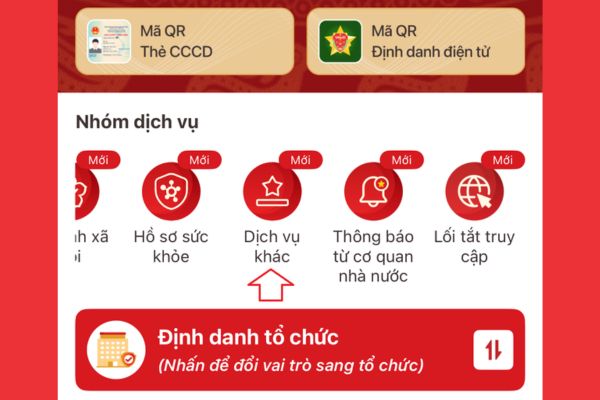
Find the Other Services section

Step 2: In the Other Services interface, find and click on the item Provide information to State agencies.

Step 3: The system will display the request management screen. Here, you click on the button Create new to start the process.
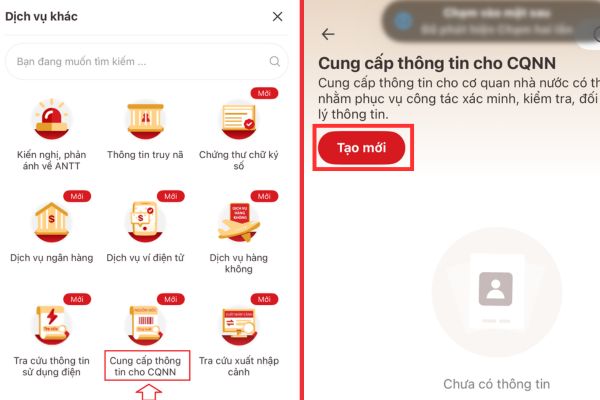
Click the Create New button

Step 4: In the “Provided information” section, click on the box Select information and search for the item Certificate of land use rights.
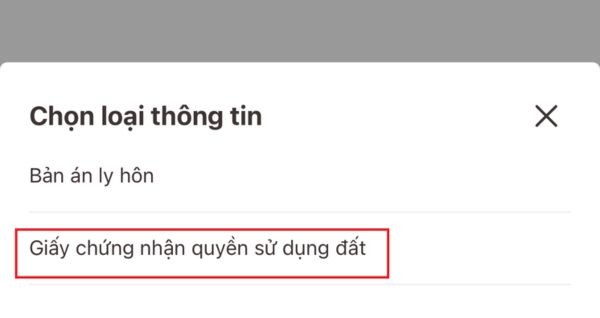
Select the item Land Use Rights Certificate

Step 5: The application will automatically fill in your full name and personal identification number. You need to enter the following additional information:

  • Certificate number (usually starts with a letter and has a series of numbers, located on the first page of the red book).
  • The land plot address on the red book follows a 3-level structure (Province/City; District/District; Commune/Ward).
  • The current land plot address follows a 2-level structure.

In case you declare on your behalf or the red book is owned by an organization, you need to fill in additional information about the owner/organization and the reason for declaring on your behalf.
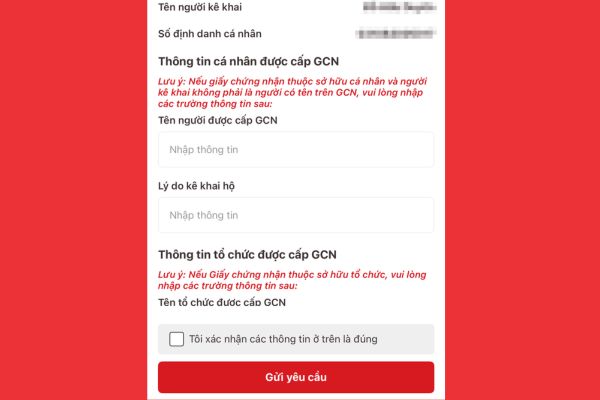
Enter additional information

Step 6: You need to take photos or fully scan all pages of the red book and upload to the system. Accepted file formats include PDF, PNG, JPG, JPEG. The total size of all uploaded files cannot be exceeded 3.5MB.

Step 7: After you have filled in all the information and uploaded the attachment, check it again. Finally, you tick the box “I confirm the above information is correct” and press the button Send request. The screen will display the message “Information sent successfully” and you are done.

Detailed instructions on how to submit red books on VNeID right at home

Other notable new features on VNeID 2.2.4

Besides submitting the red book, version VNeID 2.2.4 also brings many other improvements and benefits to users:

  • The application allows you to integrate your children’s education records, making it easier to manage your dependents’ education records.
  • Many important public services have been updated and adjusted, including procedures related to criminal records, residence registration and issuance/management of Citizen Identification Cards.
  • The passport information integration feature has also been updated to work more effectively.
  • You can use the product traceability lookup feature to check product information.
  • The National Law Portal has been added, helping you easily look up legal documents.

Other notable new features on VNeID 2.2.4

Conclusion

With the detailed instructions above, the implementation How to submit red book on VNeID is no longer an obstacle. This feature not only helps people save time and effort but also makes an important contribution to digitizing and cleaning national land data. Please update VNeID to the latest version to immediately experience these great utilities

Tags: booksdetailedhomeInstructionsRedsubmitVNeID
Previous Post

How to Create a QR code to connect to Wifi without giving the guest a Password

Next Post

How to create photos under the snow extremely quickly in just a few minutes

AnonyViet

AnonyViet

Related Posts

What to do when your company opening information is stolen?
Software

What to do when your company opening information is stolen?

November 4, 2026
Experience Galaxy Tab S12 Ultra: Price of 40 million is a worthy investment to replace a laptop
Software

Experience Galaxy Tab S12 Ultra: Price of 40 million is a worthy investment to replace a laptop

November 2, 2026
Receive Driver Booster 14 license key immediately for free for 6 months
Software

Receive Driver Booster 14 license key immediately for free for 6 months

November 1, 2026
Online pagoda game: Experience practice and relieve stress at home
Software

Online pagoda game: Experience practice and relieve stress at home

November 1, 2026
Instructions for receiving Avira Prime 3 months for free, no credit card
Software

Instructions for receiving Avira Prime 3 months for free, no credit card

October 31, 2026
Instructions for installing CleanYourTv to remove Android TV ads
Software

Instructions for installing CleanYourTv to remove Android TV ads

October 29, 2026
Next Post
How to create photos under the snow extremely quickly in just a few minutes

How to create photos under the snow extremely quickly in just a few minutes

0 0 votes
Article Rating
Subscribe
Login
Notify of
guest

guest

0 Comments
Oldest
Newest Most Voted

Recent News

What to do when your company opening information is stolen?

What to do when your company opening information is stolen?

November 4, 2026
How to get 0 in Docker credits to run AI Agent for free

How to get $250 in Docker credits to run AI Agent for free

November 3, 2026
Experience Galaxy Tab S12 Ultra: Price of 40 million is a worthy investment to replace a laptop

Experience Galaxy Tab S12 Ultra: Price of 40 million is a worthy investment to replace a laptop

November 2, 2026
Cách Đăng ký Nhận Code ChatGPT Business

Cách Đăng ký Nhận Code ChatGPT Business

November 2, 2026
What to do when your company opening information is stolen?

What to do when your company opening information is stolen?

November 4, 2026
How to get 0 in Docker credits to run AI Agent for free

How to get $250 in Docker credits to run AI Agent for free

November 3, 2026
Experience Galaxy Tab S12 Ultra: Price of 40 million is a worthy investment to replace a laptop

Experience Galaxy Tab S12 Ultra: Price of 40 million is a worthy investment to replace a laptop

November 2, 2026
AnonyViet - English Version

AnonyViet

AnonyViet is a website share knowledge that you have never learned in school!

We are ready to welcome your comments, as well as your articles sent to AnonyViet.

Follow Us

Contact:

Email: anonyviet.com[@]gmail.com

Main Website: https://anonyviet.com

Recent News

What to do when your company opening information is stolen?

What to do when your company opening information is stolen?

November 4, 2026
How to get 0 in Docker credits to run AI Agent for free

How to get $250 in Docker credits to run AI Agent for free

November 3, 2026
  • Home
  • Home 2
  • Home 3
  • Home 4
  • Home 5
  • Home 6
  • Next Dest Page
  • Sample Page

say88 tỷ lệ kèo nhà cái kèo nhà cái 5 febet

No Result
View All Result
  • Home
  • News
  • Software
  • Knowledge
  • MMO
  • Tips
  • Security
  • Network
  • Office

say88 tỷ lệ kèo nhà cái kèo nhà cái 5 febet

wpDiscuz
0
0
Would love your thoughts, please comment.x
()
x
| Reply