How to create photos under the snow is a “stormy” trend on social networks, helping you transform into the main character in a romantic winter scene. With just a few steps, you will immediately have a set of 3 cinematic frames to show off to your friends. Let’s discover the secret now!
| Join the channel Telegram belong to AnonyViet 👉 Link 👈 |
2 ways to create photos under the snow using AI
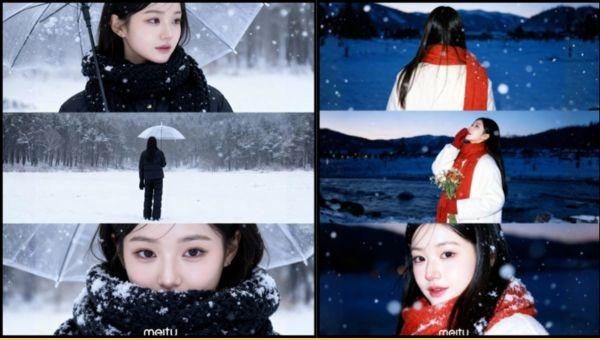
The trend of 3-frame photos in the snow is creating a craze on social networking platforms. The unique composition with over-the-shoulder angles, mid-shots and close-ups creates a harmonious whole, imbued with a cinematic style. Below are two methods to help you easily create photos under the snow.
Method 1: Create photos with Meitu application
If you prioritize convenience and want immediate results, Meitu is an option not to be missed. Although some premium features will require a fee, the simplicity and quality it brings are completely worth it.
Step 1: First, open it Meitu application and access the feature “AI Art” (or “Creative AI”) right on the main interface.

Step 2: Next, upload the portrait you want to edit and browse the template library to choose a winter snow effect that suits your style.

Step 3: Finally, the AI system will automatically process in a few seconds. You just need to wait and save the finished work to your phone ready to share.
Method 2: Create photos with Gemini Nano Banana
For those who love customization and want complete control over their creations without the cost, Gemini is the perfect tool. Using detailed prompts, you can instruct the AI to create a unique photo.
Step 1: Start by visiting the website or opening it Google AI Studio > Select the Nano Banana tool.

Step 2: Then, you upload a clear portrait photo of yourself as a sample and copy one of the suggested commands below.
Prompt 1: Cinematic, romantic style
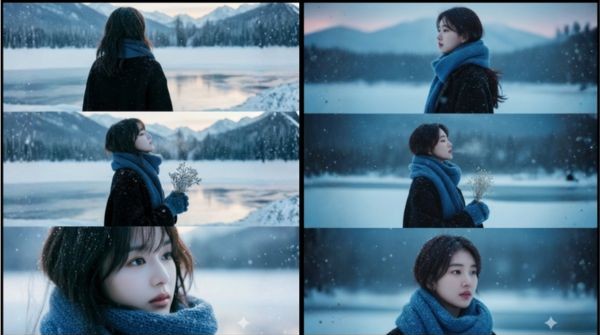
Dựa trên gương mặt tham chiếu, hãy tạo bộ ảnh điện ảnh gồm ba khung hình cận cảnh, khắc họa một người trẻ giữa không gian núi tuyết trong buổi hoàng hôn, mang sắc thái siêu thực và đầy cảm xúc.

Nhân vật có mái tóc mềm nhẹ, khoác áo len đen dáng dài, quàng khăn len xanh dày và đeo găng tay cùng tông. Những bông tuyết nhỏ rơi lất phất, đọng lại trên tóc, vai và tay áo, vẽ nên khung cảnh mùa đông tĩnh lặng bên hồ băng phủ sương.

• Khung 1: Chụp cận từ sau vai, nhân vật nghiêng đầu nhìn về phía dãy núi xa, ánh hoàng hôn phản chiếu trên tóc, tuyết rơi nhẹ phủ mờ vai áo, tạo cảm giác vừa cô đơn vừa bình yên.

• Khung 2: Trung cảnh nửa người nghiêng, nhân vật cầm bó hoa nhỏ, khẽ ngẩng mặt đón những bông tuyết đang rơi. Hơi thở lạnh tan thành làn khói mỏng, tan dần trong ánh chiều xanh tím.

• Khung 3: Cận khuôn mặt, ánh sáng hoàng hôn pha xanh lam phản chiếu dịu trên da, tuyết vương trên tóc và khăn, ánh mắt nhân vật mông lung, chất chứa nỗi niềm lặng lẽ.

Phông nền là rừng xa và con sông đóng băng, mờ nhẹ để làm nổi bật chiều sâu cảm xúc của gương mặt.

Ánh sáng: tự nhiên lúc hoàng hôn, điểm flash nhẹ, làm rõ tương phản giữa tuyết trắng và sắc xanh lam trên khăn.

Phong cách: điện ảnh, hiện thực xen lãng mạn mùa đông, hạt film mịn, độ sâu trường ảnh nông, ánh sáng mềm và trầm ấm.

Bố cục: khung dọc tỉ lệ 16:9, ba khung xếp dọc liên tiếp như chuỗi ảnh phim, duy trì nhịp tuyết rơi xuyên suốt, nhân vật chiếm trọng tâm khung hình.
Prompt 2: Sad, narrative style (English version)
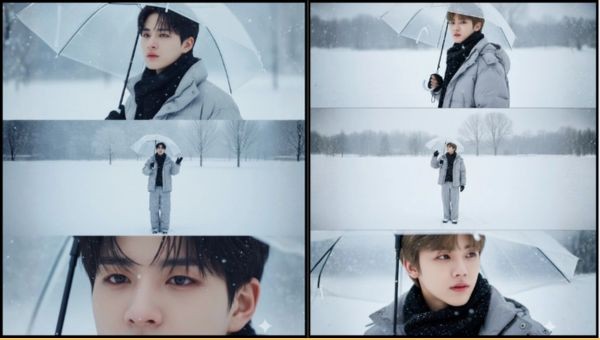
Create a vertical composition in 4K resolution (2160×3840 px), divided into three equal horizontal panels, seamlessly aligned.

Main subject: Based on the reference face, hairstyle, and physique — a young figure embodying melancholy and wistful remembrance, eyes deep and reflective, carrying a quiet sense of longing and solitude.

Outfit: A loose winter puffer jacket with wide-leg trousers, paired with a black wool scarf, giving a sense of gentle warmth amid the cold.

Overall mood: A world blanketed in white snow, rendered in cool tones that breathe melancholy, stillness, and distance.

• Frame 1 (portrait): The character holds a clear umbrella, turning slightly over the shoulder to face the viewer. Their gaze is hauntingly soft yet sorrowful, eyes shimmering with emotion. The background melts into a misty blur, snow drifting slowly through the air.

• Frame 2 (full body): The same figure, umbrella still in hand, stands alone in a boundless snowy plain, walking at an unhurried pace while lifting their face toward the falling snow. The shot is angled from above, capturing the gesture of an outstretched hand trying to feel the fleeting flakes. Far behind, a few bare trees rise faintly against the whiteness, emphasizing isolation within vast emptiness.

• Frame 3 (close-up): A tight focus on the eyes, where sadness meets distant reflection. The gaze drifts past the frame — a quiet ache, a yearning left unspoken, framed by snowlight and silence.

The entire sequence should flow like a cinematic triptych, carrying the same winter hush and emotional continuity, where snow, breath, and memory intertwine in stillness.
Step 3: After pasting the command, you just need to press send and wait for the results. Don’t hesitate to try again and again because AI will produce different variations, helping you find the most satisfactory photo.
Small notes to have more perfect photos
The quality of the output image depends greatly on the original image you provide. To get the most out of your photos in the snow, keep the following in mind:
- You should prioritize photos with good lighting, not too dark or overexposed so that AI can accurately recognize faces.
- A high-definition, candid portrait photo would be the ideal input material for AI.
- To avoid confusing the composition, choose a photo with a background that is as simple as possible, helping the AI focus on the subject.
- A moment with a natural, relaxed expression will help the final photo have soul and convey emotions better.
Conclusion
With these How to create photos under the snow shared above, owning a set of artistic winter photos is no longer difficult. Whether you are a beginner or familiar with AI tools, get started now to create your own unique works. Wishing you beautiful and impressive photos