Set 2 layers security for chatgpt In essence, it is like locking another door to your home. Recently, there is a lot of information about the exposed chatgpt account that many people worry, but you can completely protect yourself. The addition of this protective layer is not complicated but extremely effective, ensuring that only you can access the conversations. Join Anonyviet to see how to do it right below!
| Join the channel Telegram belong to Anonyviet 👉 Link 👈 |
Why turn 2 -layer security for chatgpt?
In the digital age, only one password is not safe enough. Passwords may be guessed or stolen. At that time, the second layer of security was a reliable bodyguard for your account.
- Even if the bad guy knows your password, they cannot log in. The reason is because they do not have the second key, the authentication code is only available on the phone.
- Many users Chatgpt To exchange jobs, creative ideas or private information. Turning on 2 -layer security will help you keep these content safely from curiosity.
- You will no longer have to be afraid of someone who is sneaking into your account anymore.
Instructions for installing 2 -layer security for chatgpt
This process is very fast, you just need to follow the following simple steps.
To start, you need to install the application Google Authenticator On the phone. This is a free Google app, helping to create random codes to log in.
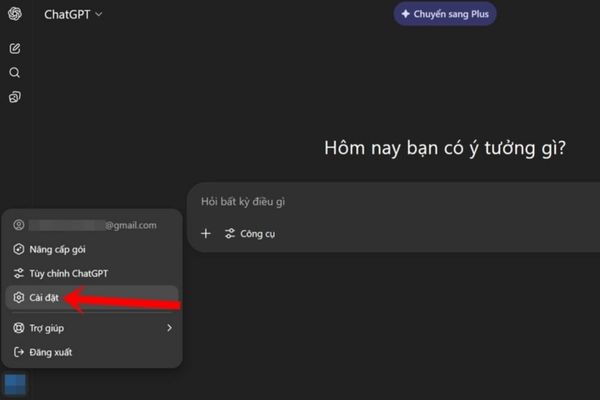
Step 1: First, log in to the chatgpt account. In the bottom corner left on the left of the screen, click on your name or avatar and then choose Setting.
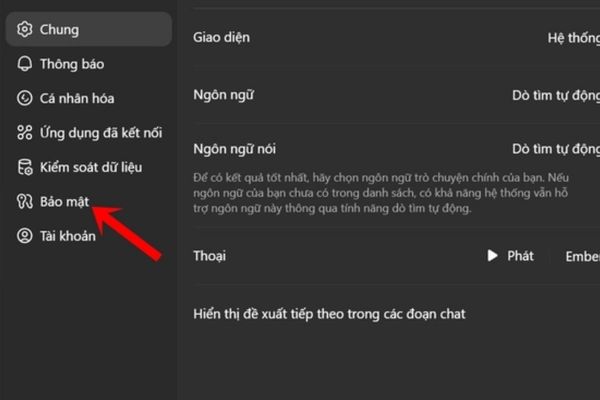
Step 2: Please find and click on the item Security.
Step 3: Now, you just need to deceive the switch next to the line Multi -love authentication Right to turn it on. Chatgpt will ask you if you are sure, click Allow.
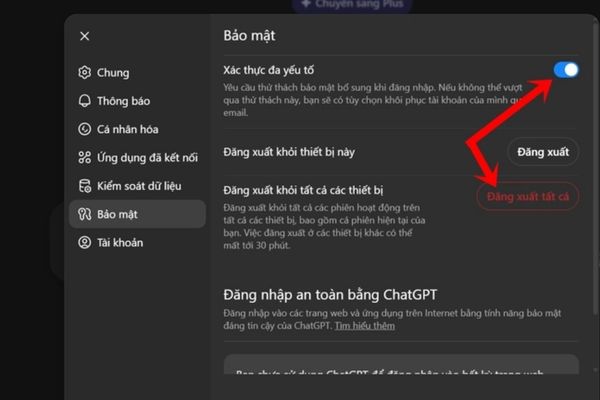
A tip: You should click on “Log out of all devices”(Log out of all devices) to escape all old login times, ensuring absolute safety.
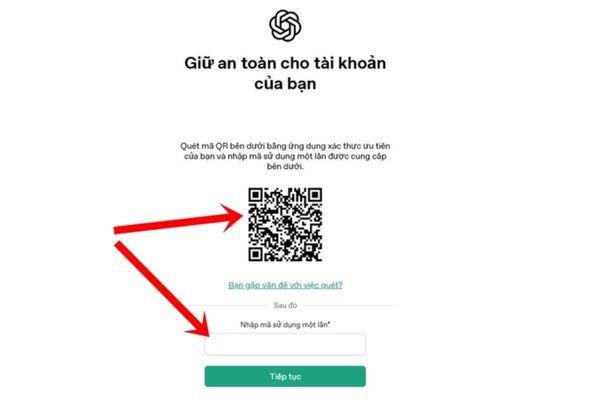
Step 4: On the computer screen will appear a QR code. Open the Google Authenticator application on your phone, click on the plus (+) and select “Scan the QR code”. Then you just need to put the phone camera into the QR code on the screen.
Step 5: Immediately, the application on the phone will appear a sequence 6 digits. This sequence will change every 30 seconds.
Please enter these 6 numbers quickly into the blank box on the chatgpt page and click the confirmation. When you have a successful announcement, you can do it! From now on, each login, you will need to enter an additional 6 -digit code from this application.
Conclusion
That’s it! You have completed the job Set 2 layers security for chatgpt And equipped with an extremely strong “lock” for your account. Now, you can be completely assured that your conversations are always kept safe and private. Take a few minutes to set up today!