• Home
  • News
  • Software
  • Knowledge
  • MMO
  • Tips
  • Security
  • Network
  • Office
AnonyViet - English Version
  • Home
  • News
  • Software
  • Knowledge
  • MMO
  • Tips
  • Security
  • Network
  • Office
No Result
View All Result
  • Home
  • News
  • Software
  • Knowledge
  • MMO
  • Tips
  • Security
  • Network
  • Office
No Result
View All Result
AnonyViet - English Version
No Result
View All Result

How to block ads on iPhone, iPad and Mac (both web and app)

AnonyViet by AnonyViet
September 29, 2025
in Software
0

How to block ads on iPhone Effective is always what users seek to enhance the experience of using the device. If you are too tired with pop-ups, banner ads suddenly appear, discover solutions called QC Edit by Haphung V4.0. This is a method of using free DNS configuration, powerful and extremely easy to set.

Join the channel Telegram belong to Anonyviet 👉 Link 👈

Introducing the block block QC Edit by Haphung V4.0

QC Edit by Haphung V4.0 Not a common application. This is a DNS configuration profile Ha Phung Research and share help your iPhone and iPad filter out advertising domain names right from the root.

Instead of having to install third -party applications or using complex VPN, this method works by installing a configuration profile directly into your device.

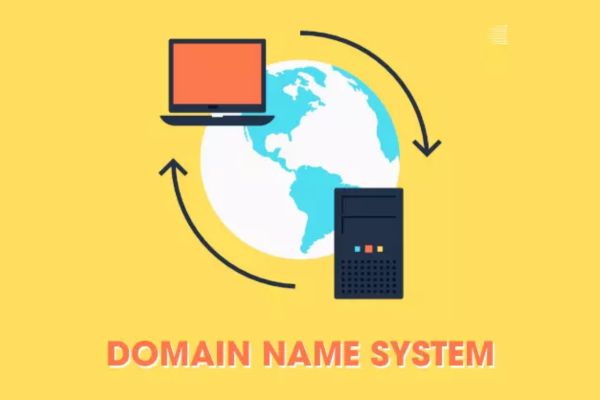
This record will navigate the iPhone’s network requirements through a special DNS server. This server is responsible for identifying and filtering advertisers’ domain names, preventing them from downloading before displaying on your screen.
Introducing the block block QC Edit by Haphung V4.0

Why is this an optimal way to block ads on iPhone?

This method is favored by many users because it solves many disadvantages of traditional tools:

  • This method is capable of blocking 90% advertising Intermediate through DNS, helping websites and applications to load significantly faster.
  • This tool also helps to reduce part of advertising on difficult platforms like YouTube And Facebook, although it is not 100%completely eliminated.
  • You will no longer have to worry about battery drain or flickering connection, because the DNS configuration is much softer than maintaining a continuous VPN connection.
  • This solution is fully compatible with the Apple ecosystem, good support above iOS, iPados, macOS and TVOS.
  • You can rest assured that the ad will be blocked on all network connections, from 3G/4G mobile data to wifi network at home or public.
  • The advertising ability is applied synchronously on both Safari browser and other applications you have installed.
  • The blocking list will be automatically updated on the server side, helping you always be protected from new advertising sources without having to reinstall the configuration.
  • The most important thing is that this solution is completely free of charge And do not require you to download any additional applications from the App Store.
How to block ads on iPhone, iPad and Mac

Detailed instructions on how to block ads on iPhone

You only need to perform 3 simple steps below to activate this great feature:

Step 1: First, please copy the download link below:

https://www.mediafire.com/file/mp73j9qvevt2hdq

Then paste it into the Safari browser. When Safari asked, click the “Allow“To download the file.

Step 2: Next, you enter Setting > General installation > VPN management and equipment. You will see a new item called Adblock Edit by Haphung V4.0 in the part The file has been downloaded. Click on it, select Setting In the upper right corner and confirm the password of the machine when required.
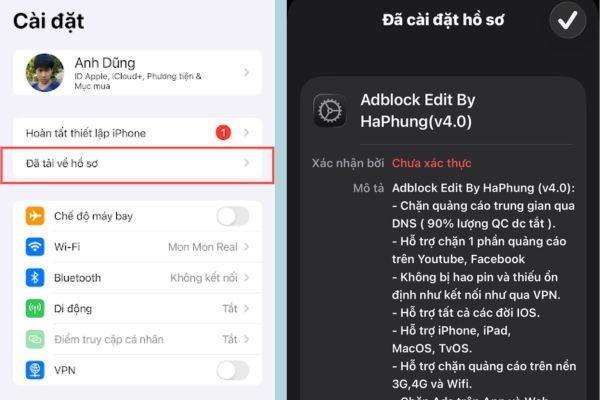
Adblock Edit by Haphung V4.0 in the downloaded profile

Step 3: To ensure the configuration is applied immediately, close the applications that are running background. Now, reopen the browser or any application and feel the difference when there is no ad.

Note about servers: The developer offers different server options (Vip01, 02, 03). In particular, the VIP03 server is integrated with access to some websites with 18+ content. If you don’t want to use this feature, you can choose the server Vip01 or vip02.
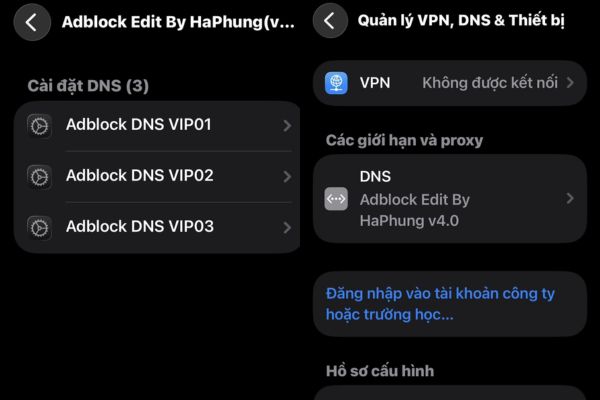
You can choose vip01 or vip02 server

Conclusion

In short, the use of DNS configuration is one How to block ads on iPhone Extremely smart and effective. With QC Edit by Haphung blocking, you not only eliminate unnecessary troubles but also help protect the performance and battery life of the device. Let’s follow the instructions above to enjoy a fresh and smoother cyber space from today!


Tags: AdsAppBlockiPadiPhoneMacweb
Previous Post

How to save photos of friends to overcome Facebook images

Next Post

Top 10 good quality camera memory cards should be used

AnonyViet

AnonyViet

Related Posts

Is Xiaomi Redmi A7 a valuable choice in the popular smartphone segment?
Software

Is Xiaomi Redmi A7 a valuable choice in the popular smartphone segment?

July 14, 2026
Compact design, durable battery, excellent camera: Review of OPPO Reno 16 Pro 5G
Software

Compact design, durable battery, excellent camera: Review of OPPO Reno 16 Pro 5G

July 12, 2026
Download the free 3D Pinball Space Cadet game on the App Store now
Software

Download the free 3D Pinball Space Cadet game on the App Store now

July 12, 2026
Learn new skills with iPad 11 (A16) 128GB: when is enough, when should you upgrade to a higher level?
Software

Learn new skills with iPad 11 (A16) 128GB: when is enough, when should you upgrade to a higher level?

July 10, 2026
Instructions for taking free buses in Ho Chi Minh City from July 2026
Software

Instructions for taking free buses in Ho Chi Minh City from July 2026

July 9, 2026
3 steps to change Zalo number when sim is revoked
Software

3 steps to change Zalo number when sim is revoked

July 8, 2026
Next Post
Top 10 good quality camera memory cards should be used

Top 10 good quality camera memory cards should be used

0 0 votes
Article Rating
Subscribe
Login
Notify of
guest

guest

0 Comments
Oldest
Newest Most Voted

Recent News

Instructions for Getting Netflix 30 Days Free to Watch Movies

Instructions for Getting Netflix 30 Days Free to Watch Movies

July 18, 2026
How to create a website introducing yourself using Bio Link for free

How to create a website introducing yourself using Bio Link for free

July 17, 2026
Hippie OSINT Toolkit: The ultimate information investigation toolkit

Hippie OSINT Toolkit: The ultimate information investigation toolkit

July 17, 2026
HP 16GB RAM Laptop: Who should choose and is it necessary?

HP 16GB RAM Laptop: Who should choose and is it necessary?

July 17, 2026
Instructions for Getting Netflix 30 Days Free to Watch Movies

Instructions for Getting Netflix 30 Days Free to Watch Movies

July 18, 2026
How to create a website introducing yourself using Bio Link for free

How to create a website introducing yourself using Bio Link for free

July 17, 2026
Hippie OSINT Toolkit: The ultimate information investigation toolkit

Hippie OSINT Toolkit: The ultimate information investigation toolkit

July 17, 2026
AnonyViet - English Version

AnonyViet

AnonyViet is a website share knowledge that you have never learned in school!

We are ready to welcome your comments, as well as your articles sent to AnonyViet.

Follow Us

Contact:

Email: anonyviet.com[@]gmail.com

Main Website: https://anonyviet.com

Recent News

Instructions for Getting Netflix 30 Days Free to Watch Movies

Instructions for Getting Netflix 30 Days Free to Watch Movies

July 18, 2026
How to create a website introducing yourself using Bio Link for free

How to create a website introducing yourself using Bio Link for free

July 17, 2026
  • Home
  • Home 2
  • Home 3
  • Home 4
  • Home 5
  • Home 6
  • Next Dest Page
  • Sample Page

say88 tỷ lệ kèo nhà cái kèo nhà cái 5 febet

No Result
View All Result
  • Home
  • News
  • Software
  • Knowledge
  • MMO
  • Tips
  • Security
  • Network
  • Office

say88 tỷ lệ kèo nhà cái kèo nhà cái 5 febet

wpDiscuz
0
0
Would love your thoughts, please comment.x
()
x
| Reply