• Home
  • News
  • Software
  • Knowledge
  • MMO
  • Tips
  • Security
  • Network
  • Office
AnonyViet - English Version
  • Home
  • News
  • Software
  • Knowledge
  • MMO
  • Tips
  • Security
  • Network
  • Office
No Result
View All Result
  • Home
  • News
  • Software
  • Knowledge
  • MMO
  • Tips
  • Security
  • Network
  • Office
No Result
View All Result
AnonyViet - English Version
No Result
View All Result

Unlock 1000+ Windows feature with Super God Mode

AnonyViet by AnonyViet
March 20, 2025
in Software
0

Do you know that Windows hides dozens of useful features that normal users are hard to discover? Super God Mode It is the key to opening the door to that secret world, allowing you to customize Windows as you like easily.


Join the channel Telegram belong to Anonyviet 👉 Link 👈

What is Super God Mode?

Different from the thoughts of many people, Super God Mode Not an official feature of Windows. It is a PowerShell command created by YouTuber Thiojoe, capable of scanning the entire system and gathering all settings, tools and hidden positions into a single place, making it easy to find and refine your Windows experience.

What is Super God Mode?

See also: Useful Scripts: Summary of 211 useful tools for web browsers

What is Super God Mode different from God Mode?

Similar to “God Mode” has been around for Windows, Super God Mode also provides quick access to the system settings. However, the difference is that Super God Mode goes further by searching and displaying hidden settings, affiliates, URL protocols and more, giving you the ability to control the system at an intensive level.

How to activate Super God Mode on Windows 11/10

To experience the power of Super God Mode, you need to download and run the instructions, then visit the folder containing the shortcuts created:

Step 1: Access Github project page and download super_god_mode.ps1 file to your computer.
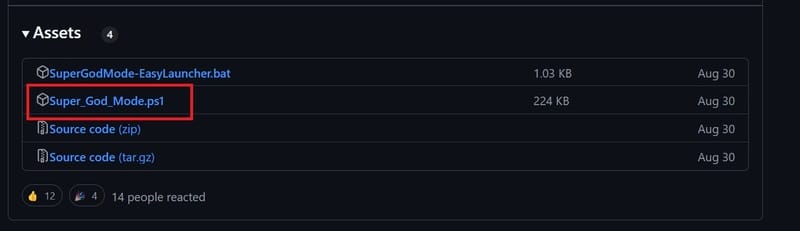
Download super_god_mode.ps1 file

Step 2: Open Start menu and search for PowerShell (or Terminal)> Right -click on PowerShell and select Run as Administrator.

Step 3: Change the implementation policy to allow PowerShell instructions to run.

Tip: You can download the file Supergodmode -Sylaucher.bat To launch the instructions without changing the policy.

Step 4: Enter the following command to open the folder containing the set and press Enter:

cd path\to\script-directory\

Step 5: Enter the following command to run the Super God Mode instruction and click Enter:

.\Super_God_Mode.ps1
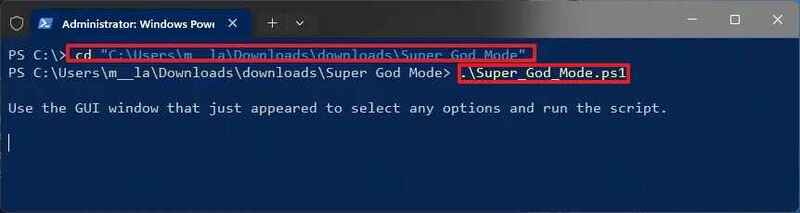
Run the Super God Mode

Step 6: (Optional) Confirm the installation of “Control Outputs” to specify scanning range.

Step 7: (Optional) Select the link folder by using the “output directory” settings.

Step 8: (Optional) Customize name for the folder using the “output folder name” settings.

Step 9: Click the Run Script button.
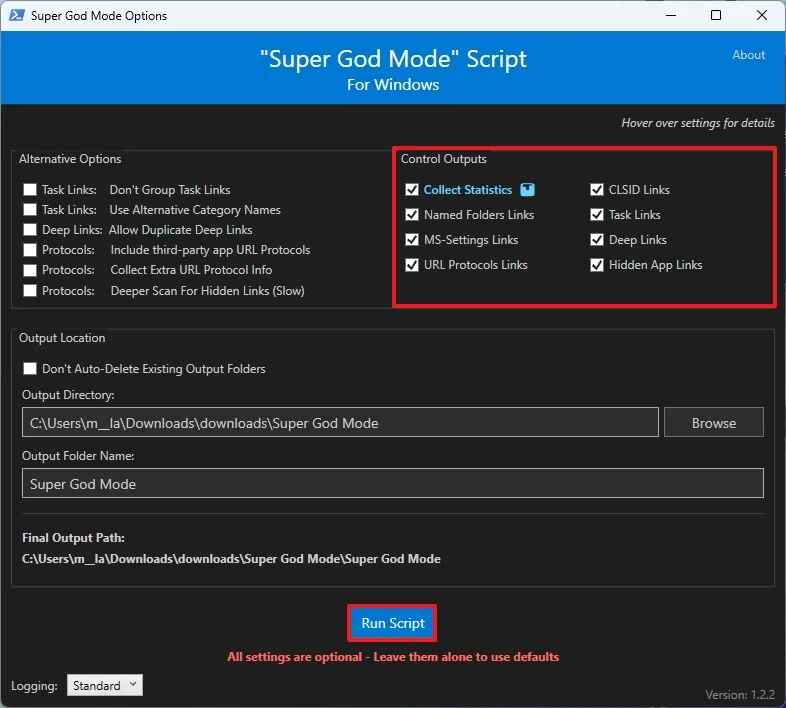
Click the Run Script button

Once completed, the command will start scanning the system and collect links. Scanning time may vary depending on your system configuration.

How to use Super God Mode to manage the system

After successfully running Super God Mode, the system will create a directory that contains all shortcuts to the system settings. You can easily open and use these features without going back to PowerShell.
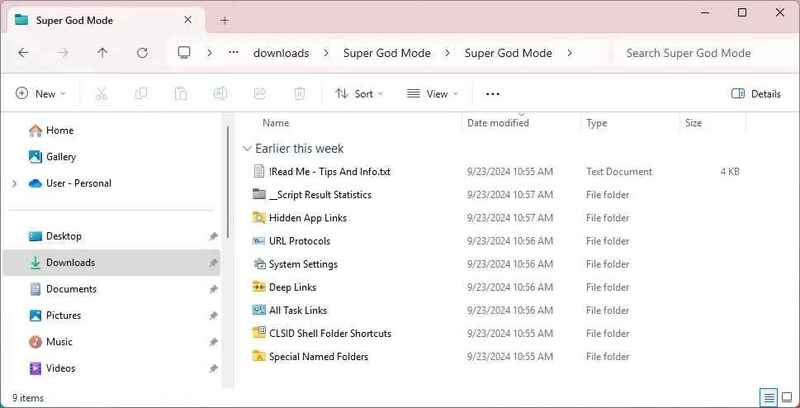
The folder contains all shortcuts

Special name Folders: contains shortcuts to important system positions such as AppData, Startup, Windows, Program Files, …

CLSID Shell Folder Shortcuts: Store the link to the settings in the Control Panel and Settings application, along with shortcuts for some other system features.

All Task Links: Includes all links to the settings in Control Panel, similar to the original “God Mode” on Windows.
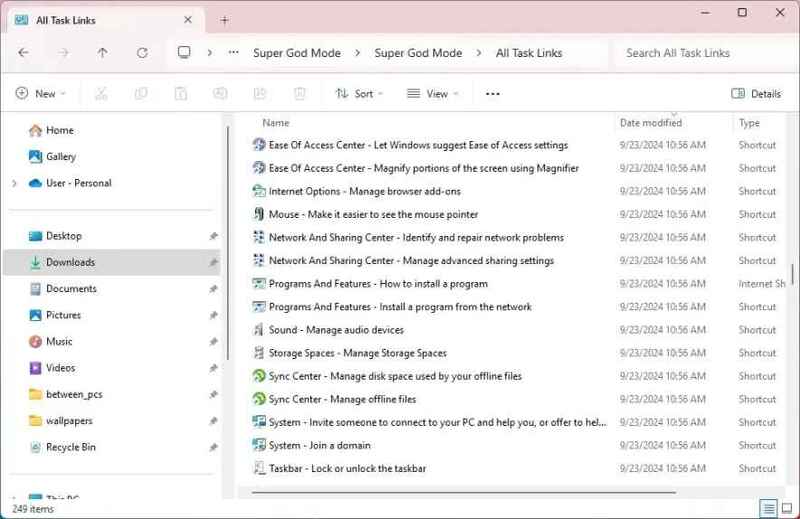
All task links
All task links

Deep Links: Similar to “All task links”, but these links opens specific pages in the Control Panel.
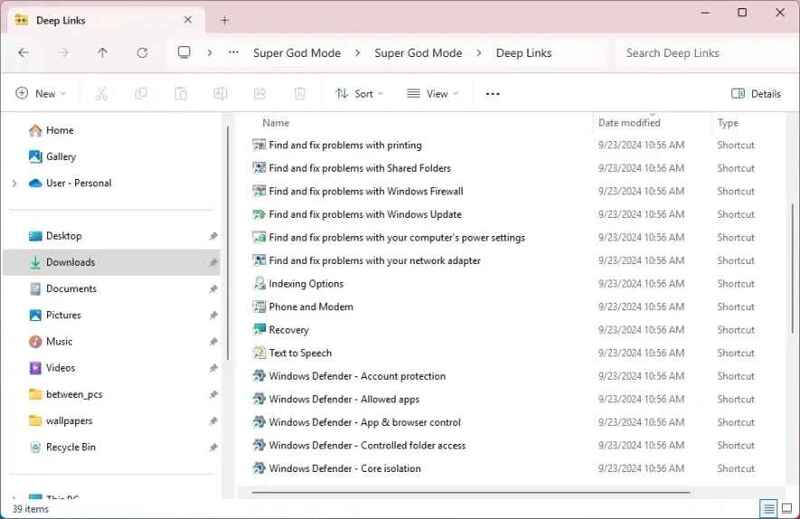
Deep Links folder
Deep Links folder

URL Protocols: Contains URI bonds for system features and applications.
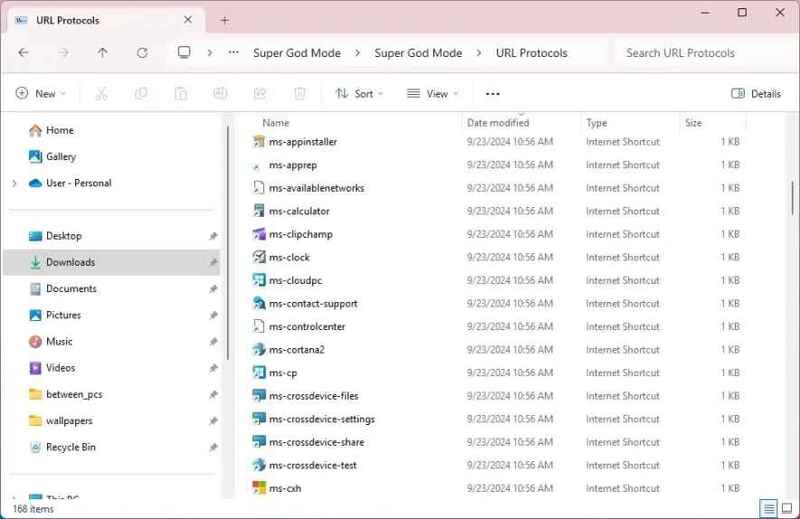
URL Protocols folder

Hidden App Links: Similar to “URL Protocols”, but these links lead to specific parts or features in the application.
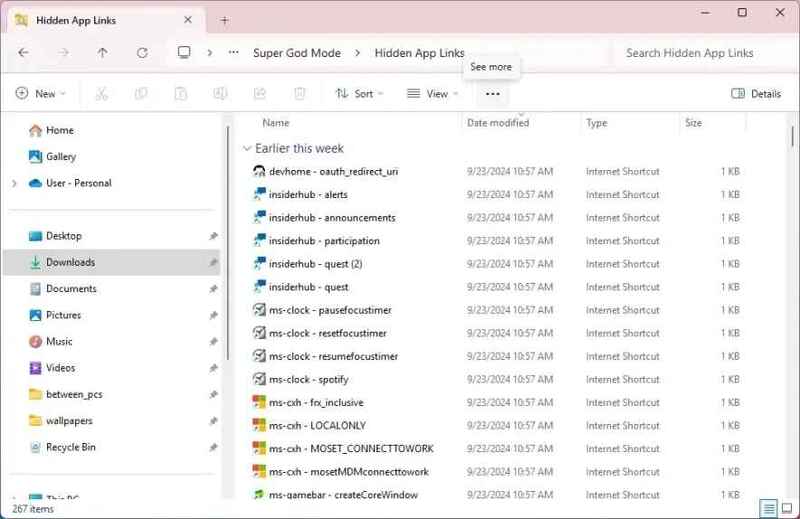
Hidden App Links folder

System Settings: Includes all URI to open a specific page in the Settings application.
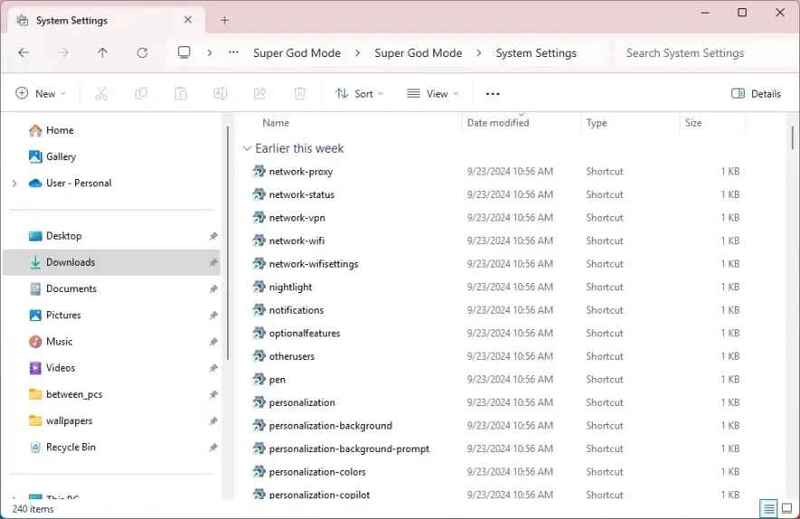
System Settings folder

In addition, you will also find some CSV and XML files containing detailed information collected during the scan.

Benefits of Super God Mode

Super God Mode brings many benefits for both individual users and system administrators:

  • Access and customize every corner of the Windows system.
  • Quickly search and access hidden settings without having to remember complicated paths.
  • Easily share specific settings for other users instead of having to explain each step.
  • The instructions only scan and display links, not making any changes that affect the system.

See also: Share the link link to create QR code in Google Sheets

Conclusion

Super God Mode Not only is a useful tool to customize the Windows operating system, but also the key for users to optimize and completely control their system. Whether you are a normal user or network administrator, Super God Mode brings convenience, saving time and improving the experience of using a computer. Try applying today to feel the difference!


Tags: featureGodModesuperunlockWindows
Previous Post

How to use zalo to-do to assign jobs, work in groups, manage jobs

Next Post

Instructions to turn Audio YouTube into ringtones

AnonyViet

AnonyViet

Related Posts

Receive copyright for 3 Halloween software worth 0
Software

Receive copyright for 3 Halloween software worth $150

October 23, 2026
Instructions for receiving 3 months of MultCloud Premium for free with 200GB data
Software

Instructions for receiving 3 months of MultCloud Premium for free with 200GB data

October 17, 2026
Instructions for receiving pension through VNeID without going to the ward
Software

Instructions for receiving pension through VNeID without going to the ward

October 16, 2026
Record first, choose focus later: how to use 4K 60 fps Cinema mode on iPhone 18 Pro
Software

Record first, choose focus later: how to use 4K 60 fps Cinema mode on iPhone 18 Pro

October 15, 2026
How to receive 22k from Viettel Tammi on the occasion of 22nd birthday
Software

How to receive 22k from Viettel Tammi on the occasion of 22nd birthday

October 15, 2026
3 valuable upgrades on Samsung Galaxy A08 compared to its predecessor A07
Software

3 valuable upgrades on Samsung Galaxy A08 compared to its predecessor A07

October 12, 2026
Next Post
Instructions to turn Audio YouTube into ringtones

Instructions to turn Audio YouTube into ringtones

0 0 votes
Article Rating
Subscribe
Login
Notify of
guest

guest

0 Comments
Oldest
Newest Most Voted

Recent News

Receive copyright for 3 Halloween software worth 0

Receive copyright for 3 Halloween software worth $150

October 23, 2026
How to use Messenger without a Facebook account

How to use Messenger without a Facebook account

October 22, 2026
Instructions on how to exit iOS 27 Beta and update to the official version

Instructions on how to exit iOS 27 Beta and update to the official version

October 22, 2026
Instructions for updating PHP to avoid PHP2Shell

Instructions for updating PHP to avoid PHP2Shell

October 22, 2026
Receive copyright for 3 Halloween software worth 0

Receive copyright for 3 Halloween software worth $150

October 23, 2026
How to use Messenger without a Facebook account

How to use Messenger without a Facebook account

October 22, 2026
Instructions on how to exit iOS 27 Beta and update to the official version

Instructions on how to exit iOS 27 Beta and update to the official version

October 22, 2026
AnonyViet - English Version

AnonyViet

AnonyViet is a website share knowledge that you have never learned in school!

We are ready to welcome your comments, as well as your articles sent to AnonyViet.

Follow Us

Contact:

Email: anonyviet.com[@]gmail.com

Main Website: https://anonyviet.com

Recent News

Receive copyright for 3 Halloween software worth 0

Receive copyright for 3 Halloween software worth $150

October 23, 2026
How to use Messenger without a Facebook account

How to use Messenger without a Facebook account

October 22, 2026
  • Home
  • Home 2
  • Home 3
  • Home 4
  • Home 5
  • Home 6
  • Next Dest Page
  • Sample Page

say88 tỷ lệ kèo nhà cái kèo nhà cái 5 febet

No Result
View All Result
  • Home
  • News
  • Software
  • Knowledge
  • MMO
  • Tips
  • Security
  • Network
  • Office

say88 tỷ lệ kèo nhà cái kèo nhà cái 5 febet

wpDiscuz
0
0
Would love your thoughts, please comment.x
()
x
| Reply