Turn audio youtube into ringtones It is a great way to make your phone different and personal. From vibrant tunes, memorable lines to strange sounds, YouTube opens the door to countless options for you to unleash your creativity.
|
Join the channel Telegram belong to Anonyviet 👉 Link 👈 |
Why choose Wonderfox HD Video Converter Factory Pro?
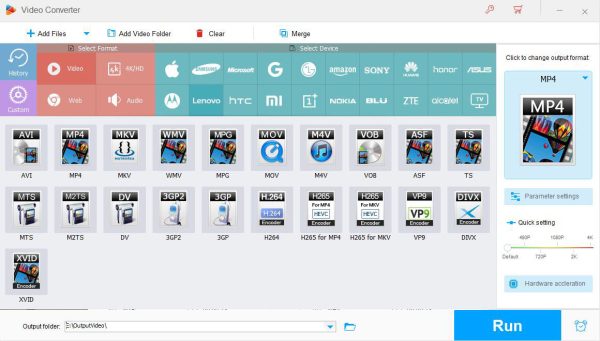
Wonderfox HD Video Converter Factory Pro Not just a format conversion software – it is a versatile toolkit for all multimedia needs. With impressive and flexible speed, this is the optimal solution to turn Youtube Audio into ringtones.
1. Accelerating encryption 50 times faster with NVIDIA NVNV & Intel QSV
Wonderfox's GPU acceleration technology helps to shorten the processing time, turning a long -lasting video into a audio file in just a few minutes.
2. Integrated video editing process
You can cut the sound from the video YouTube To get the most perfect 30 seconds. Adjust the volume, add the Fade-in/Fade-Out effect or combine multiple audio segments-all done right in the software.
3. Download videos from more than 1,000 websites at HD quality
No need for third -party download tools. Wonderfox allows you to download videos directly from YouTube, Vevo, Facebook and more than 1,000 other platforms with a resolution of up to 4K, ensuring sharp sound quality.
4. Convert YouTube content to more than 600 formats & equipment
Ringtones need specific formats like MP3, M4R or WAV. Wonderfox supports more than 600 output options, from iPhone, Android to older devices, ensuring perfect compatibility.
5. Write the screen with audio
If you have used Xbox to record YouTube videos and want to extract audio, Wonderfox's screen recording feature will help you do it easily.
.6. Mass processing
Create a ringtone library for each different contact or mood by processing many YouTube files at the same time.
7. Add subtitles external
With foreign clips, you can add subtitles to keep the context or remove them to get pure sound.
8. Keep many sound versions
Maintain Youtube's original sound quality or criticize specific versions, such as vocals.
9
Save storage by reducing the file size without losing the clarity of the sound – ideal for the device with limited memory.
10. Create a gif from video or YouTube photos
Turn prominent moments in YouTube videos into GIF to share with your ringtone.
11. Friendly interface
No need for professional skills. The visual design leads you from downloading YouTube audio to the ringtone installation in just a few clicks.
How to turn Audio YouTube into ringtones
Run this versatile program on PC and follow the simple steps below to create ringtones from YouTube audio.
Step 1: Software boot, select the item “DownloaderAnd press the button “New Download“To start.
Step 2: Access YouTube, find the sound you want to turn into ringtones, then Copy the URL of the video.
Step 3: Back to Wonderfox, paste the URL just copied into the input box, then click “Analyze“Let the software quickly analyze links.
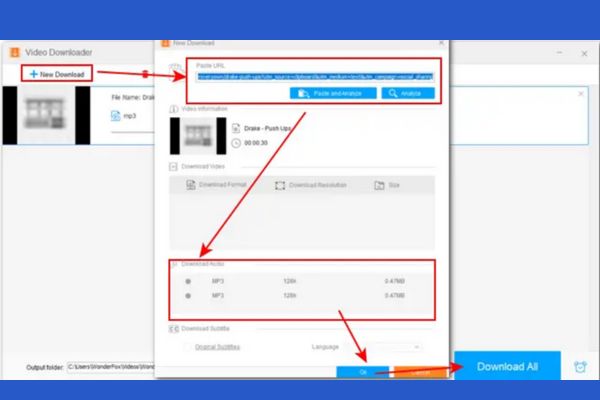
Step 4: When the analysis is completed, select MP3 as the output format, then click “OK” and “Download all“To save the audio file to the device.
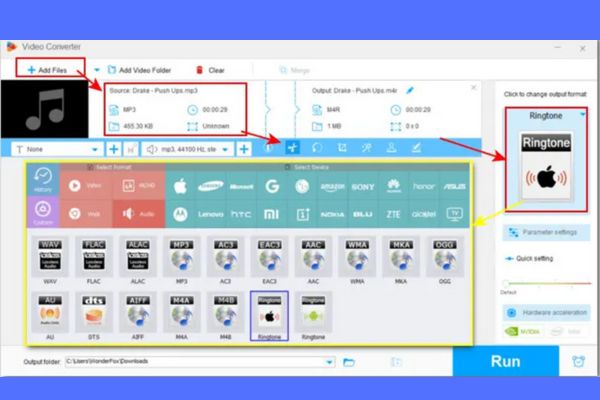
Step 5: Return to the main interface, open “Converter”, Pull the downloaded audio file into the program and use the editing tool to cut into sections for less than 30 seconds.
Step 6: Click the icon “Output format“On the right, choose the tab”Audio“Here, you will see the ringtone configuration available for Android or iPhone, choose the right type for your device.
Step 7: Press the button “Tremble“To start the conversion process. After completion, the file has been shipped to the phone and installed as ringtones.
Frequently asked questions
1. Is converting YouTube video into ringtone legal?
This depends on how you use. Creating ringtones for personal purposes is accepted, but should not distribute content with copyright!
2. Can I use Wonderfox to edit Podcast into ringtone?
Okay! You can extract sound from podcast, interview or even gameplay recording.
3. Wonderfox HD Video Converter Factory Pro support macOS?
Unfortunately, the software is only running on Windows.
Conclusion
Turn audio youtube into ringtones It is no longer far away when you have Wonderfox HD Video Converter Factory Pro. From favorite music, funny dialogue to unique sound from livestream, all can become a unique impression on your phone.