• Home
  • News
  • Software
  • Knowledge
  • MMO
  • Tips
  • Security
  • Network
  • Office
AnonyViet - English Version
  • Home
  • News
  • Software
  • Knowledge
  • MMO
  • Tips
  • Security
  • Network
  • Office
No Result
View All Result
  • Home
  • News
  • Software
  • Knowledge
  • MMO
  • Tips
  • Security
  • Network
  • Office
No Result
View All Result
AnonyViet - English Version
No Result
View All Result

How to check whether Facebook is collapsed or not equal to downforelyoneonyorjustme.com.

AnonyViet by AnonyViet
February 27, 2025
in Tips
0

This morning, just opened the computer, I was eagerly surfing Facebook to see if there was anything new, then oh, the site kept loading forever but could not enter. At first, I thought my house would have a problem, but changed to the phone, used 4G and still not finished. At this time, in the beginning, there was a question: “Is Facebook collapsed? Or do I have this problem? ” Fortunately, I remember a super useful website to check this situation: downforelyONONONEORJUSTME.Com.. Today, I will share how to use this page so you can check myself if you have the same situation!


Join the channel Telegram belong to Anonyviet 👉 Link 👈

First, this is an extremely simple and convenient website, helping you check if a website (like Facebook) is having a global problem or not, or just a personal matter from you. The page address is: https://downfor prevesoroneorjustme.com. Hearing the name is interesting, right? “Come down for everyone or me?” – The question that everyone has questions when having problems with their favorite websites.

Simple use in 3 steps

This morning, when Facebook could not enter, I followed the following steps:

Visit the website

Open the browser and type https://downfor prevordineorjustme.com/facebook (Because I want to check Facebook). Or if you check another page, just go to the homepage and enter the domain name (for example, facebook.com) in the search box right in the middle of the page.
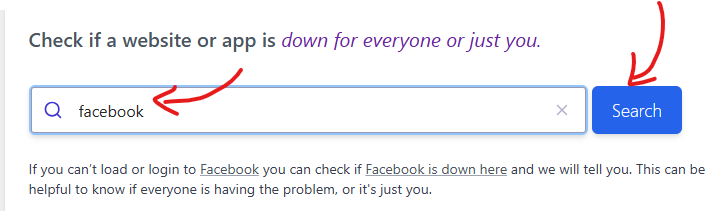
downforelyoneorjustme.com.

Press Enter and wait for the results

After typing, press Enter, Trang will take a few seconds to check. The results will appear immediately. If this morning Facebook really collapsed globally, I will see the words: “It's not just you! Facebook.com Looks Down From Here. (Not only me! Facebook.com is collapsing from here). If there is no problem, it will report: “It's just you. Facebook.com is up. ” (Only my friend. Facebook.com is still working normally).

In the Recent User Reports for Facebook as a result of the global user of Facebook service, you will see some countries like Candana, USA cannot access Facebook.
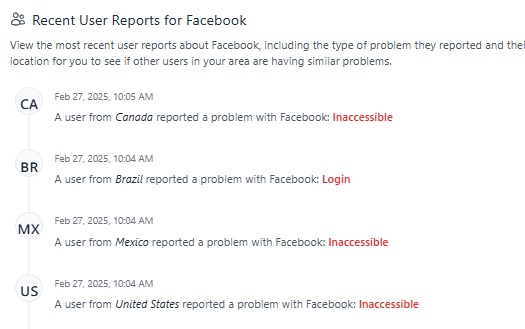
Check Facebook loi

Confirm (if necessary)

To be more sure, I often try to refresh or wait a few minutes and check it again. Sometimes the problem is just temporary, or maybe because his network is really sorry.

This morning, thanks to this page, I know that not only I have problems but Facebook is really malfunctioning in some areas. This helps me to be confused, do not have to sit down the modem or blame the computer anymore. Moreover, it also saves you time – instead of waiting without knowing what happens, you can safely wait until everything is stable again.
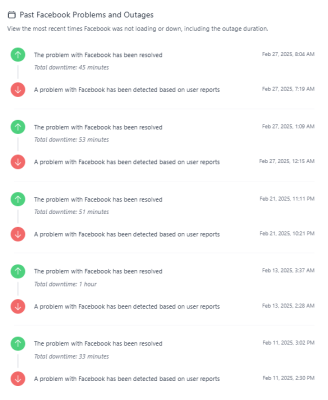
Facebook Down

If you see Facebook collapsed globally, try checking more technology news pages or social networks (like Twitter) to see if people are talking about this case. This morning, I saw quite a lot of people lamented like me, so it was more sure about the result Down for everything or just me.

Conclude

So from now on, every time I encounter a situation like this morning – Facebook or any website cannot enter – you have a simple tool to check immediately. Just a few clicks know where the problem is, whether to wait or need to find a way to fix it from you. Try to use https://downforimeoneonyorjustme.com to see why, make sure you will feel unexpectedly convenient!


Tags: checkcollapseddownforelyoneonyorjustme.comequalFacebook
Previous Post

How to add, reduce applications on the right mouse menu Windows

Next Post

Turn off the game installation and app of Windows 10 in the background mode

AnonyViet

AnonyViet

Related Posts

Instructions on how to make money from personal Facebook
Tips

Instructions on how to make money from personal Facebook

May 2, 2026
How to add sliders to Facebook Stories to easily rewind videos
Tips

How to add sliders to Facebook Stories to easily rewind videos

April 21, 2026
How to change the default font on Windows 10
Tips

How to change the default font on Windows 10

April 13, 2026
5 tips for using a Browser to replace an App (helps save RAM, time and money)
Tips

5 tips for using a Browser to replace an App (helps save RAM, time and money)

April 13, 2026
How to make funny MeMe photos without Photoshop within 10 seconds
Tips

How to make funny MeMe photos without Photoshop within 10 seconds

April 11, 2026
How to quickly design your own Logo without Photoshop
Tips

How to quickly design your own Logo without Photoshop

April 10, 2026
Next Post
Turn off the game installation and app of Windows 10 in the background mode

Turn off the game installation and app of Windows 10 in the background mode

0 0 votes
Article Rating
Subscribe
Login
Notify of
guest

guest

0 Comments
Oldest
Newest Most Voted
Inline Feedbacks
View all comments

Recent News

Instructions on how to make money from personal Facebook

Instructions on how to make money from personal Facebook

May 2, 2026
Create an avatar to celebrate April 30 with a beautiful red flag shirt with yellow stars

Create an avatar to celebrate April 30 with a beautiful red flag shirt with yellow stars

April 30, 2026
How to get 2 months of Super Duolingo for free worth 300k

How to get 2 months of Super Duolingo for free worth 300k

April 30, 2026
How to create a Face Sticker Collection using ChatGPT

How to create a Face Sticker Collection using ChatGPT

April 29, 2026
Instructions on how to make money from personal Facebook

Instructions on how to make money from personal Facebook

May 2, 2026
Create an avatar to celebrate April 30 with a beautiful red flag shirt with yellow stars

Create an avatar to celebrate April 30 with a beautiful red flag shirt with yellow stars

April 30, 2026
How to get 2 months of Super Duolingo for free worth 300k

How to get 2 months of Super Duolingo for free worth 300k

April 30, 2026
AnonyViet - English Version

AnonyViet

AnonyViet is a website share knowledge that you have never learned in school!

We are ready to welcome your comments, as well as your articles sent to AnonyViet.

Follow Us

Contact:

Email: anonyviet.com[@]gmail.com

Main Website: https://anonyviet.com

Recent News

Instructions on how to make money from personal Facebook

Instructions on how to make money from personal Facebook

May 2, 2026
Create an avatar to celebrate April 30 with a beautiful red flag shirt with yellow stars

Create an avatar to celebrate April 30 with a beautiful red flag shirt with yellow stars

April 30, 2026
No Result
View All Result
  • Home
  • News
  • Software
  • Knowledge
  • MMO
  • Tips
  • Security
  • Network
  • Office

wpDiscuz
0
0
Would love your thoughts, please comment.x
()
x
| Reply