• Home
  • News
  • Software
  • Knowledge
  • MMO
  • Tips
  • Security
  • Network
  • Office
AnonyViet - English Version
  • Home
  • News
  • Software
  • Knowledge
  • MMO
  • Tips
  • Security
  • Network
  • Office
No Result
View All Result
  • Home
  • News
  • Software
  • Knowledge
  • MMO
  • Tips
  • Security
  • Network
  • Office
No Result
View All Result
AnonyViet - English Version
No Result
View All Result

Instructions for running DeepSeeK R1 Offline on Android and iPhone

AnonyViet by AnonyViet
February 14, 2025
in Software
0

In the era of technological development, AI models like Deepseek R1 are becoming an indispensable tool in many fields. However, the use of AI models through cloud platforms often comes with concerns about data security and dependence on the Internet connection. To solve these problems, Run DeepSeeK R1 Offline On personal equipment is an optimal solution, bringing flexibility and safer for users.

Join the channel Telegram belong to Anonyviet 👉 Link 👈

Why should you run Deepseek R1 offline on your phone?

DeepSeeK R1, a breakthrough AI model from the Chinese research team, is creating a strong wave in the technology community. With superior ability, Deepseek R1 even risen to the number one position on the US App Store, surpassing Chatgpt.

However, the use of this model through the website officially raises concerns about security and privacy, especially when data is stored in China. To solve this problem, you can run DeepSeeK R1 Offline on Android and iPhone phones.
Why should you run Deepseek R1 offline on your phone?

See also: How to use lmstudio to install AI offline on PC Run Deepseek, Sonet …

Running Deepseek R1 offline offers outstanding advantages:

  • Data security: Your information is stored directly on the device, no need to be sent to the outside server.
  • No Internet: You can use AI model anytime, anywhere.
  • Optimization of performance: Make the most of the hardware of the phone's hardware.

System requirements

To run DeepSeeK R1 Offline on your phone, your device needs to meet the following minimum requirements:

  • RAM: Minimum 6GB.
  • Chipset: Snapdragon 8 Elite, Snapdragon 8-Series or 7-Series (for Android).
  • Drum memory: About 2GB to download and store the model.
System requirements
System requirements

How to run deepSeeK R1 offline on Android and iPhone

Step 1: Download and install Pocketpal AI application

Pocketpal AI As a free application, support both Android and iOS, help you easily run the offline AI models. This is the optimal option compared to paid apps like Apollo AI or private LLM.

Step 2: Download the Deepseek R1 model

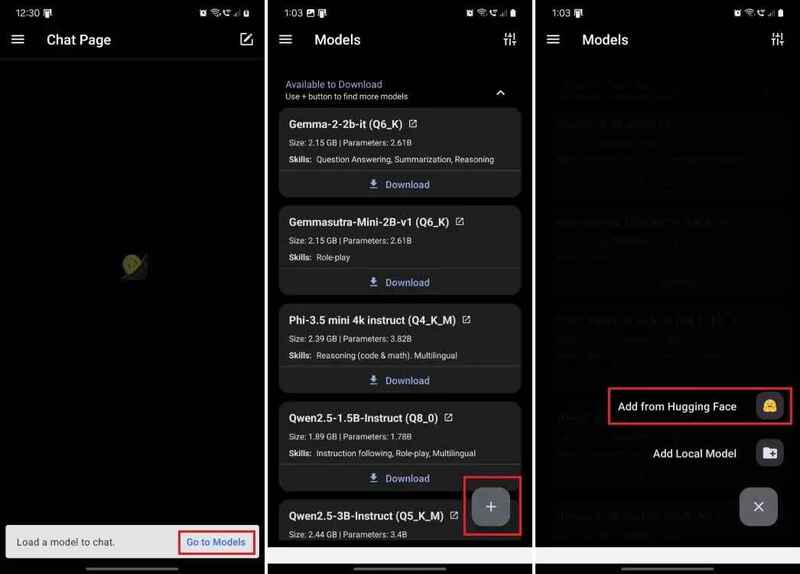
  • After installing pocketpal AI, follow these steps:
  • Open the application, then click on the “Go to Models“.
  • Next, touch the icon “+At the right corner of the screen.
  • Select “Add from hugings face“.
Select "Add from hugings face"
Select “Add from Hugging Face”

Step 3: Find and download the Deepseek R1 model

  • In the search window, enter the keyword “deepSeek” and find the model “DeepSeeK-R1-Distill-Qwen-1.5B”By Bartowski author.

Note: Select the version that suits your phone memory. For example, the “Q5_K_M” version only accounts for about 1.3GB of RAM.

  • After downloading, return to the main screen and select “Load“To download the model into the application.
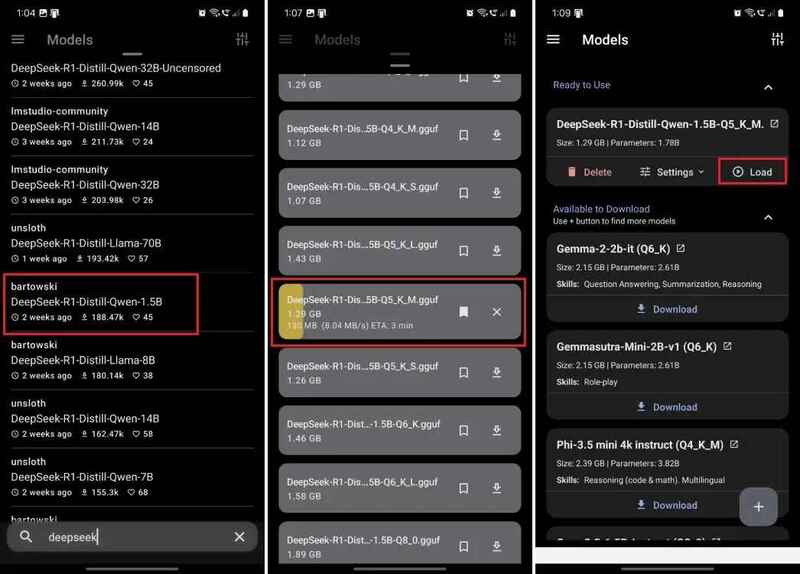
Find the model "DeepSeeK-R1-Distill-Qwen-1.5B"
Find the model “DeepSeeK-R1-Distill-Qwen-1.5B”

Step 4: Start chatting with deepSeeK R1

When the model is ready, you can start chatting offline with Deepseek R1 without connecting the Internet.
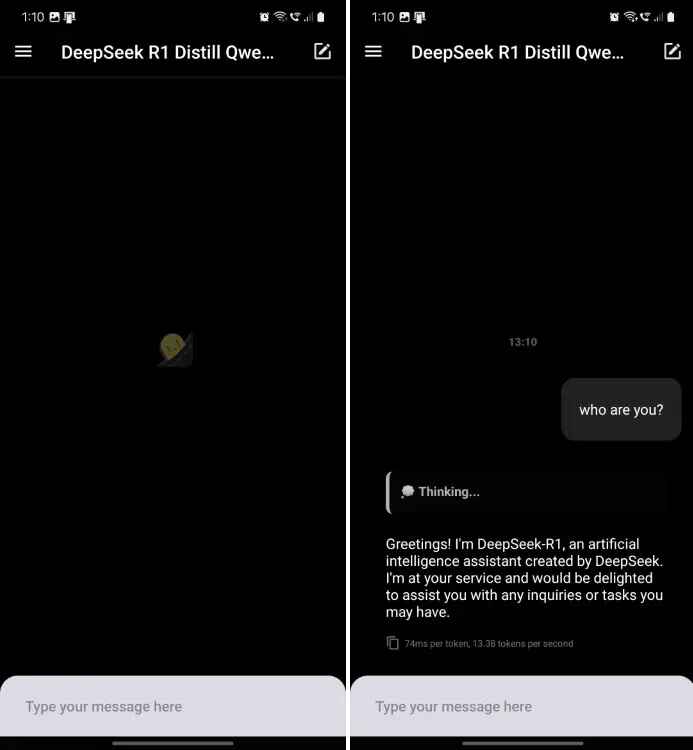
Start chatting with deepSeeK R1

Evaluate

During the test, both versions of 1.5B and 7B of Deepseek R1 showed a lot of “hallucination” phenomenon, especially when handling historical events. However, this model is still useful in tasks such as:

  • Creative writing: Create unique and attractive content.
  • Programming: Support to write code and solve logic problems.

If you own a powerful device, test it with the version 32B of Deepseek R1. This model gives a significant better programming and argument.

See also: How to use Deepseek V3: AI of China

Conclusion

Run DeepSeeK R1 Offline On Android and iPhone is the ideal solution to enjoy the power of AI without worrying about security or internet connection. With Pocketpal AI application, you can easily download and use this model for free. Wish you apply successfully!


Tags: AndroidDeepseekInstructionsiPhoneOfflinerunning
Previous Post

How to block strange WhatsApp messages to protect privacy

Next Post

How to increase the length of the PIN on Windows to improve security

AnonyViet

AnonyViet

Related Posts

Create an avatar to celebrate April 30 with a beautiful red flag shirt with yellow stars
Software

Create an avatar to celebrate April 30 with a beautiful red flag shirt with yellow stars

April 30, 2026
How to get 2 months of Super Duolingo for free worth 300k
Software

How to get 2 months of Super Duolingo for free worth 300k

April 30, 2026
How to create a Face Sticker Collection using ChatGPT
Software

How to create a Face Sticker Collection using ChatGPT

April 29, 2026
How to install the cute Bongo Cat mouse pointer for Windows
Software

How to install the cute Bongo Cat mouse pointer for Windows

April 29, 2026
Instructions for looking up prescriptions on VNeID instead of paper medical books
Software

Instructions for looking up prescriptions on VNeID instead of paper medical books

April 26, 2026
Compare Poco X8 Pro and Poco X7 Pro: A new step for the “king” of mid-range performance
Software

Compare Poco X8 Pro and Poco X7 Pro: A new step for the “king” of mid-range performance

April 24, 2026
Next Post
How to increase the length of the PIN on Windows to improve security

How to increase the length of the PIN on Windows to improve security

0 0 votes
Article Rating
Subscribe
Login
Notify of
guest

guest

0 Comments
Oldest
Newest Most Voted
Inline Feedbacks
View all comments

Recent News

Create an avatar to celebrate April 30 with a beautiful red flag shirt with yellow stars

Create an avatar to celebrate April 30 with a beautiful red flag shirt with yellow stars

April 30, 2026
How to get 2 months of Super Duolingo for free worth 300k

How to get 2 months of Super Duolingo for free worth 300k

April 30, 2026
How to create a Face Sticker Collection using ChatGPT

How to create a Face Sticker Collection using ChatGPT

April 29, 2026
How to install the cute Bongo Cat mouse pointer for Windows

How to install the cute Bongo Cat mouse pointer for Windows

April 29, 2026
Create an avatar to celebrate April 30 with a beautiful red flag shirt with yellow stars

Create an avatar to celebrate April 30 with a beautiful red flag shirt with yellow stars

April 30, 2026
How to get 2 months of Super Duolingo for free worth 300k

How to get 2 months of Super Duolingo for free worth 300k

April 30, 2026
How to create a Face Sticker Collection using ChatGPT

How to create a Face Sticker Collection using ChatGPT

April 29, 2026
AnonyViet - English Version

AnonyViet

AnonyViet is a website share knowledge that you have never learned in school!

We are ready to welcome your comments, as well as your articles sent to AnonyViet.

Follow Us

Contact:

Email: anonyviet.com[@]gmail.com

Main Website: https://anonyviet.com

Recent News

Create an avatar to celebrate April 30 with a beautiful red flag shirt with yellow stars

Create an avatar to celebrate April 30 with a beautiful red flag shirt with yellow stars

April 30, 2026
How to get 2 months of Super Duolingo for free worth 300k

How to get 2 months of Super Duolingo for free worth 300k

April 30, 2026
No Result
View All Result
  • Home
  • News
  • Software
  • Knowledge
  • MMO
  • Tips
  • Security
  • Network
  • Office

wpDiscuz
0
0
Would love your thoughts, please comment.x
()
x
| Reply