• Home
  • News
  • Software
  • Knowledge
  • MMO
  • Tips
  • Security
  • Network
  • Office
AnonyViet - English Version
  • Home
  • News
  • Software
  • Knowledge
  • MMO
  • Tips
  • Security
  • Network
  • Office
No Result
View All Result
  • Home
  • News
  • Software
  • Knowledge
  • MMO
  • Tips
  • Security
  • Network
  • Office
No Result
View All Result
AnonyViet - English Version
No Result
View All Result

How to fix echo when calling Messenger on iPhone, Android

AnonyViet by AnonyViet
August 18, 2024
in Software
0

You may experience the call phenomenon. Messenger echo when using this application to call relatives and friends. This can happen on both iPhone and Android, caused by many different reasons, making users feel uncomfortable. The article below will guide you on how to fix this annoying problem.

Join the channel Telegram belong to AnonyViet 👉 Link 👈

How to fix Messenger calls with echo

Turn down the volume and turn off the speaker

Many factors can cause this phenomenon. Messenger echo when making calls. One common cause is having the volume set too high, combined with using the speakerphone, which can create a feedback effect.

To resolve this issue, you should try lowering the volume of your Messenger call and turning off speakerphone on both devices – yours and the person you're calling – to see if that improves the situation.
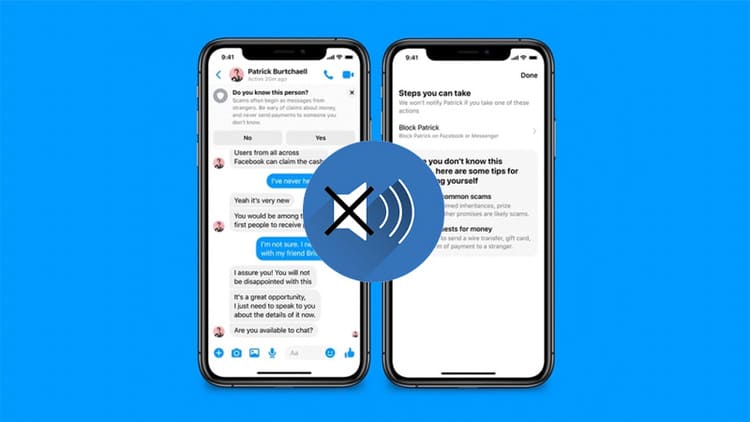
Reduce volume and turn off speaker when Messenger calls have echo
How to fix Messenger calls with echo

Check network connection when Messenger has echo

A weak or unstable internet connection may cause call interruptions. Messenger echo. Make sure you have a strong and stable network connection.

Try visiting other websites like Google Chrome or YouTube to see if they load again. If pages don't load, there may be a problem with your internet connection.

Checking your network connection can help reduce Messenger echo issues.
Check network connection

Reinstall Messenger

A commonly recommended solution to handle Messenger echo is to delete and then reinstall the app Messenger. There is a high chance that the audio feedback problem originates from the app itself, and reinstalling it could be the key to solving that problem.

During the reinstallation process, make sure you have granted all the necessary permissions requested by the app. Once done, log back in and check if the issue is resolved.

Turn on Microphone for Messenger

Step 1: Go to 'Settings' > 'Apps' > Select 'Messenger'.
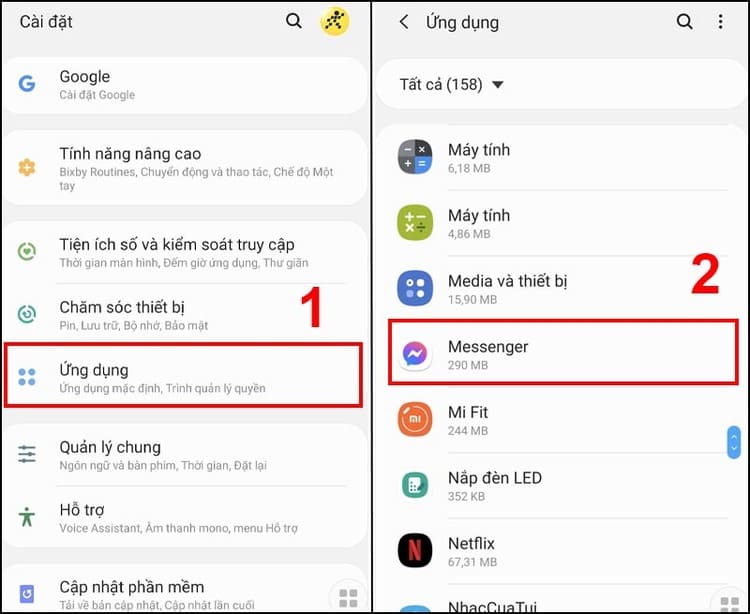
Go to 'Settings' > 'Apps' > Select 'Messenger'.” width=”750″ height=”614″ srcset=”https://anonyviet.com/wp-content/uploads/2024/05/khac-phuc-goi-messenger-bi-vong-tieng-3.jpg 750w, https://anonyviet.com/wp-content/uploads/2024/05/khac-phuc-goi-messenger-bi-vong-tieng-3-300×246.jpg 300w” sizes=”(max-width: 750px) 100vw, 750px”/><figcaption id=Go to 'Settings' > 'Apps' > Select 'Messenger'.

Step 2: Select 'Permissions' > 'Microphone' and allow access.
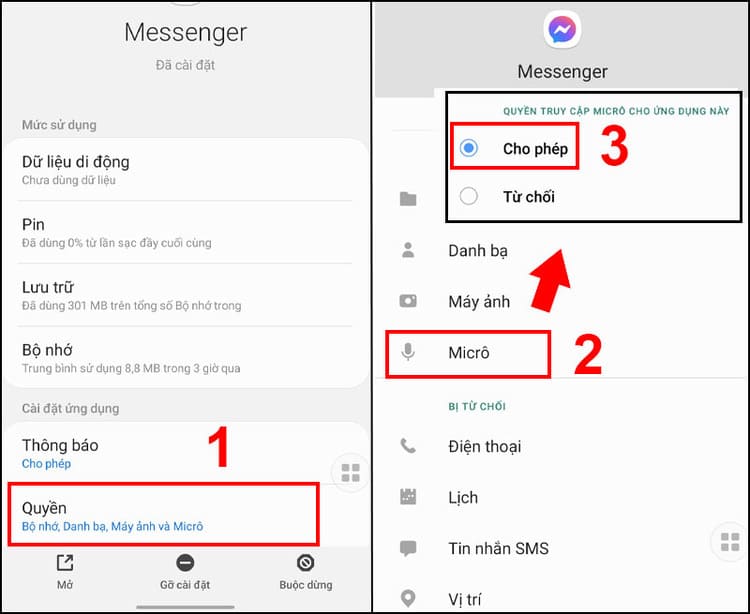
Select 'Permissions' > 'Microphone' and allow access.” width=”750″ height=”614″ srcset=”https://anonyviet.com/wp-content/uploads/2024/05/khac-phuc-goi-messenger-bi-vong-tieng-4.jpg 750w, https://anonyviet.com/wp-content/uploads/2024/05/khac-phuc-goi-messenger-bi-vong-tieng-4-300×246.jpg 300w” sizes=”(max-width: 750px) 100vw, 750px”/><figcaption id=Select 'Permissions' > 'Microphone' and allow access.

Go to 'Settings', go to 'Messenger' and enable access for the microphone.
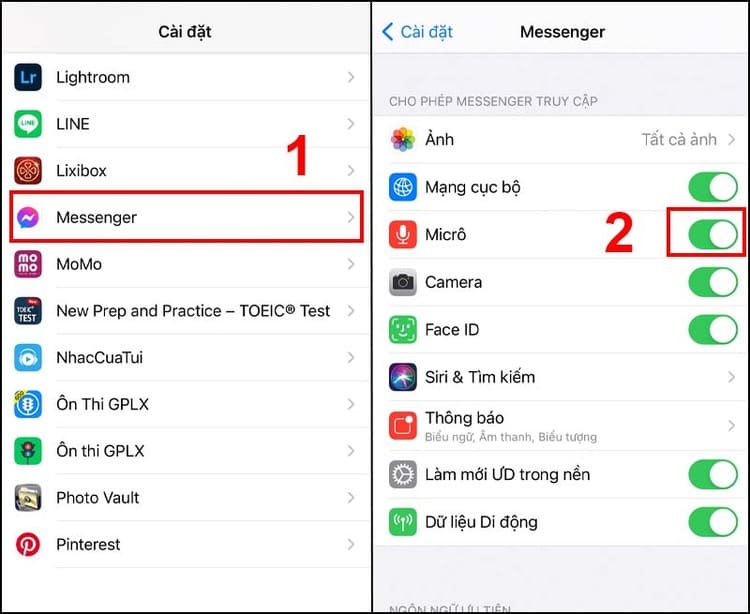
Enable access for microphone.

Enable noise cancellation (iPhone)

On iPhone, you can enable noise cancellation to reduce echo in Messenger.

Step 1: Go to 'Settings' > 'Accessibility' > 'Audio/Visual'.
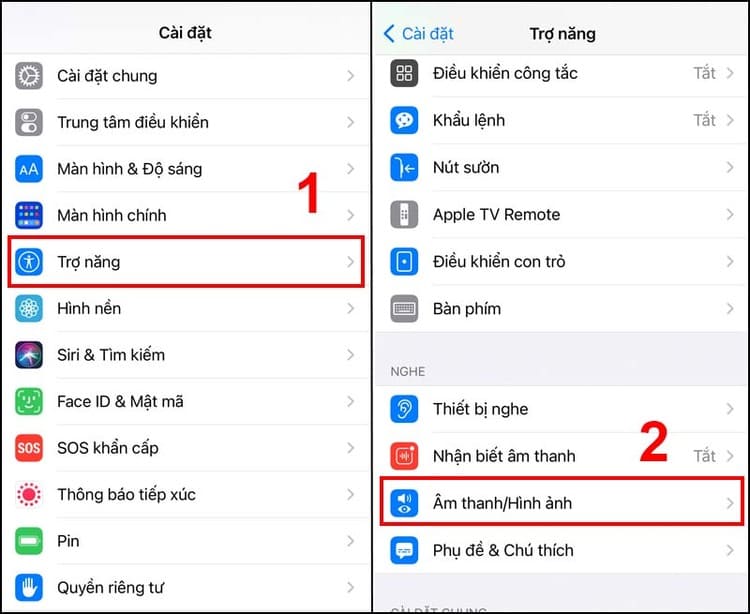
Go to 'Settings' > 'Accessibility' > 'Audio/Visual' when Messenger echoes” width=”750″ height=”614″ srcset=”https://anonyviet.com/wp-content/uploads/2024/05/khac-phuc-goi-messenger-bi-vong-tieng-6.jpg 750w, https://anonyviet.com/wp-content/uploads/2024/05/khac-phuc-goi-messenger-bi-vong-tieng-6-300×246.jpg 300w” sizes=”(max-width: 750px) 100vw, 750px”/><figcaption id=Go to 'Settings' > 'Accessibility' > 'Audio/Visual'.

Step 2: Turn on 'Phone Noise Cancellation'.
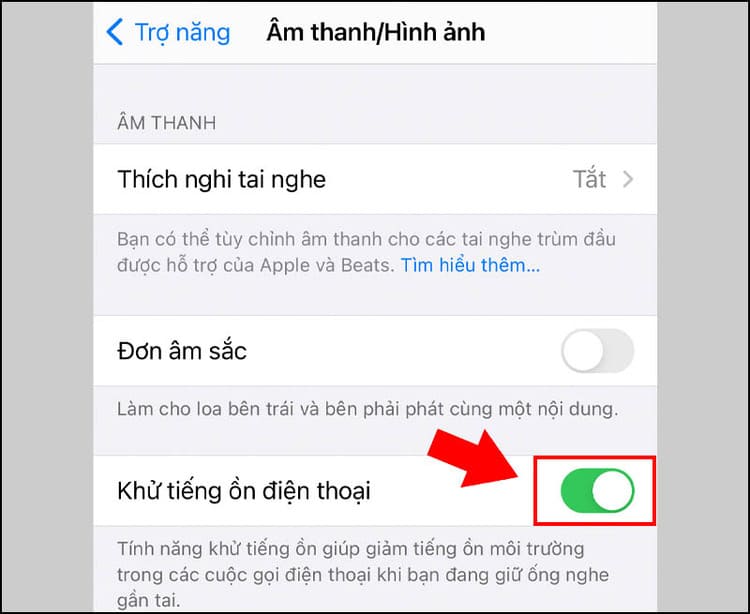
Turn on 'Phone Noise Cancellation' when Messenger echoes
Turn on 'Phone Noise Cancellation'.

Restart your phone

If all the above measures do not work, try restarting your phone. This is a simple but often effective way to solve technical problems.

Conclusion

After applying the remedies from adjusting the volume, checking the network connection, to restarting the phone, hopefully you have been able to solve the calling problem. Messenger echo on iPhone and Android. Good luck!


Tags: AndroidcallingechofixiPhoneMessenger
Previous Post

iHanoi: “Must-Have” Application for all citizens of the Capital

Next Post

Instructions to turn off post notifications on TikTok

AnonyViet

AnonyViet

Related Posts

Instructions on how to get Norton 360 Deluxe for 1 year for free
Software

Instructions on how to get Norton 360 Deluxe for 1 year for free

July 19, 2026
Is Xiaomi Redmi A7 a valuable choice in the popular smartphone segment?
Software

Is Xiaomi Redmi A7 a valuable choice in the popular smartphone segment?

July 14, 2026
Compact design, durable battery, excellent camera: Review of OPPO Reno 16 Pro 5G
Software

Compact design, durable battery, excellent camera: Review of OPPO Reno 16 Pro 5G

July 12, 2026
Download the free 3D Pinball Space Cadet game on the App Store now
Software

Download the free 3D Pinball Space Cadet game on the App Store now

July 12, 2026
Learn new skills with iPad 11 (A16) 128GB: when is enough, when should you upgrade to a higher level?
Software

Learn new skills with iPad 11 (A16) 128GB: when is enough, when should you upgrade to a higher level?

July 10, 2026
Instructions for taking free buses in Ho Chi Minh City from July 2026
Software

Instructions for taking free buses in Ho Chi Minh City from July 2026

July 9, 2026
Next Post
Instructions to turn off post notifications on TikTok

Instructions to turn off post notifications on TikTok

0 0 votes
Article Rating
Subscribe
Login
Notify of
guest

guest

0 Comments
Oldest
Newest Most Voted

Recent News

Instructions for Logo Design in just a few clicks with Logaster

Instructions for Logo Design in just a few clicks with Logaster

July 20, 2026
Clean Tam – Accompanying the green space of every Vietnamese family

Clean Tam – Accompanying the green space of every Vietnamese family

July 20, 2026
3 coolest ways to turn off your computer

3 coolest ways to turn off your computer

July 19, 2026
Instructions on how to get Norton 360 Deluxe for 1 year for free

Instructions on how to get Norton 360 Deluxe for 1 year for free

July 19, 2026
Instructions for Logo Design in just a few clicks with Logaster

Instructions for Logo Design in just a few clicks with Logaster

July 20, 2026
Clean Tam – Accompanying the green space of every Vietnamese family

Clean Tam – Accompanying the green space of every Vietnamese family

July 20, 2026
3 coolest ways to turn off your computer

3 coolest ways to turn off your computer

July 19, 2026
AnonyViet - English Version

AnonyViet

AnonyViet is a website share knowledge that you have never learned in school!

We are ready to welcome your comments, as well as your articles sent to AnonyViet.

Follow Us

Contact:

Email: anonyviet.com[@]gmail.com

Main Website: https://anonyviet.com

Recent News

Instructions for Logo Design in just a few clicks with Logaster

Instructions for Logo Design in just a few clicks with Logaster

July 20, 2026
Clean Tam – Accompanying the green space of every Vietnamese family

Clean Tam – Accompanying the green space of every Vietnamese family

July 20, 2026
  • Home
  • Home 2
  • Home 3
  • Home 4
  • Home 5
  • Home 6
  • Next Dest Page
  • Sample Page

say88 tỷ lệ kèo nhà cái kèo nhà cái 5 febet

No Result
View All Result
  • Home
  • News
  • Software
  • Knowledge
  • MMO
  • Tips
  • Security
  • Network
  • Office

say88 tỷ lệ kèo nhà cái kèo nhà cái 5 febet

wpDiscuz
0
0
Would love your thoughts, please comment.x
()
x
| Reply