• Home
  • News
  • Software
  • Knowledge
  • MMO
  • Tips
  • Security
  • Network
  • Office
AnonyViet - English Version
  • Home
  • News
  • Software
  • Knowledge
  • MMO
  • Tips
  • Security
  • Network
  • Office
No Result
View All Result
  • Home
  • News
  • Software
  • Knowledge
  • MMO
  • Tips
  • Security
  • Network
  • Office
No Result
View All Result
AnonyViet - English Version
No Result
View All Result

How to change the default Download folder on Windows 11 to another drive

AnonyViet by AnonyViet
April 4, 2024
in Tips
0

The default Download folder of Windows 11 is located in drive C, this can cause drive C to become full and affect the performance of the computer. Therefore, you may want to move the Download folder to another drive, with larger capacity and less occupied by the system. In this article, AnonyViet will guide you How to change Download folder default on Windows 11 simply and quickly.

Join the channel Telegram belong to AnonyViet 👉 Link 👈

Why should you change the Download folder to another drive?

Windows 11 is Microsoft's latest operating system, bringing many new features and interfaces to users. However, some default Windows 11 settings may not suit your needs and preferences. One of them is the location of the Download folder, where files downloaded from the Internet are stored.

Therefore, you should change the Download folder to another drive, to:

  • Increase free space for C drive, make the computer run faster, improve access speed in the operating system
  • Protect the data you download when you have to reinstall the operating system.
  • Easily manage files downloaded from websites or created on the system
  • Another drive with larger capacity can be used or permanently connected to the system

How to change the default Download folder to another drive

Step 1: Right-click on the default Download folder > Select the 'Location' tab > Click 'Move'
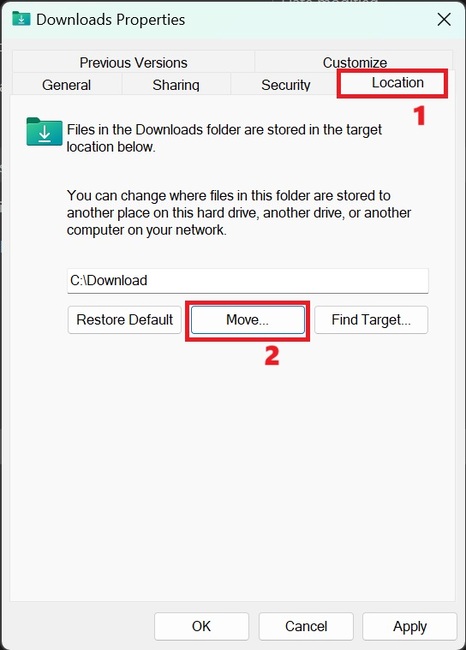
How to change Download folder
Select 'Location' tab > Click 'Move'

Step 2: Select the new location you want to move the Download folder to, for example drive D, E, F, Z… and click the Select Folder button > Click the Apply button to save the changes.
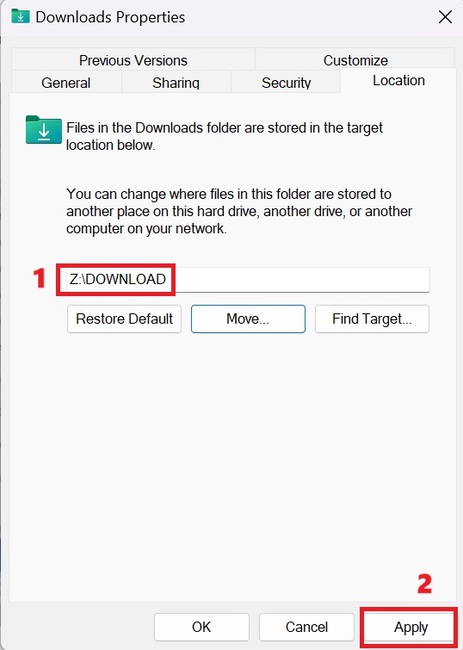
How to change Download folder
Select new location > Click 'Apply'

At this point, Windows 11 will ask if you want to move all files from the old location to the new location. If you select Yes, Windows 11 will automatically copy and delete files in the old Download folder. If you choose No, Windows 11 will only change the Download folder location without affecting existing files.
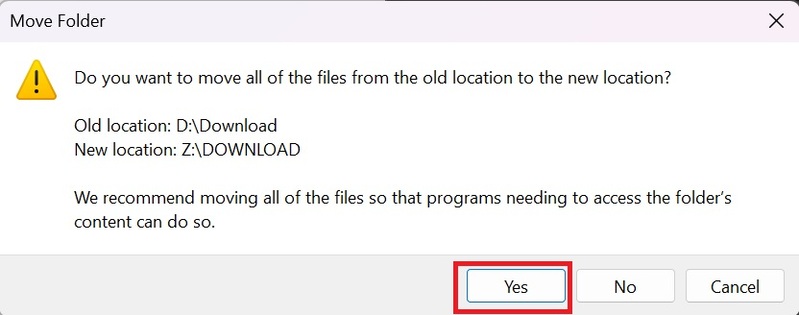
How to change Download folder
Select Yes

Step 3: Click OK to complete

Epilogue

So you're done How to change Download folder default on Windows 11. This way, you can free up storage space on drive C. You can also apply the same method to change the location of other default folders on Windows 11, such as Documents , Music, Pictures, Videos and 3D Objects. Good luck!


The article scored: 5/5 – (100 votes)

Tags: changedefaultDownloaddriveFolderWindows
Previous Post

How to turn on Gmail notifications on Chrome so you don't miss important emails

Next Post

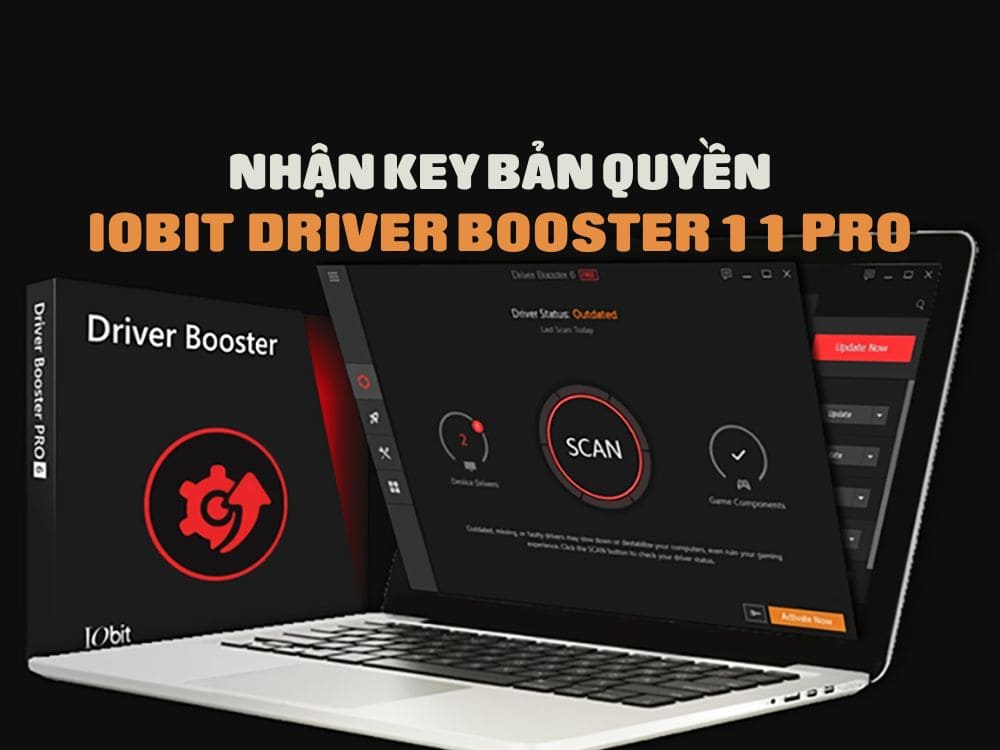
Share Key Driver Booster 11 Pro for free

AnonyViet

AnonyViet

Related Posts

Cách Đăng ký Nhận Code ChatGPT Business
Tips

Cách Đăng ký Nhận Code ChatGPT Business

November 2, 2026
Instructions for cleaning LG TV with Antigravity to help it run faster
Tips

Instructions for cleaning LG TV with Antigravity to help it run faster

October 30, 2026
Quét lỗ hổng bảo mật cho Vide Coding bằng Security Audit Skill
Tips

Quét lỗ hổng bảo mật cho Vide Coding bằng Security Audit Skill

October 27, 2026
Instructions for registering for OxionAI Pro for 1 year with many powerful AI models
Tips

Instructions for registering for OxionAI Pro for 1 year with many powerful AI models

October 24, 2026
How are Windows 11 Pro and Windows 10 Pro different?
Tips

How are Windows 11 Pro and Windows 10 Pro different?

October 23, 2026
Instructions for using CleanYourTV: Remove ads on Android TV, Google TV
Tips

Instructions for using CleanYourTV: Remove ads on Android TV, Google TV

October 23, 2026
Next Post
Share Key Driver Booster 11 Pro for free

Share Key Driver Booster 11 Pro for free

0 0 votes
Article Rating
Subscribe
Login
Notify of
guest

guest

0 Comments
Oldest
Newest Most Voted

Recent News

Instructions on how to buy super bargain 1k Bach Hoa Xanh products

Instructions on how to buy super bargain 1k Bach Hoa Xanh products

November 6, 2026
Besides the 7500 mAh battery and 6.9 inch screen, what else does the POCO C95 Pro 4G have to make it a secondary device worth buying?

Besides the 7500 mAh battery and 6.9 inch screen, what else does the POCO C95 Pro 4G have to make it a secondary device worth buying?

November 5, 2026
App fixes printer errors automatically, effective immediately with 1 click

App fixes printer errors automatically, effective immediately with 1 click

November 5, 2026
What to do when your company opening information is stolen?

What to do when your company opening information is stolen?

November 4, 2026
Instructions on how to buy super bargain 1k Bach Hoa Xanh products

Instructions on how to buy super bargain 1k Bach Hoa Xanh products

November 6, 2026
Besides the 7500 mAh battery and 6.9 inch screen, what else does the POCO C95 Pro 4G have to make it a secondary device worth buying?

Besides the 7500 mAh battery and 6.9 inch screen, what else does the POCO C95 Pro 4G have to make it a secondary device worth buying?

November 5, 2026
App fixes printer errors automatically, effective immediately with 1 click

App fixes printer errors automatically, effective immediately with 1 click

November 5, 2026
AnonyViet - English Version

AnonyViet

AnonyViet is a website share knowledge that you have never learned in school!

We are ready to welcome your comments, as well as your articles sent to AnonyViet.

Follow Us

Contact:

Email: anonyviet.com[@]gmail.com

Main Website: https://anonyviet.com

Recent News

Instructions on how to buy super bargain 1k Bach Hoa Xanh products

Instructions on how to buy super bargain 1k Bach Hoa Xanh products

November 6, 2026
Besides the 7500 mAh battery and 6.9 inch screen, what else does the POCO C95 Pro 4G have to make it a secondary device worth buying?

Besides the 7500 mAh battery and 6.9 inch screen, what else does the POCO C95 Pro 4G have to make it a secondary device worth buying?

November 5, 2026
  • Home
  • Home 2
  • Home 3
  • Home 4
  • Home 5
  • Home 6
  • Next Dest Page
  • Sample Page

say88 tỷ lệ kèo nhà cái kèo nhà cái 5 febet

No Result
View All Result
  • Home
  • News
  • Software
  • Knowledge
  • MMO
  • Tips
  • Security
  • Network
  • Office

say88 tỷ lệ kèo nhà cái kèo nhà cái 5 febet

wpDiscuz
0
0
Would love your thoughts, please comment.x
()
x
| Reply