• Home
  • News
  • Software
  • Knowledge
  • MMO
  • Tips
  • Security
  • Network
  • Office
AnonyViet - English Version
  • Home
  • News
  • Software
  • Knowledge
  • MMO
  • Tips
  • Security
  • Network
  • Office
No Result
View All Result
  • Home
  • News
  • Software
  • Knowledge
  • MMO
  • Tips
  • Security
  • Network
  • Office
No Result
View All Result
AnonyViet - English Version
No Result
View All Result

How to bring Windows 10 Shortcut Apps to the Desktop

AnonyViet by AnonyViet
February 17, 2023
in Tips
0

If you use Windows 10, you will notice that Apps downloaded from the Store will not create shortcuts on the Desktop, this is very time consuming when you need to open an App, because you have to click and Start Menu and then click away. find the App where it is located (Example: Skype for example). Today AnonyViet will guide you how to

Join the channel Telegram belong to AnonyViet 👉 Link 👈

First you need: Open dialog box Run… (Windows + R)

Then type this command in:

%windir%\explorer.exe shell:::{4234d49b-0245-4df3-b780-3893943456e1}

then press enter

How to bring Windows 10 Shortcut Apps to Desktop 8

Then a window Applications will appear, this is where all the shortcuts of the Apps that have been installed into Windows are stored

How to bring Windows 10 Shortcut Apps to Desktop 9

Now you just need right click go to any app, select Create shortcut

How to bring Windows 10 Shortcut Apps to Desktop 10

There will be an announcement with Content “Can’t create a shortcut here, do you want to put it on the Desktop”. Select Yes will create a shortcut on the Desktop.

How to bring Windows 10 Shortcut Apps to Desktop 11

Shortcuts appear. You can double click on the icon to check,

How to bring Windows 10 Shortcut Apps to the Desktop

With a small trick, I hope you will not have trouble with bringing the icon to the Desktop on Windows 10 when installing the App


The article achieved: 5/5 – (100 votes)

Previous Post

Share all tips Facebook, Photoshop, MMO

Next Post

Windows Security Documentation (Vietnamese)

AnonyViet

AnonyViet

Related Posts

Cách Đăng ký Nhận Code ChatGPT Business
Tips

Cách Đăng ký Nhận Code ChatGPT Business

November 2, 2026
Instructions for cleaning LG TV with Antigravity to help it run faster
Tips

Instructions for cleaning LG TV with Antigravity to help it run faster

October 30, 2026
Quét lỗ hổng bảo mật cho Vide Coding bằng Security Audit Skill
Tips

Quét lỗ hổng bảo mật cho Vide Coding bằng Security Audit Skill

October 27, 2026
Instructions for registering for OxionAI Pro for 1 year with many powerful AI models
Tips

Instructions for registering for OxionAI Pro for 1 year with many powerful AI models

October 24, 2026
How are Windows 11 Pro and Windows 10 Pro different?
Tips

How are Windows 11 Pro and Windows 10 Pro different?

October 23, 2026
Instructions for using CleanYourTV: Remove ads on Android TV, Google TV
Tips

Instructions for using CleanYourTV: Remove ads on Android TV, Google TV

October 23, 2026
Next Post
Windows Security Documentation (Vietnamese)

Windows Security Documentation (Vietnamese)

0 0 votes
Article Rating
Subscribe
Login
Notify of
guest

guest

0 Comments
Oldest
Newest Most Voted

Recent News

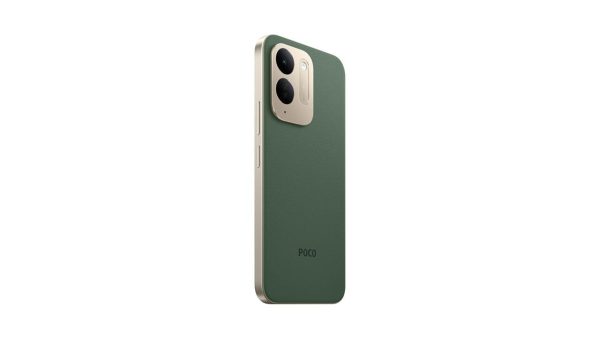
Besides the 7500 mAh battery and 6.9 inch screen, what else does the POCO C95 Pro 4G have to make it a secondary device worth buying?

Besides the 7500 mAh battery and 6.9 inch screen, what else does the POCO C95 Pro 4G have to make it a secondary device worth buying?

November 5, 2026
App fixes printer errors automatically, effective immediately with 1 click

App fixes printer errors automatically, effective immediately with 1 click

November 5, 2026
What to do when your company opening information is stolen?

What to do when your company opening information is stolen?

November 4, 2026
How to get 0 in Docker credits to run AI Agent for free

How to get $250 in Docker credits to run AI Agent for free

November 3, 2026
Besides the 7500 mAh battery and 6.9 inch screen, what else does the POCO C95 Pro 4G have to make it a secondary device worth buying?

Besides the 7500 mAh battery and 6.9 inch screen, what else does the POCO C95 Pro 4G have to make it a secondary device worth buying?

November 5, 2026
App fixes printer errors automatically, effective immediately with 1 click

App fixes printer errors automatically, effective immediately with 1 click

November 5, 2026
What to do when your company opening information is stolen?

What to do when your company opening information is stolen?

November 4, 2026
AnonyViet - English Version

AnonyViet

AnonyViet is a website share knowledge that you have never learned in school!

We are ready to welcome your comments, as well as your articles sent to AnonyViet.

Follow Us

Contact:

Email: anonyviet.com[@]gmail.com

Main Website: https://anonyviet.com

Recent News

Besides the 7500 mAh battery and 6.9 inch screen, what else does the POCO C95 Pro 4G have to make it a secondary device worth buying?

Besides the 7500 mAh battery and 6.9 inch screen, what else does the POCO C95 Pro 4G have to make it a secondary device worth buying?

November 5, 2026
App fixes printer errors automatically, effective immediately with 1 click

App fixes printer errors automatically, effective immediately with 1 click

November 5, 2026
  • Home
  • Home 2
  • Home 3
  • Home 4
  • Home 5
  • Home 6
  • Next Dest Page
  • Sample Page

say88 tỷ lệ kèo nhà cái kèo nhà cái 5 febet

No Result
View All Result
  • Home
  • News
  • Software
  • Knowledge
  • MMO
  • Tips
  • Security
  • Network
  • Office

say88 tỷ lệ kèo nhà cái kèo nhà cái 5 febet

wpDiscuz
0
0
Would love your thoughts, please comment.x
()
x
| Reply