• Home
  • News
  • Software
  • Knowledge
  • MMO
  • Tips
  • Security
  • Network
  • Office
AnonyViet - English Version
  • Home
  • News
  • Software
  • Knowledge
  • MMO
  • Tips
  • Security
  • Network
  • Office
No Result
View All Result
  • Home
  • News
  • Software
  • Knowledge
  • MMO
  • Tips
  • Security
  • Network
  • Office
No Result
View All Result
AnonyViet - English Version
No Result
View All Result

New Facebook Tut – Unlock check name 2018

AnonyViet by AnonyViet
February 17, 2023
in Tips
0

Today is the 2nd of spring 2018. I would like to wish you a peaceful and happy new year. Wishing you much success in work and life. At the same time, I also thank you for supporting AnonyViet during the past time.

Join the channel Telegram belong to AnonyViet 👉 Link 👈

Today’s post is an article about Tut Check Name Facebook shared by Member. Please allow me to post it for you guys to refer to. If you have a good article you want to share, please send it to Gmail [email protected] (Price of royalties 10k/post).

[email protected]

Tutorial TUT Unlock Check Name 2018

Need to prepare a software Fake (Spoof) IP address. I usually use Chrome Extensions Hola and AnonymousX. You can use any other software or Extension of your choice.

Prepare a fake ID card (Dame information with the account). Then now we start to perform Tut to unlock Check Name!

When you go to Facebook, you will see a line saying you use a fake name and need to verify.
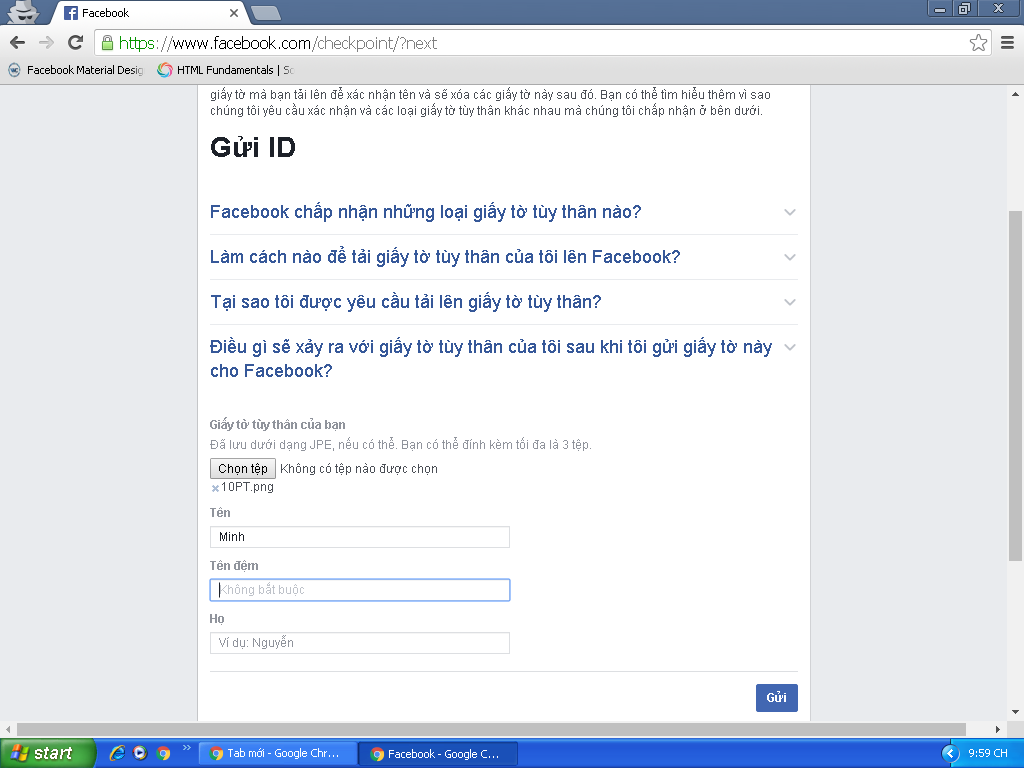
New Facebook Tut - Unlock check name 2018

Fake UK IP and change language to UK. Then fill in the following order:

Dòng 1: Tên Của Bạn ( Không cần điền họ và chữ đệm ).

Dòng 2: Tên đệm (Không cần điền họ).

Dòng 3: Họ.

Re-enter for the second time. Upload a photo of your student card and still fill in and fake IP as before!

3rd time back in. Fake adds a marriage certificate or driver’s license or something and still fills in and fake IP continues as before.

Please visit the contact link 237 below.

Contact link 237

Please skip the ad to support me. Thank you very much !

At the contact link 237, you still fill in the same information as before. Do it many times, until you receive an email from Facebook, reply as follows:

Hello Facebook team ! … ( tên trong Fb của bạn ) is my name . I edit my name in my account because my father and my mom need edit my name end I have some certificate for Facebook see . Thanks , hope you open my account

Finally, upload the photo of the ID card and the documents that were forged earlier for Facebook to review a few times to be sure.

Recommendations

Should be done during the working time of Facebook employees in the US (evening in Vietnam).

Like Fanpage or follow website for quick updates.

Thank you very much
#Lmint.

The article achieved: 5/5 – (100 votes)

Previous Post

Summary of necessary software for Windows

Next Post

Turn off Auto Update on Windows 10 thoroughly

AnonyViet

AnonyViet

Related Posts

How to get ChatGPT Business 48 months discount from only 0 VND
Tips

How to get ChatGPT Business 48 months discount from only 0 VND

May 9, 2026
How to create a tiny version of yourself to follow the trend very easily
Tips

How to create a tiny version of yourself to follow the trend very easily

May 9, 2026
How to get 500GB pCloud for free, Swiss standard cloud storage
Tips

How to get 500GB pCloud for free, Swiss standard cloud storage

May 8, 2026
Instructions on how to make money from personal Facebook
Tips

Instructions on how to make money from personal Facebook

May 2, 2026
How to add sliders to Facebook Stories to easily rewind videos
Tips

How to add sliders to Facebook Stories to easily rewind videos

April 21, 2026
How to change the default font on Windows 10
Tips

How to change the default font on Windows 10

April 13, 2026
Next Post
Turn off Auto Update on Windows 10 thoroughly

Turn off Auto Update on Windows 10 thoroughly

0 0 votes
Article Rating
Subscribe
Login
Notify of
guest

guest

0 Comments
Oldest
Newest Most Voted
Inline Feedbacks
View all comments

Recent News

Instructions for turning off automatic playlists on YouTube

Instructions for turning off automatic playlists on YouTube

May 10, 2026
How to get ChatGPT Business 48 months discount from only 0 VND

How to get ChatGPT Business 48 months discount from only 0 VND

May 9, 2026
How to create a tiny version of yourself to follow the trend very easily

How to create a tiny version of yourself to follow the trend very easily

May 9, 2026
How to get 500GB pCloud for free, Swiss standard cloud storage

How to get 500GB pCloud for free, Swiss standard cloud storage

May 8, 2026
Instructions for turning off automatic playlists on YouTube

Instructions for turning off automatic playlists on YouTube

May 10, 2026
How to get ChatGPT Business 48 months discount from only 0 VND

How to get ChatGPT Business 48 months discount from only 0 VND

May 9, 2026
How to create a tiny version of yourself to follow the trend very easily

How to create a tiny version of yourself to follow the trend very easily

May 9, 2026
AnonyViet - English Version

AnonyViet

AnonyViet is a website share knowledge that you have never learned in school!

We are ready to welcome your comments, as well as your articles sent to AnonyViet.

Follow Us

Contact:

Email: anonyviet.com[@]gmail.com

Main Website: https://anonyviet.com

Recent News

Instructions for turning off automatic playlists on YouTube

Instructions for turning off automatic playlists on YouTube

May 10, 2026
How to get ChatGPT Business 48 months discount from only 0 VND

How to get ChatGPT Business 48 months discount from only 0 VND

May 9, 2026
No Result
View All Result
  • Home
  • News
  • Software
  • Knowledge
  • MMO
  • Tips
  • Security
  • Network
  • Office

wpDiscuz
0
0
Would love your thoughts, please comment.x
()
x
| Reply