• Home
  • News
  • Software
  • Knowledge
  • MMO
  • Tips
  • Security
  • Network
  • Office
AnonyViet - English Version
  • Home
  • News
  • Software
  • Knowledge
  • MMO
  • Tips
  • Security
  • Network
  • Office
No Result
View All Result
  • Home
  • News
  • Software
  • Knowledge
  • MMO
  • Tips
  • Security
  • Network
  • Office
No Result
View All Result
AnonyViet - English Version
No Result
View All Result

7 hidden Google tools you didn’t know

AnonyViet by AnonyViet
January 28, 2023
in Tips
0

Google has many hidden tools that you can run directly from Google Search. To run these tools, you can enter a phrase directly into the Google search bar. After you hit enter, the results page will show the tool right at the top.

Join the channel Telegram of the AnonyViet 👉 Link 👈

7 hidden Google tools you didn’t know

In this article, I will introduce you to 7 hidden tools on Google.

7 hidden Google tools you didn’t know

1. Flip the coin
7 hidden Google tools that you didn't know

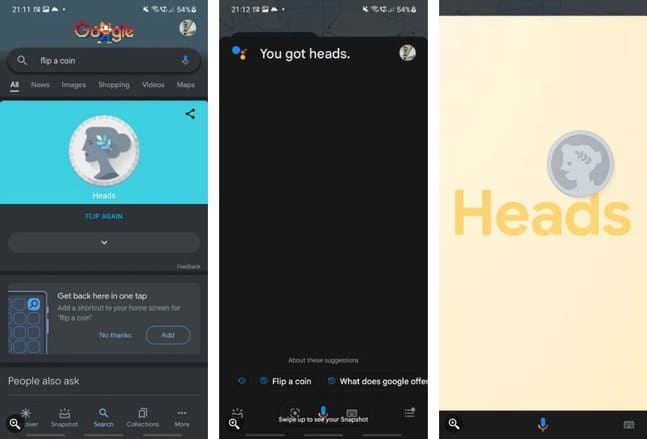
In the past, people would toss a coin when they couldn’t decide on a thing. Since the coins usually have a uniform weight across the surface, you almost always have a 50/50 chance. But with the advent of debit cards, credit cards and e-wallets, most people carry less coins.

So if you can’t decide, instead of tossing a real coin, take out your phone and search “Flip a coin” on Google. You can also do this on Google Assistant by saying “Hey Google, flip a coin“.

Then a screen will pop up, showing a coin. In addition to showing the results you get on the screen, Google Assistant will also tell you the result is heads or tails.

2. Roll the dice

7 hidden Google tools that you didn't know

Many games require dice to play such as billionaire chess, seahorse chess, etc. However, there may be times when you forget to bring the dice. If you don’t have dice, you can use Google.

Just search “Roll Dice” on Google and now you have the dice to play. Not just limited to a six-sided dice. You can choose four, six, eight, ten, twelve and twenty faces. You can even add any number you want

3. Spinner
7 hidden Google tools that you didn't know

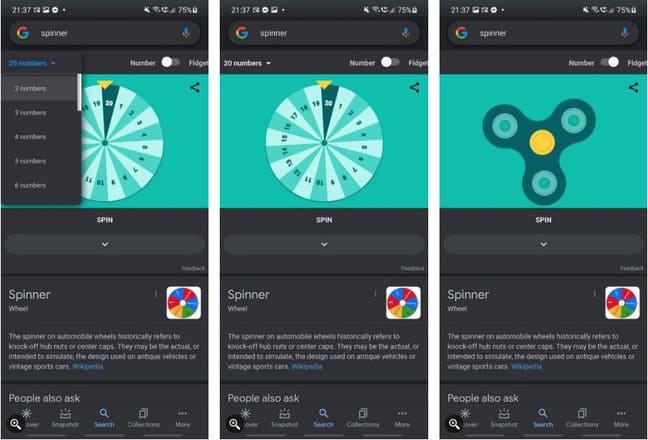
You can use the Spinner to pick a lucky winner, give a presentation, or just about anything else.

To open the Spinner, type “Spinner” on Google search. You will see a wheel with six numbers. If you want to change the number of participants, click the menu in the upper left. You can choose between two to twenty participants.

And if you find it boring, you can move the slider in the upper right corner from Number luxurious Fidget for an interesting spin.

4. Color Picker
7 hidden Google tools that you didn't know

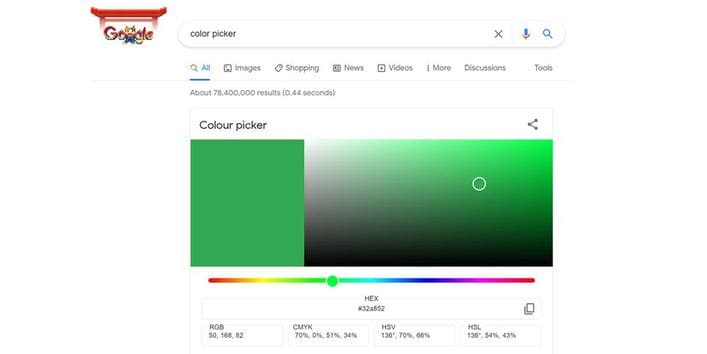
Google provides a color picker to help you choose colors. When you search for “Color Picker” on Google, you will get the window Color picker with pre-selected color. And if you are not satisfied with the result, refresh the page and you will get a new color.

You can choose the color you want by sliding the color bar. You can also choose the saturation and brightness you want on the window on the right. The final color you get is the color shown in the left window.

And if you are working as a graphic designer, you will see corresponding color codes like HEX, RGB, CMYK, HSV and HSL.

5. Breathing exercises
7 hidden Google tools that you didn't know

Sometimes, stress and fatigue can make you mentally uncomfortable. If this is the case, I recommend you practice breathing to calm your mind.

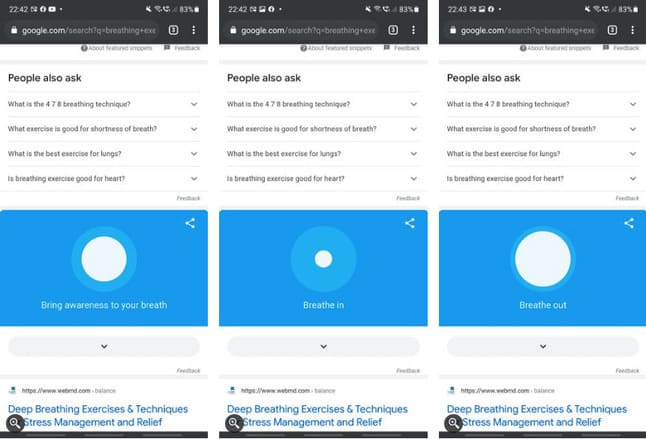
The breathing exercise app guides you through a one-minute inhalation and exhalation exercise. The app asks you to focus on your breathing and reminds you when to inhale and exhale during this phase.

To access the app, simply type “Breathing Exercise” on Google Search.

6. Balance Bubble

7 hidden Google tools that you didn't know

Balancing balloons are often used in construction or design to measure the inclination (order) of a line or plane. As long as your device has a built-in gyroscope, you can use it to calculate the angle of a surface.

To do this, go to Google Search and type “Bubble Level“. You can then place your phone or tablet on the surface to see how flat it is. Note: this tool is now out of support on Google.

7. Metronome
7 hidden Google tools that you didn't know

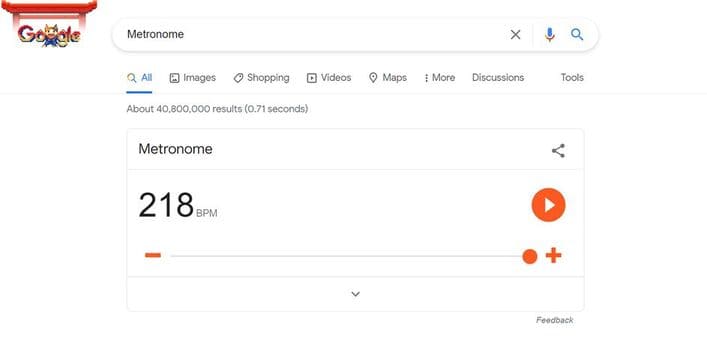
You can use your phone as a heart monitor. Whether you are an Android or iOS user, all you need is to search for “Metronome” on Google. There is a slider that allows you to choose from 60 to 218 beats per minute. Once you have selected the bpm unit, press the play button and you will hear the beat you need.

Also, you can see more about Google facts that you didn’t know here.

The article achieved: 5/5 – (100 votes)

Tags: didntGooglehiddentools
Previous Post

Instructions for solving problems on Shodan.io on Tryhackme

Next Post

Hướng dẫn DNSSEC (DNS Security Extension) Full – Windows Server 2012 R2

AnonyViet

AnonyViet

Related Posts

Windows 7/8.1/10 users will be upgraded to Windows 11 for free
Tips

Windows 7/8.1/10 users will be upgraded to Windows 11 for free

July 30, 2026
Instructions for receiving ChatGPT Plus for 1 month for free in 2026
Tips

Instructions for receiving ChatGPT Plus for 1 month for free in 2026

July 28, 2026
Some reasons I don’t like Windows 11
Tips

Some reasons I don’t like Windows 11

July 27, 2026
Instructions on how to get free Facebook white ticks
Tips

Instructions on how to get free Facebook white ticks

July 27, 2026
Collection of Windows 11 wallpapers for computers and phones
Tips

Collection of Windows 11 wallpapers for computers and phones

July 26, 2026
Don’t install leaked Windows 11
Tips

Don’t install leaked Windows 11

July 25, 2026
Next Post
Hướng dẫn DNSSEC (DNS Security Extension) Full – Windows Server 2012 R2

Hướng dẫn DNSSEC (DNS Security Extension) Full - Windows Server 2012 R2

0 0 votes
Article Rating
Subscribe
Login
Notify of
guest

guest

0 Comments
Oldest
Newest Most Voted

Recent News

Windows 7/8.1/10 users will be upgraded to Windows 11 for free

Windows 7/8.1/10 users will be upgraded to Windows 11 for free

July 30, 2026
Instructions for receiving the free Certified LLM Security Expert certificate

Instructions for receiving the free Certified LLM Security Expert certificate

July 30, 2026
MSI laptops are not just for gamers: Which line is suitable for students, office workers and creative people?

MSI laptops are not just for gamers: Which line is suitable for students, office workers and creative people?

July 29, 2026
What is quantum resistant cryptography? Why must the Internet change?

What is quantum resistant cryptography? Why must the Internet change?

July 29, 2026
Windows 7/8.1/10 users will be upgraded to Windows 11 for free

Windows 7/8.1/10 users will be upgraded to Windows 11 for free

July 30, 2026
Instructions for receiving the free Certified LLM Security Expert certificate

Instructions for receiving the free Certified LLM Security Expert certificate

July 30, 2026
MSI laptops are not just for gamers: Which line is suitable for students, office workers and creative people?

MSI laptops are not just for gamers: Which line is suitable for students, office workers and creative people?

July 29, 2026
AnonyViet - English Version

AnonyViet

AnonyViet is a website share knowledge that you have never learned in school!

We are ready to welcome your comments, as well as your articles sent to AnonyViet.

Follow Us

Contact:

Email: anonyviet.com[@]gmail.com

Main Website: https://anonyviet.com

Recent News

Windows 7/8.1/10 users will be upgraded to Windows 11 for free

Windows 7/8.1/10 users will be upgraded to Windows 11 for free

July 30, 2026
Instructions for receiving the free Certified LLM Security Expert certificate

Instructions for receiving the free Certified LLM Security Expert certificate

July 30, 2026
  • Home
  • Home 2
  • Home 3
  • Home 4
  • Home 5
  • Home 6
  • Next Dest Page
  • Sample Page

say88 tỷ lệ kèo nhà cái kèo nhà cái 5 febet

No Result
View All Result
  • Home
  • News
  • Software
  • Knowledge
  • MMO
  • Tips
  • Security
  • Network
  • Office

say88 tỷ lệ kèo nhà cái kèo nhà cái 5 febet

wpDiscuz
0
0
Would love your thoughts, please comment.x
()
x
| Reply