• Home
  • News
  • Software
  • Knowledge
  • MMO
  • Tips
  • Security
  • Network
  • Office
AnonyViet - English Version
  • Home
  • News
  • Software
  • Knowledge
  • MMO
  • Tips
  • Security
  • Network
  • Office
No Result
View All Result
  • Home
  • News
  • Software
  • Knowledge
  • MMO
  • Tips
  • Security
  • Network
  • Office
No Result
View All Result
AnonyViet - English Version
No Result
View All Result

Universal MCT wrapper: Download ISO Windows 10 all versions

AnonyViet by AnonyViet
January 31, 2023
in Tips
0

Universal MCT wrapper is this new script (script) that makes it easy to download ISO files of any version of Windows 10, including Windows 10 from version 1507 to 20H2.

Join the channel Telegram of the AnonyViet 👉 Link 👈
Universal MCT wrapper: Download ISO Windows 10 all versions
Universal MCT wrapper – Download ISO Windows 10

For those familiar with ISO files, they are a sector-by-sector copy of a DVD. This ISO file can be burned or burned to a DVD to create a copy of the original data, mounted as a drive letter in Windows, or extracted by a program such as 7-Zip to access the files contained in there.

If you want to do a clean install of Windows 10 or have problems during the installation process, downloading the ISO file to install Windows 10 is what you need to do.

A new script (script) named ‘Universal MCT wrapper‘ allows you to download the Media Creation Tool software of any version of Windows 10 so that you can create an ISO file of that version.

How to download Universal MCT wrapper

To use the script, you need to download Universal MCT wrapper and launch it. You will see a dialog box that allows you to select the version of Windows 10 that you want to create the ISO file for.

AnonyViet has already created the file .bat based on the source code of the Universal MCT wrapper, you just need to Download Download and launch to download the Windows 10 ISO installation file, without any further action.
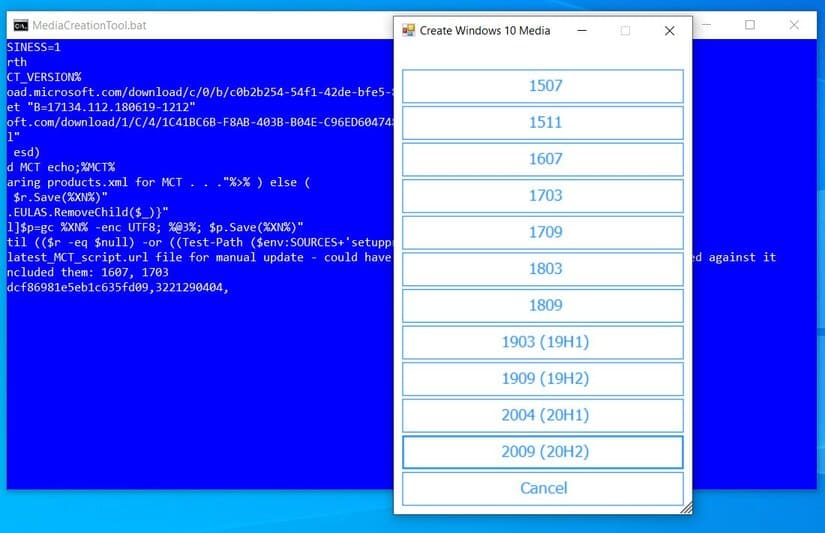
Universal MCT wrapper

After selecting the version, the program will download the Media Creation Tool software for that version and it will automatically launch the program in Windows 10.

Depending on the version of Windows 10 you choose, the Media Creation Tool will provide different Windows options that you can choose from. For example, earlier versions of Windows are broken down into different licenses, while newer versions of Windows 10 are combined into a Client or Enterprise option.
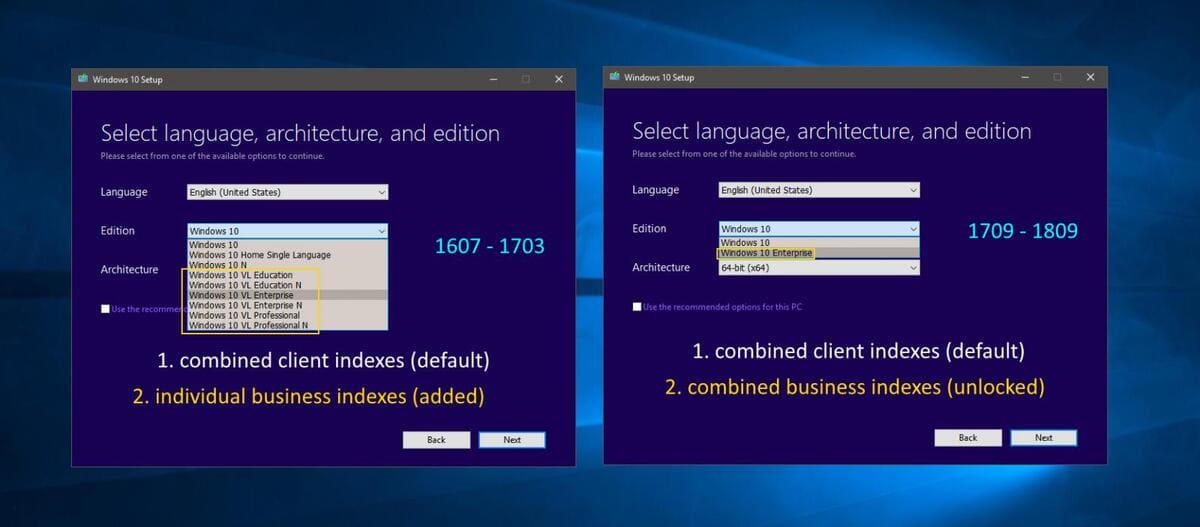
Universal MCT wrapper: Download ISO Windows 10 all versions 5

After the Media Creation Tool is launched, to create an ISO file, you need to follow these steps:

  1. Agree to terms.
  2. Select “Create installation media for another PC” and press next.
  3. Select the version of Windows (Client, Enterprise, Professional, etc.) you want to create and press next.
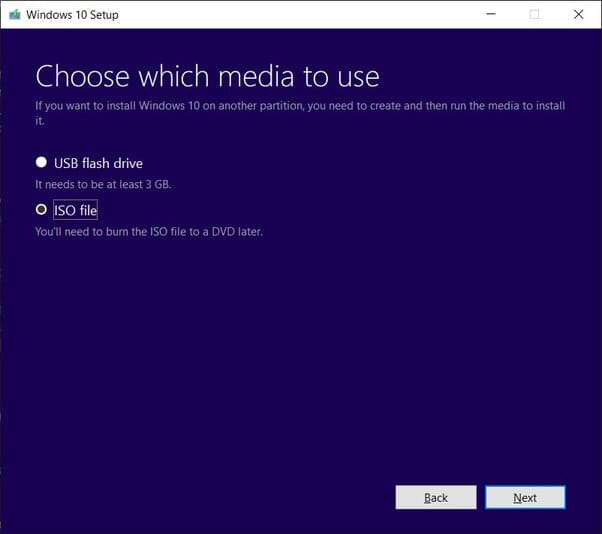
  4. Under “Choose which media to use”, select “ISO file” and press Next.Universal MCT wrapper: Download ISO Windows 10 all versions 6
  5. Select the folder to save the ISO file.
  6. Wait for the Media Creation Tool to download the selected ISO file.

When done, the ISO file will be saved in the folder you specified. Now you can Windows installation and that.

How to check the Windows 10 version of the ISO file

After creating the ISO file, you may want to double check that it is the correct version of Windows 10 before using it.

To do this, you just need to double-click the ISO file to have Windows 10 automatically open the ISO file as a drive.

Then you need to open CMD and execute the following dism.exe command to get the information of the ISO file you just created. You just need to replace [drive_letter] with the drive letter to which the ISO file is assigned.

dism /Get-WimInfo /WimFile:[drive_letter]:\sources\install.esd /index:1

After running the command, the tool Deployment Image Servicing and Management (DISM) will display information about the Windows 10 version in the ISO file. As you can see below, this ISO file is of Windows 10 version 10240, corresponding to Windows 10 1507.
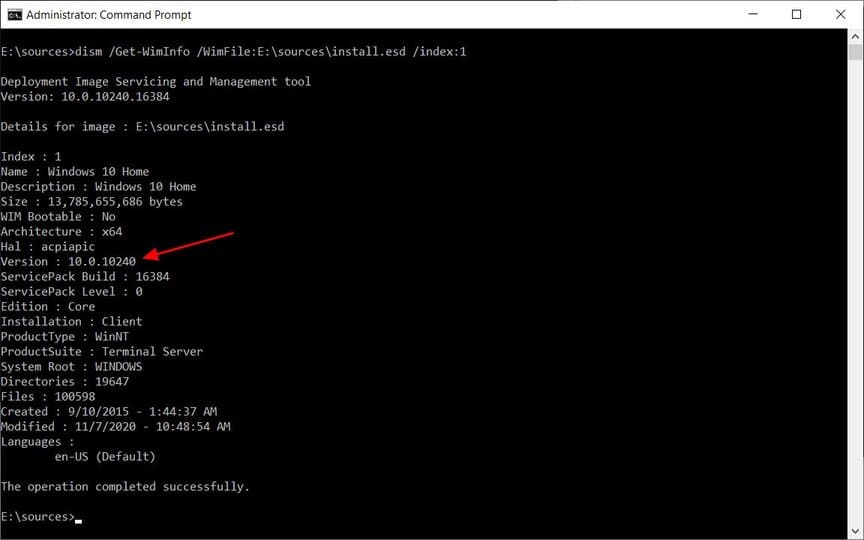
Universal MCT wrapper: Download ISO Windows 10 all versions 7

Now that you know you’re using the right version, you can next burn the ISO file to a DVD as a backup tool or use it to install Windows.

Note: if you install outdated versions of Windows 10, Windows Update will automatically update you with a newer feature update.


The article achieved: 5/5 – (100 votes)

Tags: DownloadISOMCTUniversalversionsWindowswrapper
Previous Post

Full set of CEHv9 Vietnamese textbooks

Next Post

“Free AntiDDoS” Service for Websites

AnonyViet

AnonyViet

Related Posts

How to change the default font on Windows 10
Tips

How to change the default font on Windows 10

April 13, 2026
5 tips for using a Browser to replace an App (helps save RAM, time and money)
Tips

5 tips for using a Browser to replace an App (helps save RAM, time and money)

April 13, 2026
How to make funny MeMe photos without Photoshop within 10 seconds
Tips

How to make funny MeMe photos without Photoshop within 10 seconds

April 11, 2026
How to quickly design your own Logo without Photoshop
Tips

How to quickly design your own Logo without Photoshop

April 10, 2026
How to convert Website into App on Windows
Tips

How to convert Website into App on Windows

April 9, 2026
Instructions for getting 3 months of Adobe Express Pro for free
Tips

Instructions for getting 3 months of Adobe Express Pro for free

April 9, 2026
Next Post
“Free AntiDDoS” Service for Websites

"Free AntiDDoS" Service for Websites

0 0 votes
Article Rating
Subscribe
Login
Notify of
guest

guest

0 Comments
Oldest
Newest Most Voted
Inline Feedbacks
View all comments

Recent News

How to add Watermark to Google Docs to protect copyright

How to add Watermark to Google Docs to protect copyright

April 19, 2026
How to intercept traffic using Burp Suite to analyze HTTP/HTTPS

How to intercept traffic using Burp Suite to analyze HTTP/HTTPS

April 18, 2026
How to avoid Adblock detection on Youtube with 4 good tips

How to avoid Adblock detection on Youtube with 4 good tips

April 17, 2026
How to transfer ChatGPT data to Claude is extremely simple

How to transfer ChatGPT data to Claude is extremely simple

April 16, 2026
How to add Watermark to Google Docs to protect copyright

How to add Watermark to Google Docs to protect copyright

April 19, 2026
How to intercept traffic using Burp Suite to analyze HTTP/HTTPS

How to intercept traffic using Burp Suite to analyze HTTP/HTTPS

April 18, 2026
How to avoid Adblock detection on Youtube with 4 good tips

How to avoid Adblock detection on Youtube with 4 good tips

April 17, 2026
AnonyViet - English Version

AnonyViet

AnonyViet is a website share knowledge that you have never learned in school!

We are ready to welcome your comments, as well as your articles sent to AnonyViet.

Follow Us

Contact:

Email: anonyviet.com[@]gmail.com

Main Website: https://anonyviet.com

Recent News

How to add Watermark to Google Docs to protect copyright

How to add Watermark to Google Docs to protect copyright

April 19, 2026
How to intercept traffic using Burp Suite to analyze HTTP/HTTPS

How to intercept traffic using Burp Suite to analyze HTTP/HTTPS

April 18, 2026
No Result
View All Result
  • Home
  • News
  • Software
  • Knowledge
  • MMO
  • Tips
  • Security
  • Network
  • Office

wpDiscuz
0
0
Would love your thoughts, please comment.x
()
x
| Reply