Shopee profit calculation tool is the perfect solution to solve the extremely difficult problem of product pricing. Instead of manual calculations that are prone to errors, you only need a few mouse clicks to get accurate results. Let’s explore with AnonyViet how to use this tool right here.
📢 Join the channel Telegram belong to AnonyViet
Update new articles, cool tools and IT tips fastest
Current status of business on Shopee
Stepping into the online business path, everyone has the dream of exploding sales. However, the reality of the e-commerce battlefield is more fierce than we imagine. One of the biggest pain points for sellers today is the cost problem. Platforms continuously update policies, resulting in an increase in a variety of different service fees.
From fixed fees, transaction processing fees, to shipping support packages or promotional vouchers, all create a huge cost matrix. Not stopping there, tax liability is also a mandatory factor that shop owners must carefully calculate.
If you just do mental calculations or set prices based on emotions, you can easily fall into the trap of virtual revenue. That means orders still come in regularly every day, packing is tiring, but at the end of the month, the profit is a negative number. Unable to control cash flow and hidden fees are the leading reasons why many stores have to sadly close.

To solve the valuation problem, many people still keep the habit of using books or creating manual Excel spreadsheets. However, as the booth scale expanded, this method revealed many weaknesses. Below is a comparison table to help you have a clearer view.
| Evaluation criteria | Manual calculation method | Use automated tools |
| Processing speed | Slow due to having to enter data and set up formulas many times | Extremely fast with just a few basic number filling operations |
| Accuracy | Mistakes can easily occur during data entry | Absolute accuracy based on pre-programmed algorithms |
| Policy update | You must learn and modify the formula yourself every time the floor changes fees | The system automatically updates according to the platform’s latest policies |
| User experience | Dry and complicated and requires office computer skills | Intuitive interface that is friendly and easy to use for all audiences |
Looking at the table above, it can be seen that the application of technology in financial management is an inevitable trend. A profit calculator Shopee Well designed will help you completely eliminate the risks caused by incorrect calculations.

To help you quickly master this tool and apply it immediately to your business, below are extremely simple steps. You don’t need to be a financial expert to professionally price products yourself.
Step 1: Access the main interface of the tool HERE. Here, you will see a table that is designed very clearly and is easy to see.

Step 2: Enter basic product parameters. You need to fill in the exact amount.Capital price”Import and level”Desired interest” that you expect to earn per unit of product. This is the most important step of reverse pricing thinking.
Step 3: Proceed to choose your shop type Regular shop or mall shop. Next, choose the right one commodity industry that you are doing business in, because each industry will have a different fixed fee rate.
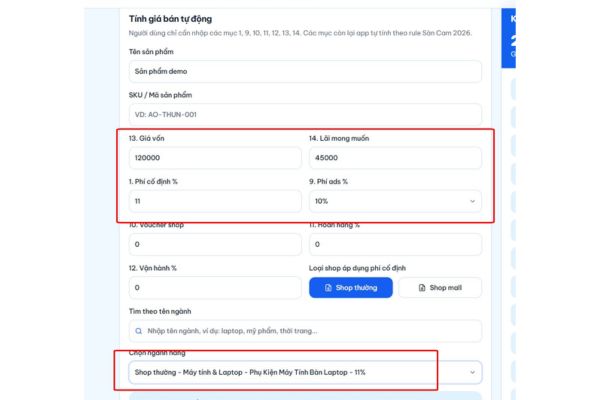
Step 4: Enter other expected costs, if any. If you run advertising, fill in the expected advertising cost percentage. Similar to the return rate or discount vouchers that the shop itself sponsors.
Step 5: Immediately, the Shopee profit calculator will return it to you.Recommended selling price“. Besides, the system also lists in detail each fee you incur, helping you clearly understand where your cash flow is going to have a reasonable optimal plan.

Conclusion
Product pricing has never been easier with the help of Shopee profit calculation tool. You can completely proactively control your cash flow and ensure the expected profit. Wishing you a steady hand in the e-commerce market.
Frequently Asked Questions (Q&A)
1. Does this tool charge users?
Absolutely not. This is a free utility to help the seller community optimize business processes.
2. Is the data I enter kept secure?
Have. The parameters you enter are only temporarily processed in the browser to produce calculation results and are not stored on the server.
3. Does the software automatically update the platform’s new fees?
Have. The development team always closely monitors policy changes from the platform to adjust the algorithm, ensuring the results are always the most accurate.