Tool to check software copyright is a real lifesaver for IT people in times of tightening laws. Instead of having to go to each device to check, now you can manage hundreds of devices at the same time with just a few mouse clicks. Thanks to that, the review job becomes easier and more accurate than ever. Let’s go together AnonyViet Discover how to download and use right here!
📢 Join the channel Telegram belong to AnonyViet
Update new articles, cool tools and IT tips fastest
Recently, IT people have been spreading the word about an extremely useful personal project by the author Harry Hoang Le named development Windows True License v0.8.7-beta. In the current context, authorities are working very strictly on intellectual property issues. Using pirated or cracked software in a corporate environment can lead to huge fines.
Therefore, the author wrote this software copyright check tool to save network administrators. Instead of being afraid when there is an inspection, IT workers can now proactively check the license status of the entire system easily. Thanks to this, the company will avoid unnecessary legal troubles and at the same time make its digital assets transparent.
Outstanding features of Windows True License
It is not natural that this application is so sought after. It addresses the itch of system administrators.
Ability to synthesize huge data
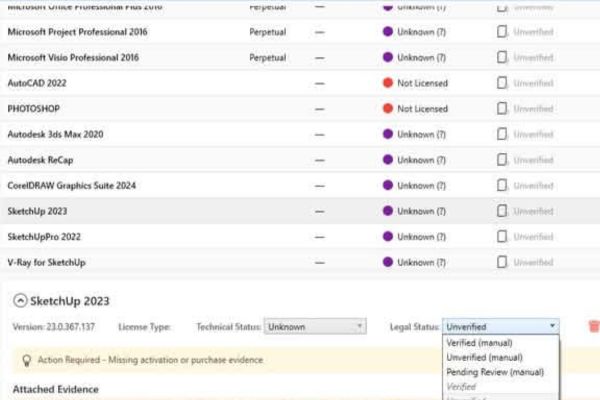
The brightest point of this software is the ability to import data from many different computers. Specifically, you can collect data from maximum 870 machines station to create a single comprehensive report. Instead of having to open each file excel. excel or taking notes manually, everything is now displayed visually on one screen. Thanks to that, software asset management becomes much more leisurely.
Updates are continuously optimized
The author is very diligent in listening to users when continuously releasing patches such as beta 3 and beta 4. In these new versions, you are given the right to remove misidentified software or applications that you do not need to test. In addition, the newly added filter helps minimize redundant and confusing display information. Therefore, the error of displaying duplicate software names that caused discomfort in the past has been completely fixed.
To help you easily visualize the structure of the downloaded file, I have made a small summary table below. This is the full version, runs directly without requiring complicated installation.
| Specifications | Detail |
| Full file name | Windows True License v0.8.7-beta full (include .NET desktop runtime 8 ).exe |
| File capacity | 183 MB |
| Outstanding features | Run directly, no need to install additional runtime on the computer |
| Check code SHA256 | D5FC56EFDE102E4A91756BD2E7087A4FDCC123702E2DBA47057FF359080FED34 |
| Check code MD5 | 39E5AE9F8D017FFC26705AA8E5E78D2C |
Using this software copyright check tool is really simple, does not require any advanced techniques. The downloaded file itself has built-in .NET desktop runtime 8, so the capacity is a bit heavy (about 183 MB). In return, you download it and use it immediately. Below are the basic operations:
Step 1: Access the Google Drive link provided by the author HERE to download the file to your computer.
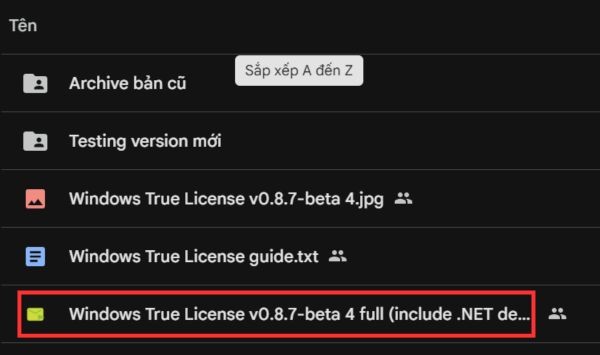
Step 2: Check the SHA256 or MD5 code to see if it matches the information in the table above to ensure the file is not corrupted or edited during the download process.
Step 3: Double click on the downloaded file to launch the software.
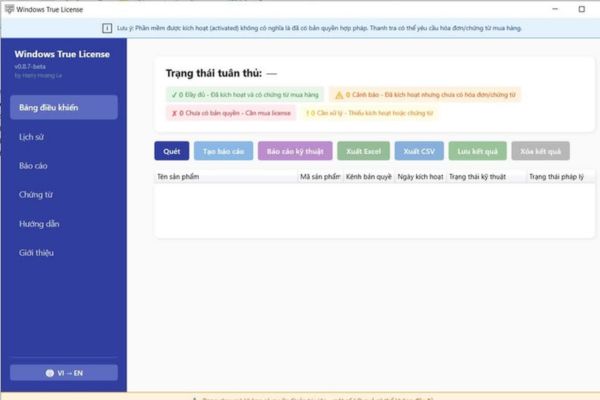
Step 4: Proceed to import data from computers in the internal network (remember, it supports up to 870 computers) into the software system.
Step 5: Use new filters to remove unnecessary software, then export a summary report to present to superiors.
Why should you use Windows True License instead of doing it manually?
Obviously, checking every computer in a large company is a torture. When using a software copyright check tool, you save dozens of time. Instead of straining your eyes to look at every line of the registry or control panel, the software will automatically bring to light applications that do not have a valid license.
Thanks to that, the IT department can quickly make plans to buy additional licenses or remove them before an inspection team knocks on the door. Furthermore, because this is a high-quality Vietnamese product made by Mr. Harry Hoang Le, the interface and processing flow are very close to the actual needs of domestic businesses. In short, owning a genuine software copyright check tool like this is a must for any technical person today.

Conclusion
Finally, the equipping one software copyright check tool Being strong is extremely necessary today. Instead of spending money on outsourcing services, you can completely audit the entire system yourself. Wishing you successful operations and good protection of your network.
Frequently Asked Questions (Q&A)
1. Why is the downloaded file size quite heavy (up to 183 MB)?
Because this is the full version with the .NET desktop runtime 8 environment built into it. Thanks to that, you can run the tool directly on any computer without having to bother installing other supporting software.
2. The tool supports data collection from up to how many computers?
According to information from the author, the software supports importing data from up to 870 computers.
3. How to fix duplicate software displays?
You just need to use the new versions (from beta 3, beta 4 and above), the author has updated a new filter to help fix duplicate errors and allow removing mistakenly recognized software.