• Home
  • News
  • Software
  • Knowledge
  • MMO
  • Tips
  • Security
  • Network
  • Office
AnonyViet - English Version
  • Home
  • News
  • Software
  • Knowledge
  • MMO
  • Tips
  • Security
  • Network
  • Office
No Result
View All Result
  • Home
  • News
  • Software
  • Knowledge
  • MMO
  • Tips
  • Security
  • Network
  • Office
No Result
View All Result
AnonyViet - English Version
No Result
View All Result

TikTok launches Sound Search feature to easily find songs

AnonyViet by AnonyViet
August 9, 2024
in Software
0

TikTok – The short video social network that is taking the world by storm, has just launched a promising new feature called “Sound Search” (Sound Search). This feature allows users to easily search for songs by singing, humming the melody or streaming the audio they are looking for. This marks a new step in the application of sound recognition technology on social networking platforms, and poses a direct challenge to giants like Apple's Shazam and Google's Hum to Search.

Join the channel Telegram belong to AnonyViet 👉 Link 👈

Find songs easily with Sound Search

With “Sound Search,” finding your favorite song has never been easier. Instead of having to remember the lyrics or the singer’s name, users just need to hum the melody or sing a short song, and TikTok will automatically recognize and display search results. Users can even stream audio from other sources, such as radio or TV, for TikTok to recognize the song.

Find songs easily with Sound Search

What makes Sound Search TikTok different?

Beyond just identifying songs, “Sound Search” also takes full advantage of the TikTok video platform. After successfully identifying a song, the app will display a list of popular videos that use that sound clip. This makes it easy for users to discover creative and interesting videos related to the song they are looking for.

What makes Sound Search TikTok different?

Currently, “Sound Search” is only being tested for some TikTok users in certain regions. It is unclear when this feature will be widely deployed globally. However, with the potential it brings, “Sound Search” promises to be a breakthrough in the user experience on TikTok, while creating fierce competition in the sound recognition application market.

See also: How to comment on TikTok with pictures

Comparison with Shazam and Hum to Search

Shazam

Shazam is an audio recognition app owned by Apple that has long been a top choice for users when searching for songs. However, Shazam does not currently support voice recognition. This app focuses on identifying songs playing from external audio sources.

Hum to Search

Google has also integrated a “Hum to Search” feature into the Google Assistant and Google Search apps, allowing users to search for songs by humming a tune. However, “Hum to Search” has not yet been integrated into video platforms like YouTube.

How to use Sound Search feature

If you are lucky enough to be part of the beta program, you can use the “Sound Search” feature by:

Step 1: Open the TikTok app.

Step 2: Click the microphone icon in the search bar.

Step 3: Select “Search for audio”.

Step 4: Sing, hum a tune, or stream the audio you're looking for.

Step 5: TikTok will automatically identify the song and display search results.
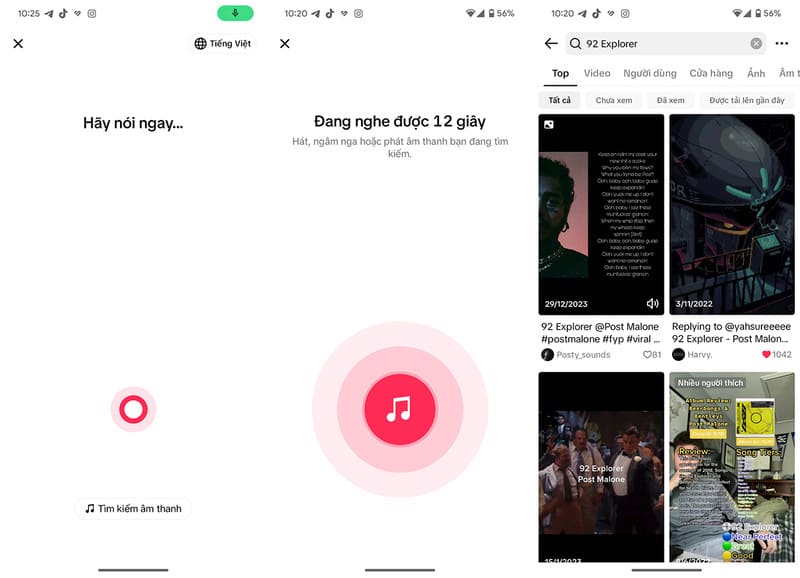
How to use Sound Search feature

Advantages of Tiktok Sound Search

  • Combine the power of video platforms when displaying popular video lists using songs, helping users discover diverse and interesting content.
  • Friendly interface, easy to use, integrated directly into TikTok's search bar, convenient for users.
  • Accurate and fast audio recognition, using advanced AI technology to identify songs from singing, humming or live streaming.
  • Can be developed to recognize not only songs but also other types of sounds, such as sound effects, animal sounds, etc.
  • With the popularity of TikTok, “Sound Search” has the potential to become the most popular sound search engine on the market.

Advantages of Tiktok Sound Search

See also: How save songs on TikTok to Spotify super simple

Conclusion

With the launch of “Sound Search“, TikTok is affirming its pioneering position in applying new technology and improving user experience. This feature not only helps users find songs more easily but also opens up new creative possibilities on this short video platform. In the future, “Sound Search” promises to continue to be developed and improved, contributing to consolidating TikTok's leading position in the race for global user market share.


Tags: easilyfeatureFindLaunchessearchsongssoundTikTok
Previous Post

How to check if passport is done using Zalo

Next Post

How to check car and motorbike fines online is extremely useful

AnonyViet

AnonyViet

Related Posts

JOPDF: Versatile PDF editing software for Windows and Mac
Software

JOPDF: Versatile PDF editing software for Windows and Mac

April 10, 2026
MyVehicle: Convenient and secure motorcycle maintenance reminder app
Software

MyVehicle: Convenient and secure motorcycle maintenance reminder app

April 10, 2026
How to turn off AI on Gmail to absolutely protect personal data
Software

How to turn off AI on Gmail to absolutely protect personal data

April 8, 2026
How to add Settings to Control Center using Shortcuts
Software

How to add Settings to Control Center using Shortcuts

April 7, 2026
Share key Driver Booster 13 Pro for free 2026
Software

Share key Driver Booster 13 Pro for free 2026

April 3, 2026
Review of Samsung Galaxy S25 after 1 year: Is the performance “monster” still in “form”?
Software

Review of Samsung Galaxy S25 after 1 year: Is the performance “monster” still in “form”?

April 1, 2026
Next Post
How to check car and motorbike fines online is extremely useful

How to check car and motorbike fines online is extremely useful

0 0 votes
Article Rating
Subscribe
Login
Notify of
guest

guest

0 Comments
Oldest
Newest Most Voted
Inline Feedbacks
View all comments

Recent News

Complete set of AI training materials from the Ministry of Education at all levels (Elementary – High School)

Complete set of AI training materials from the Ministry of Education at all levels (Elementary – High School)

April 13, 2026
How to change the default font on Windows 10

How to change the default font on Windows 10

April 13, 2026
5 tips for using a Browser to replace an App (helps save RAM, time and money)

5 tips for using a Browser to replace an App (helps save RAM, time and money)

April 13, 2026
How to add WiFi Bluetooth button to iPhone home screen

How to add WiFi Bluetooth button to iPhone home screen

April 13, 2026
Complete set of AI training materials from the Ministry of Education at all levels (Elementary – High School)

Complete set of AI training materials from the Ministry of Education at all levels (Elementary – High School)

April 13, 2026
How to change the default font on Windows 10

How to change the default font on Windows 10

April 13, 2026
5 tips for using a Browser to replace an App (helps save RAM, time and money)

5 tips for using a Browser to replace an App (helps save RAM, time and money)

April 13, 2026
AnonyViet - English Version

AnonyViet

AnonyViet is a website share knowledge that you have never learned in school!

We are ready to welcome your comments, as well as your articles sent to AnonyViet.

Follow Us

Contact:

Email: anonyviet.com[@]gmail.com

Main Website: https://anonyviet.com

Recent News

Complete set of AI training materials from the Ministry of Education at all levels (Elementary – High School)

Complete set of AI training materials from the Ministry of Education at all levels (Elementary – High School)

April 13, 2026
How to change the default font on Windows 10

How to change the default font on Windows 10

April 13, 2026
No Result
View All Result
  • Home
  • News
  • Software
  • Knowledge
  • MMO
  • Tips
  • Security
  • Network
  • Office

wpDiscuz
0
0
Would love your thoughts, please comment.x
()
x
| Reply