Turn off the swipe left feature to open the camera will help your lock screen become neater and less error-prone. Many people feel annoyed when just a light touch or slide causes the camera to turn on unintentionally. Let’s go together AnonyViet Learn the steps to disable this feature below.
| Join the channel Telegram belong to AnonyViet 👉 Link 👈 |
Instructions to turn off the swipe left feature to open the camera
Job Apple Integrating a quick camera shortcut right on the lock screen brings great convenience when you need to capture the moment. However, this sensitivity is sometimes a “double-edged sword” that causes users to accidentally activate the camera continuously without realizing it. This leads to the device overheating, the battery draining quickly, and the photo library being filled with unwanted photos.

To prevent the camera from automatically activating unintentionally, users only need to make a few simple adjustments right in the device’s settings system.
Step 1: Access camera settings
The first step to change this setting is to access the application Setting (Settings) on the iPhone’s home screen. Here, users need to scroll down and find the item Camera.
Step 2: Disable lock screen shortcut
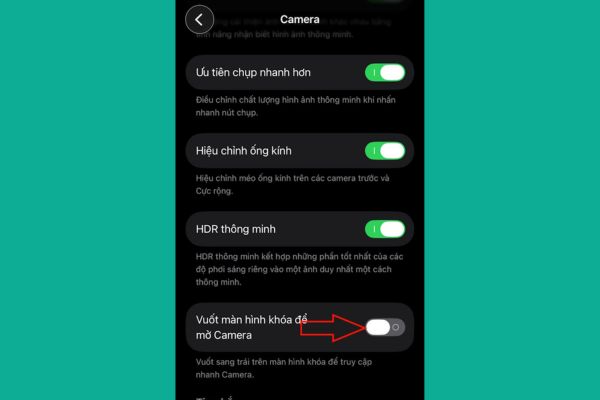
After entering the Camera settings interface, users will see a list of customization options. Look for the setting line named Swipe the lock screen to open Camera. By manufacturer’s default, this option is always enabled to assist users with quick operations.
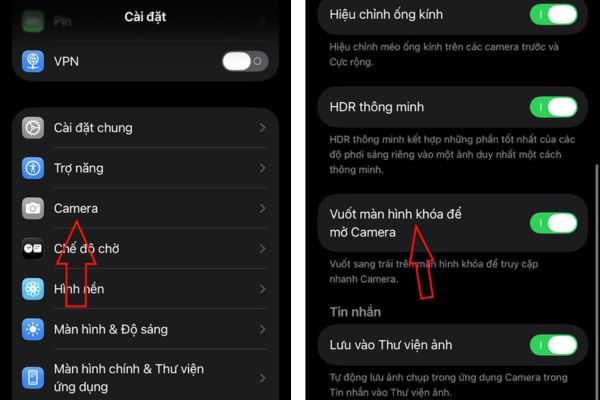
To disable, you just need to flip the switch to the off state. Immediately, swiping left from the lock screen will no longer activate the Camera app. This completely eliminates the possibility of accidentally opening the camera when holding or leaving the phone in your pocket.
Alternative methods of opening the camera
After turning off the swipe feature, users still have many other ways to access the camera when needed without worrying about confusion. You can open the Control Center and select the camera icon, or unlock the screen and tap the Camera app icon on the home screen.
In particular, for those who own iPhone 16 and above, using the dedicated Camera Control physical button will bring a much more professional and accurate photography experience.
Conclusion
Turn off the swipe left feature to open the camera Completely solve the problem of taking “ghost” photos in pockets or handbags that many people encounter. Hopefully this article has provided the concise, easy-to-understand and accurate information you were looking for. See you again in the next tips sharing articles.