• Home
  • News
  • Software
  • Knowledge
  • MMO
  • Tips
  • Security
  • Network
  • Office
AnonyViet - English Version
  • Home
  • News
  • Software
  • Knowledge
  • MMO
  • Tips
  • Security
  • Network
  • Office
No Result
View All Result
  • Home
  • News
  • Software
  • Knowledge
  • MMO
  • Tips
  • Security
  • Network
  • Office
No Result
View All Result
AnonyViet - English Version
No Result
View All Result

The latest way to bypass 2-Factor Authentication for Facebook

AnonyViet by AnonyViet
January 28, 2023
in Tips
0

In this 4.0 era, everyone must be careful with Facebook account being stolen. And it is recommended that we protect it with 2 Factor Authentication, but sometimes we lose that device, what to do? Today’s post will help you overcome Facebook’s 2-Factor Authentication!

Join the channel Telegram of the AnonyViet 👉 Link 👈

Why pass 2-Factor Authentication?

Two-factor authentication enhances the security of your Facebook account, by sending an sms code to your phone for authentication before logging in to your account.

There are some cases where you lost your sim and can’t receive the verification code or because of spam sending too many times, resulting in no authentication code to log in. That’s when this guide will help you get through the 2-factor authentication code in the easiest way that anyone can do.

Prepare

  • 1 pcs Mail
  • Phone
  • ID card / CCCD – Passport – Driving license

Break Facebook’s Two-Factor Authentication

Step 1: Login the nick you need to break 2-factor authentication and select you’re having problems

Step 2: In the lower left hand corner, select You need to authenticate differently

Break facebook 2 factor authentication

Step 3 Click the arrow in the bottom corner (where other options are displayed)

Choose more options

Step 4: Select Get more help

Select Get more help

Step 5: Select enter Mail address and select Next
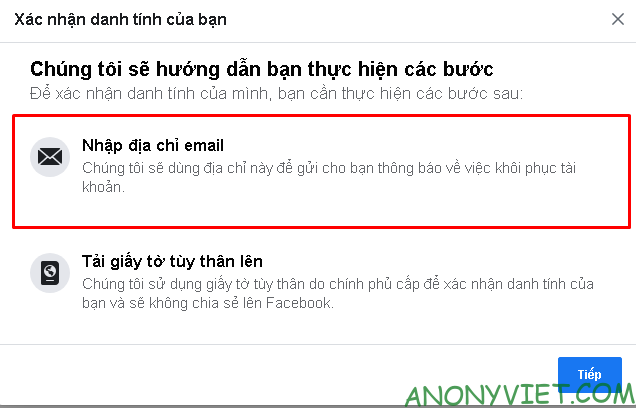
Select enter email address

Step 6: Select the Mail you want to send to
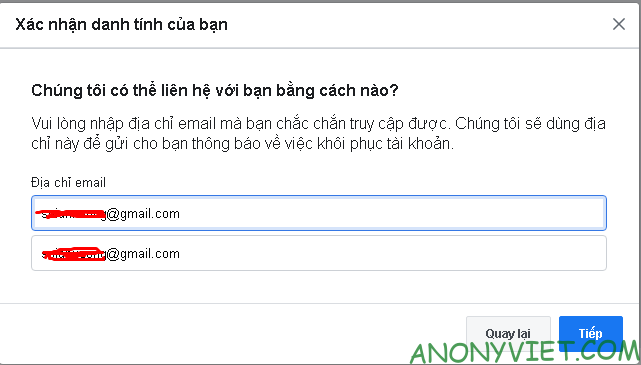
Select the email you want to send

Step 7: Wait for about 30-45 minutes, then it will ask for verification by identification, Everyone chooses the right type and then chooses to continue.
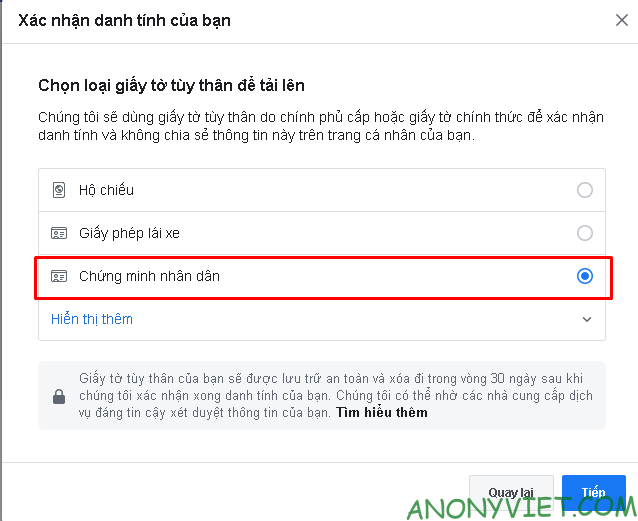
Select the type of identification document

Step 8: Everyone click on the blue + sign and upload your ID

Upload ID to Facebook

So I just finished the tutorial on how to break the latest 2-Factor Authentication for Facebook contributed by you Ngo Quoc Huy. If you have a good article, don’t hesitate to send an article contribution via email [email protected]we will edit and post it.

The article achieved: 5/5 – (100 votes)

Tags: 2FactorAuthenticationBypassFacebooklatest
Previous Post

Followers Gallery – Free Instagram Like and Follower app

Next Post

This is the Wallpaper that makes XIAOMI’s phone a brick

AnonyViet

AnonyViet

Related Posts

How to add sliders to Facebook Stories to easily rewind videos
Tips

How to add sliders to Facebook Stories to easily rewind videos

April 21, 2026
How to change the default font on Windows 10
Tips

How to change the default font on Windows 10

April 13, 2026
5 tips for using a Browser to replace an App (helps save RAM, time and money)
Tips

5 tips for using a Browser to replace an App (helps save RAM, time and money)

April 13, 2026
How to make funny MeMe photos without Photoshop within 10 seconds
Tips

How to make funny MeMe photos without Photoshop within 10 seconds

April 11, 2026
How to quickly design your own Logo without Photoshop
Tips

How to quickly design your own Logo without Photoshop

April 10, 2026
How to convert Website into App on Windows
Tips

How to convert Website into App on Windows

April 9, 2026
Next Post
This is the Wallpaper that makes XIAOMI’s phone a brick

This is the Wallpaper that makes XIAOMI's phone a brick

0 0 votes
Article Rating
Subscribe
Login
Notify of
guest

guest

0 Comments
Oldest
Newest Most Voted
Inline Feedbacks
View all comments

Recent News

How to turn off password suggestions on iPhone: Prevent Safari from auto-filling passwords

How to turn off password suggestions on iPhone: Prevent Safari from auto-filling passwords

April 27, 2026
Instructions for looking up prescriptions on VNeID instead of paper medical books

Instructions for looking up prescriptions on VNeID instead of paper medical books

April 26, 2026
Tips to completely turn off CAPTCHA codes on iPhone and Mac are super simple

Tips to completely turn off CAPTCHA codes on iPhone and Mac are super simple

April 25, 2026
Compare Poco X8 Pro and Poco X7 Pro: A new step for the “king” of mid-range performance

Compare Poco X8 Pro and Poco X7 Pro: A new step for the “king” of mid-range performance

April 24, 2026
How to turn off password suggestions on iPhone: Prevent Safari from auto-filling passwords

How to turn off password suggestions on iPhone: Prevent Safari from auto-filling passwords

April 27, 2026
Instructions for looking up prescriptions on VNeID instead of paper medical books

Instructions for looking up prescriptions on VNeID instead of paper medical books

April 26, 2026
Tips to completely turn off CAPTCHA codes on iPhone and Mac are super simple

Tips to completely turn off CAPTCHA codes on iPhone and Mac are super simple

April 25, 2026
AnonyViet - English Version

AnonyViet

AnonyViet is a website share knowledge that you have never learned in school!

We are ready to welcome your comments, as well as your articles sent to AnonyViet.

Follow Us

Contact:

Email: anonyviet.com[@]gmail.com

Main Website: https://anonyviet.com

Recent News

How to turn off password suggestions on iPhone: Prevent Safari from auto-filling passwords

How to turn off password suggestions on iPhone: Prevent Safari from auto-filling passwords

April 27, 2026
Instructions for looking up prescriptions on VNeID instead of paper medical books

Instructions for looking up prescriptions on VNeID instead of paper medical books

April 26, 2026
No Result
View All Result
  • Home
  • News
  • Software
  • Knowledge
  • MMO
  • Tips
  • Security
  • Network
  • Office

wpDiscuz
0
0
Would love your thoughts, please comment.x
()
x
| Reply