• Home
  • News
  • Software
  • Knowledge
  • MMO
  • Tips
  • Security
  • Network
  • Office
AnonyViet - English Version
  • Home
  • News
  • Software
  • Knowledge
  • MMO
  • Tips
  • Security
  • Network
  • Office
No Result
View All Result
  • Home
  • News
  • Software
  • Knowledge
  • MMO
  • Tips
  • Security
  • Network
  • Office
No Result
View All Result
AnonyViet - English Version
No Result
View All Result

The latest update of Windows 10 has a slow Wifi connection error

AnonyViet by AnonyViet
February 2, 2023
in Tips
0

As always, every time Windows 10 updates, there are always a few minor bugs. The problem this time comes from Bluetooth and Wifi errors, it seems that this update also slows down the system. But my experience is having a slow Wifi connection error, very frustrating.

Join the channel Telegram of the AnonyViet 👉 Link 👈

Details of slow Wifi connection error due to Windows 10 Update KB4549951

  • Some people have problems with the latest Windows 10 update, the patch KB4549951.
  • Some others failed to install the update and lost the Bluetooth and Wifi connection for others. Slow Wifi connection error appears in many laptops and wifi usb.
  • This issue seems to affect a small number of systems at this time.

However, the Windows 10 update is causing a few problems for everyone, although the problems seem to affect only a relatively small number of systems (via the latest update). Windows 10 KB4549951 fails to install on some systems and loses bluetooth and Wifi connections of others. In addition, they also found their system significantly slowed down since the update or had a blue screen error.

People with the error have posted to .’s forum Microsoft and Reddit to report this issue of the update. A Reddit user named “fellow_netizen” said:

“This update KB4549951 slows down data connections. Outlook 365 on Exchange takes a few minutes to load or hangs and the remote desktop speed is extremely slow. This update also caused VMware to hang. Everything went back to normal after uninstalling the update to delay it for 30 days.”

A user on the Microsoft reply forums express disappointment about this update. The important thing is that Windows 10 has more than 1 billion devices in use, so there are often bugs and issues on some of those devices. While the problems are not so common, they can annoy everyday users and system administrators have to deal with them.

Uninstall Windows 10 update KB4549951

If you want to remove update KB4549951 that causes slow wifi connection error, you can follow these steps:

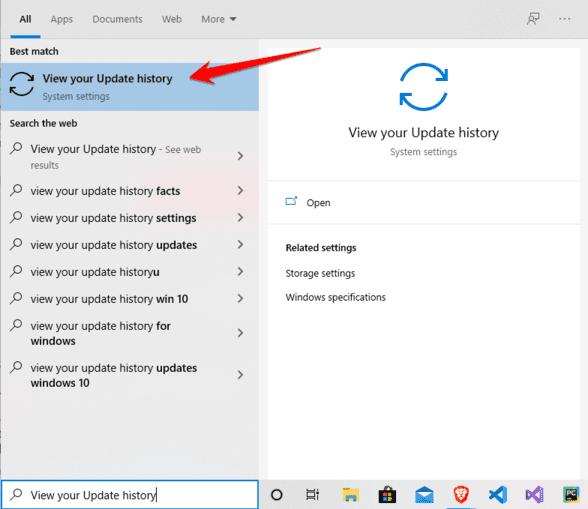
Go to Start Menu and search “View your Update history”.The latest update of Windows 10 has a slow Wifi connection error
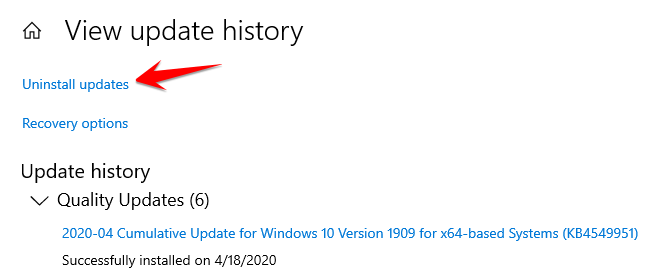
Next choose Uninstall Updates.fix slow wifi connection error

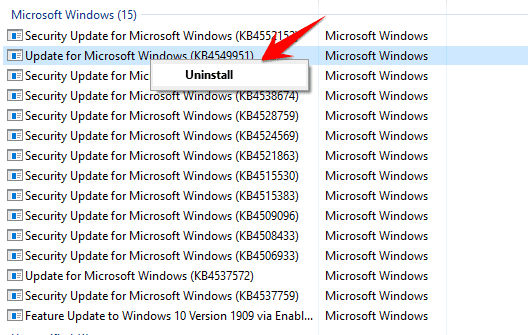
Right click on update KB4549951 and choose Uninstall.remove update KB4549951
After uninstalling the update. All you have to do is restart your computer and you’re done. So you will fix the slow Wifi connection error due to the recent Update of Windows 10.

If you want Block Update Windows 10 please follow the instructions of AnonyViet, but I do not recommend it because it will affect security.


The article achieved: 5/5 – (100 votes)

Tags: connectionerrorlatestslowUpdateWiFiWindows
Previous Post

Download AnyRecover 2.5 Full Key – Recover Deleted Data

Next Post

How to Crack App on iOS without Jailbreak

AnonyViet

AnonyViet

Related Posts

How to create a virtual Android phone with US IP for free forever
Tips

How to create a virtual Android phone with US IP for free forever

November 17, 2026
Instructions for buying a free .com domain name on Checkdomain
Tips

Instructions for buying a free .com domain name on Checkdomain

November 16, 2026
Test how well ChatGPT understands you with the box
Tips

Test how well ChatGPT understands you with the box

November 15, 2026
Grand Valley – Website to watch trains run, listen to relaxing lofi music
Tips

Grand Valley – Website to watch trains run, listen to relaxing lofi music

November 14, 2026
Instructions on how to turn off the blue dot on the MacBook screen
Tips

Instructions on how to turn off the blue dot on the MacBook screen

November 13, 2026
Instructions to follow the trend to fill the room with ChatGPT
Tips

Instructions to follow the trend to fill the room with ChatGPT

November 12, 2026
Next Post
How to Crack App on iOS without Jailbreak

How to Crack App on iOS without Jailbreak

0 0 votes
Article Rating
Subscribe
Login
Notify of
guest

guest

0 Comments
Oldest
Newest Most Voted

Recent News

How to create a virtual Android phone with US IP for free forever

How to create a virtual Android phone with US IP for free forever

November 17, 2026
Instructions for buying a free .com domain name on Checkdomain

Instructions for buying a free .com domain name on Checkdomain

November 16, 2026
Instructions on how to restore Word files that were accidentally turned off without being saved

Instructions on how to restore Word files that were accidentally turned off without being saved

November 16, 2026
Test how well ChatGPT understands you with the box

Test how well ChatGPT understands you with the box

November 15, 2026
How to create a virtual Android phone with US IP for free forever

How to create a virtual Android phone with US IP for free forever

November 17, 2026
Instructions for buying a free .com domain name on Checkdomain

Instructions for buying a free .com domain name on Checkdomain

November 16, 2026
Instructions on how to restore Word files that were accidentally turned off without being saved

Instructions on how to restore Word files that were accidentally turned off without being saved

November 16, 2026
AnonyViet - English Version

AnonyViet

AnonyViet is a website share knowledge that you have never learned in school!

We are ready to welcome your comments, as well as your articles sent to AnonyViet.

Follow Us

Contact:

Email: anonyviet.com[@]gmail.com

Main Website: https://anonyviet.com

Recent News

How to create a virtual Android phone with US IP for free forever

How to create a virtual Android phone with US IP for free forever

November 17, 2026
Instructions for buying a free .com domain name on Checkdomain

Instructions for buying a free .com domain name on Checkdomain

November 16, 2026
  • Home
  • Home 2
  • Home 3
  • Home 4
  • Home 5
  • Home 6
  • Next Dest Page
  • Sample Page

say88 tỷ lệ kèo nhà cái kèo nhà cái 5 febet

No Result
View All Result
  • Home
  • News
  • Software
  • Knowledge
  • MMO
  • Tips
  • Security
  • Network
  • Office

say88 tỷ lệ kèo nhà cái kèo nhà cái 5 febet

wpDiscuz
0
0
Would love your thoughts, please comment.x
()
x
| Reply