• Home
  • News
  • Software
  • Knowledge
  • MMO
  • Tips
  • Security
  • Network
  • Office
AnonyViet - English Version
  • Home
  • News
  • Software
  • Knowledge
  • MMO
  • Tips
  • Security
  • Network
  • Office
No Result
View All Result
  • Home
  • News
  • Software
  • Knowledge
  • MMO
  • Tips
  • Security
  • Network
  • Office
No Result
View All Result
AnonyViet - English Version
No Result
View All Result

Save image as type – Tool to select image format when saving

AnonyViet by AnonyViet
January 23, 2024
in Software
0

Have you ever wanted to save an image on the Internet as JPG or PNG, but it is only available as WebP. If you have ever encountered the above problem, then the extension “Save image as Type” will be the perfect solution for you. This is a useful utility that helps you quickly save any image without having to open an additional conversion website.

Join the channel Telegram belong to AnonyViet 👉 Link 👈

Instructions for installing and using the “Save image as type” extension

Step 1: Visit the Store Chrome Go online and search for the extension “Save image as type”. You can also access it directly this link to go to the extension's page.

Step 2: Click the “Download” button

Save image as type
Click the “Download” button

Step 3: Click “Add extension” to add an extension

Step 4: After installation is complete, you will see the extension's icon appear in the right corner of the address bar.

Step 5: To use the extension, simply right-click on the image you want to save and select “Save image as type” in the menu. You will then see a list of available formats to choose from. You can save images in the following formats: JPG, PNG, WebP.
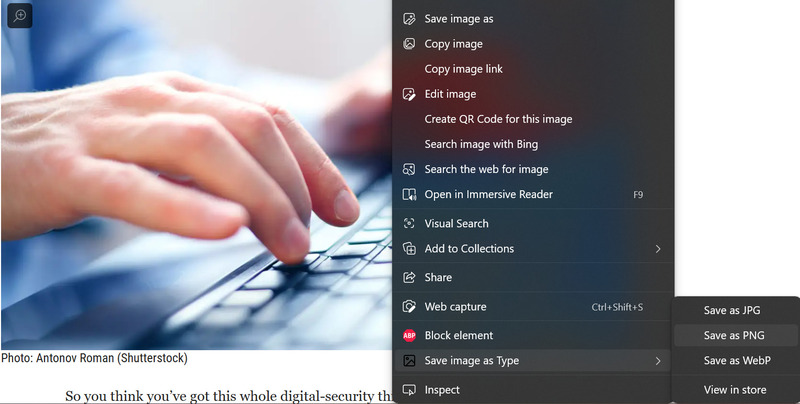
Save image as type
Right click on the image and select “Save image as type”

Benefits of Save image as type

Some benefits of Save image as type are:

  • Images can be saved in a format suitable for intended use

For example: JPG for images with many colors, PNG for images with transparent background, WebP for images with small capacity but high quality.

  • Compatibility issues can be avoided when sharing images with others.

For example, some websites or devices do not support displaying WebP images, so you may want to convert to JPG or PNG before sending.

  • Save memory space and bandwidth when loading and saving images

For example, you can reduce the size of a JPG image by reducing the quality, or you can convert to WebP to preserve the quality but reduce the size.

Epilogue

Hopefully this article will help you have a more convenient tool for saving images on the Internet. You can try using the extension “Save image as type” and share your opinion about it in the comments section. Good luck!


The article scored: 5/5 – (100 votes)

Tags: FormatimagesaveSavingselecttooltype
Previous Post

How to check iPhone battery with quick shortcuts

Next Post

The fastest way to find all saved images on your computer

AnonyViet

AnonyViet

Related Posts

Practical use of Xiaomi 17T Pro: This is a good phone in 2026
Software

Practical use of Xiaomi 17T Pro: This is a good phone in 2026

June 8, 2026
Instructions to receive 6 months of IObit Malware Fighter 13 Pro for free
Software

Instructions to receive 6 months of IObit Malware Fighter 13 Pro for free

June 7, 2026
Instructions on how to prevent acquaintances from seeing your Tiktok
Software

Instructions on how to prevent acquaintances from seeing your Tiktok

June 2, 2026
TruyenDrive: Turn Google Drive into a professional manga reader
Software

TruyenDrive: Turn Google Drive into a professional manga reader

May 31, 2026
How to extract text from photos using Zalo is super simple
Software

How to extract text from photos using Zalo is super simple

May 29, 2026
HONOR 600 in hand – High-end design, 200MP camera, not cheap price
Software

HONOR 600 in hand – High-end design, 200MP camera, not cheap price

May 28, 2026
Next Post
The fastest way to find all saved images on your computer

The fastest way to find all saved images on your computer

0 0 votes
Article Rating
Subscribe
Login
Notify of
guest

guest

0 Comments
Oldest
Newest Most Voted
Inline Feedbacks
View all comments

Recent News

Practical use of Xiaomi 17T Pro: This is a good phone in 2026

Practical use of Xiaomi 17T Pro: This is a good phone in 2026

June 8, 2026
Instructions to receive 6 months of IObit Malware Fighter 13 Pro for free

Instructions to receive 6 months of IObit Malware Fighter 13 Pro for free

June 7, 2026
How to use free online textbooks from grades 1 to 12

How to use free online textbooks from grades 1 to 12

June 6, 2026
How to convert HEIC photos to JPG on iPhone without using an app

How to convert HEIC photos to JPG on iPhone without using an app

June 5, 2026
Practical use of Xiaomi 17T Pro: This is a good phone in 2026

Practical use of Xiaomi 17T Pro: This is a good phone in 2026

June 8, 2026
Instructions to receive 6 months of IObit Malware Fighter 13 Pro for free

Instructions to receive 6 months of IObit Malware Fighter 13 Pro for free

June 7, 2026
How to use free online textbooks from grades 1 to 12

How to use free online textbooks from grades 1 to 12

June 6, 2026
AnonyViet - English Version

AnonyViet

AnonyViet is a website share knowledge that you have never learned in school!

We are ready to welcome your comments, as well as your articles sent to AnonyViet.

Follow Us

Contact:

Email: anonyviet.com[@]gmail.com

Main Website: https://anonyviet.com

Recent News

Practical use of Xiaomi 17T Pro: This is a good phone in 2026

Practical use of Xiaomi 17T Pro: This is a good phone in 2026

June 8, 2026
Instructions to receive 6 months of IObit Malware Fighter 13 Pro for free

Instructions to receive 6 months of IObit Malware Fighter 13 Pro for free

June 7, 2026
  • Home
  • Home 2
  • Home 3
  • Home 4
  • Home 5
  • Home 6
  • Next Dest Page
  • Sample Page

6789 kv999

No Result
View All Result
  • Home
  • News
  • Software
  • Knowledge
  • MMO
  • Tips
  • Security
  • Network
  • Office

6789 kv999

wpDiscuz
0
0
Would love your thoughts, please comment.x
()
x
| Reply