• Home
  • News
  • Software
  • Knowledge
  • MMO
  • Tips
  • Security
  • Network
  • Office
AnonyViet - English Version
  • Home
  • News
  • Software
  • Knowledge
  • MMO
  • Tips
  • Security
  • Network
  • Office
No Result
View All Result
  • Home
  • News
  • Software
  • Knowledge
  • MMO
  • Tips
  • Security
  • Network
  • Office
No Result
View All Result
AnonyViet - English Version
No Result
View All Result

Record screen on Windows 10 without software installation

AnonyViet by AnonyViet
January 30, 2023
in Tips
0

Windows 10 can capture or record the screen without any third party software. We will learn more about the features and usage of the Capture utility on Windows 10 in this article.

Join the channel Telegram of the AnonyViet 👉 Link 👈

Record screen on Windows 10 without software installation

Game Bar is not just for games

Windows 10’s screen capture tool is part of the Xbox Game Bar feature. Regardless of its name, Game Bar Not just for gaming. In this article, I will use it to capture/record the screen.

This tool will record your screen in H.264 MP4 format.

Screen recording is part of the “Capture” widget, accessed through the Game Bar’s “Widget Menu”. To use the Widget menu, you will need to update Windows 10 from May 2019 or later.

How to enable Screen Capture feature on Windows 10

First, press Windows + WOOD to launch the Game Bar. Alternatively, you can open the Start menu and launch the “Xbox Game Bar” app.

(If the Game Bar doesn’t appear, go to Settings > Gaming > Xbox Game Bar. Make sure the T Game Bar is set to “On.” You can also change the shortcut that opens “Open Game Bar” to any combination. whichever key you prefer instead of Windows + G.)
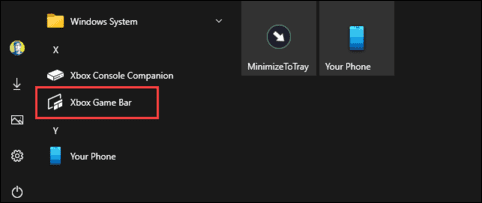
Xbox Game Bar

In the Game Bar, look for the “Capture” feature.

If you don’t see it, click the Widget menu icon on the left.
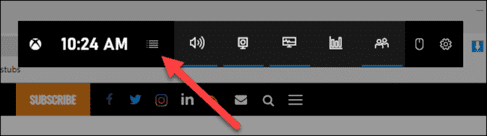
Widget menu

A drop-down list will appear, click “Capture”. The “Capture” shortcut may also be located in the Game Bar toolbar.
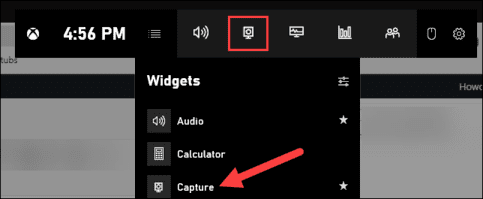
Capture game bar windows 10

How to record screen with Game Bar

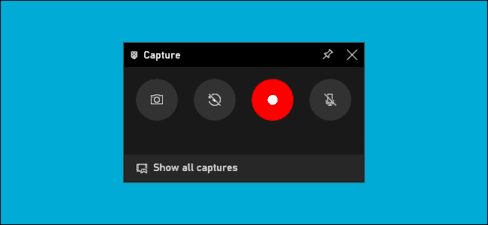
In the “Capture” window, there will be four feature buttons from left to right:

  • Screenshots: Capture the active window.
  • Record last 30 seconds: Start recording the screen after 30 seconds.
  • Start recording: Record the screen in the active window.
  • Turn on mic while recording: If this option is enabled, Windows 10 will capture the sound from your computer’s microphone and feed it into the video.
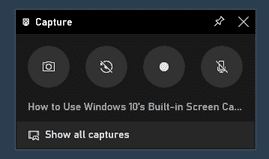
How to record screen with Game Bar

You will see text below the buttons. This is how you will know which window is active, aka what will be returned. For example, if you are browsing the web, it will display the titles of open tabs.
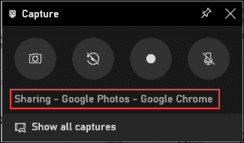
record titles of open tabs

To start recording your screen, you must first decide if you want to use the microphone, which is useful if you’re trying to explain something on the screen.
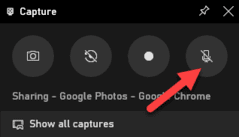
microphone

Then press the . button Start Recording.
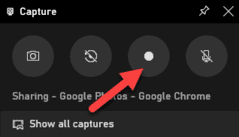
Start Recording

Screen recording will begin and you will see a small toolbar appear in the corner of the screen. It will show the video recording time and buttons to stop recording and switch the microphone.
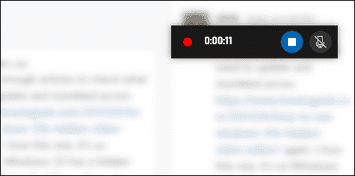
microphone switch

When you’re done, click the Stop icon to end the video recording.
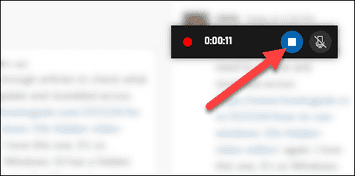
Stop

From the Capture utility, click “Show All Captures” to see your screen recording.
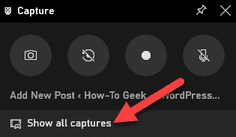
Show All Captures

Your video recording will be at the top of the list. Click the folder icon to see all the logs and screenshots in File Explorer.

These recordings are stored by default in your Windows user folder at C:\Users\User-name\Videos\Captures.
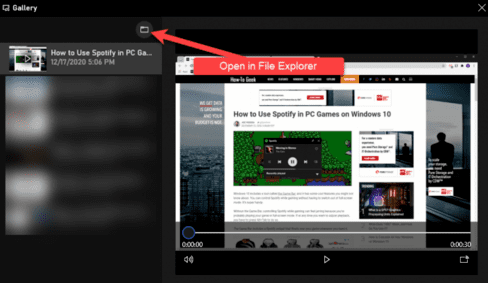
video save location

By the way, you can also start screen recording by pressing Windows + Alt + R. Go to Settings > Gaming > Xbox Game Bar to customize these shortcuts.
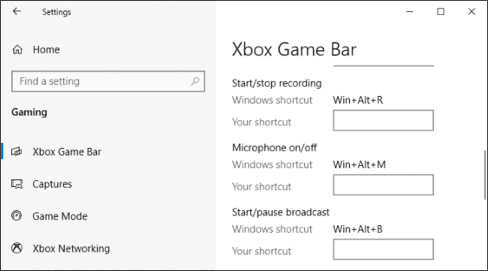
Record screen on Windows 10 without installing software 4

Above is the simplest and easiest way to record screen for Windows 10 without installing additional software.


The article achieved: 5/5 – (100 votes)

Tags: installationrecordscreensoftwareWindows
Previous Post

Revenge-RAT v3 infiltrates the computer terribly 2018

Next Post

Download TFT Teamfight Tactics – Truth Arena Mobile

AnonyViet

AnonyViet

Related Posts

How to see your email account creation date
Tips

How to see your email account creation date

November 11, 2025
Microsoft’s ranking of the 10 best Windows versions
Tips

Microsoft’s ranking of the 10 best Windows versions

November 11, 2025
Recover deleted data on Windows 10 with Windows File Recovery
Tips

Recover deleted data on Windows 10 with Windows File Recovery

November 10, 2025
Tips

Why hasn’t your computer been updated to Windows 10 2004?

November 9, 2025
3 OCR Tools Extract Text from Images without Retyping
Tips

3 OCR Tools Extract Text from Images without Retyping

November 8, 2025
Ways hackers use to hack your Facebook and how to fix it
Tips

Ways hackers use to hack your Facebook and how to fix it

November 7, 2025
Next Post
Download TFT Teamfight Tactics – Truth Arena Mobile

Download TFT Teamfight Tactics - Truth Arena Mobile

0 0 votes
Article Rating
Subscribe
Login
Notify of
guest

guest

0 Comments
Oldest
Newest Most Voted
Inline Feedbacks
View all comments

Recent News

How to install Anh Hai’s Pho Shop on MacBook is super easy

How to install Anh Hai’s Pho Shop on MacBook is super easy

November 11, 2025
How to turn off ads on Yoosee app in just 1 minute

How to turn off ads on Yoosee app in just 1 minute

November 11, 2025
Windows 11 and MS Office 2021 lifetime license, genuine from  during Keysoff’s 11.11 sale

Windows 11 and MS Office 2021 lifetime license, genuine from $14 during Keysoff’s 11.11 sale

November 11, 2025
How to see your email account creation date

How to see your email account creation date

November 11, 2025
How to install Anh Hai’s Pho Shop on MacBook is super easy

How to install Anh Hai’s Pho Shop on MacBook is super easy

November 11, 2025
How to turn off ads on Yoosee app in just 1 minute

How to turn off ads on Yoosee app in just 1 minute

November 11, 2025
Windows 11 and MS Office 2021 lifetime license, genuine from  during Keysoff’s 11.11 sale

Windows 11 and MS Office 2021 lifetime license, genuine from $14 during Keysoff’s 11.11 sale

November 11, 2025
AnonyViet - English Version

AnonyViet

AnonyViet is a website share knowledge that you have never learned in school!

We are ready to welcome your comments, as well as your articles sent to AnonyViet.

Follow Us

Contact:

Email: anonyviet.com[@]gmail.com

Main Website: https://anonyviet.com

Recent News

How to install Anh Hai’s Pho Shop on MacBook is super easy

How to install Anh Hai’s Pho Shop on MacBook is super easy

November 11, 2025
How to turn off ads on Yoosee app in just 1 minute

How to turn off ads on Yoosee app in just 1 minute

November 11, 2025
  • Home
  • Home 2
  • Home 3
  • Home 4
  • Home 5
  • Home 6
  • Next Dest Page
  • Sample Page

new88 trang chủ shbet trang chủ f168 trang chủ qq88 nhà cái 78win

No Result
View All Result
  • Home
  • News
  • Software
  • Knowledge
  • MMO
  • Tips
  • Security
  • Network
  • Office

new88 trang chủ shbet trang chủ f168 trang chủ qq88 nhà cái 78win

wpDiscuz
0
0
Would love your thoughts, please comment.x
()
x
| Reply