PDF editing application on Android Professionalism is always a necessary tool for daily work and study. Normally, you will have to pay a small fee to own premium features without ads. However, a great opportunity is coming when the PRO version of this software is open for download completely free on Google Play.
📢 Join the channel Telegram belong to AnonyViet
Update new articles, cool tools and IT tips fastest
A solution for handling PDF files on phones
Mobile phones today do not simply serve entertainment and communication needs but have become a true working tool. Among popular document formats, PDF is always the most used format thanks to its stability and uniform display on all devices.
However, reading and processing these files on the phone screen sometimes faces many difficulties due to the lack of specialized tools. To completely solve that problem, we often need to look for a powerful and flexible PDF editing application on Android.
Application PDF Reader & Editor (PRO) was born as a life-saving solution to help you turn your compact smartphone into a miniature mobile office, handling all records and papers in just a few touches.

Why should you choose this PDF editing application on Android?
The biggest difference of PDF Reader & Editor (PRO) compared to competitors on the market is the smoothness and synchronization feature. Immediately after successful installation, the application will automatically activate smart scanning mode of the entire device memory. All PDF files scattered in download folders, Zalo, Messenger or Email are gathered into a centralized management interface. You no longer have to waste time tirelessly searching for each file manually.
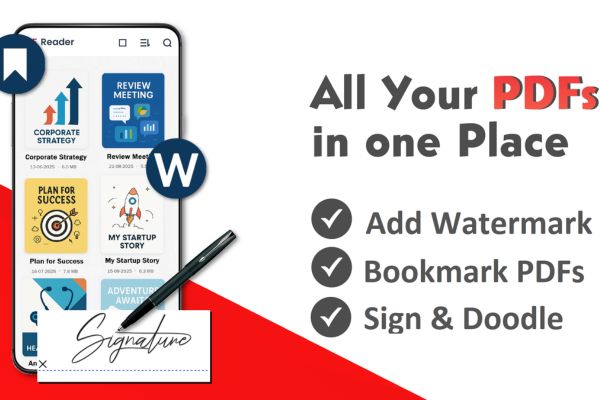
Besides, when using the above PDF editing application Android With this, you can easily take notes, highlight important lines of text or insert illustrations directly into the page. The built-in electronic signing feature is also a huge plus, helping you sign contracts and legal documents right on the go without having to print them on physical paper.
These extra features are extremely valuable for the job
Not only stopping at basic editing tasks, this is also a PDF editing application on Android that integrates very good system optimization tools. Smart file compression feature helps you significantly reduce the size of heavy document files, thereby easily sharing via chat or email platforms without worrying about exceeding the allowed capacity limit.
The issue of information security is also given special attention by the developer. You can set up password encryption for files containing sensitive data before sending them to partners. In addition, the watermark insertion feature will be a great assistant to help you mark intellectual property ownership, avoiding documents from being easily copied illegally.
Instructions for downloading PDF Reader & Editor (PRO)
The PRO version license-free program is currently live on the Google Play store but may end at any time at the discretion of the developer. You just need to follow these steps:
Step 1: Open the Google Play store application (CH Play) on your Android phone.
Step 2: Enter the exact application name “PDF Reader & Editor (PRO)” into the search bar at the top corner of the screen, or you can quickly access HERE.
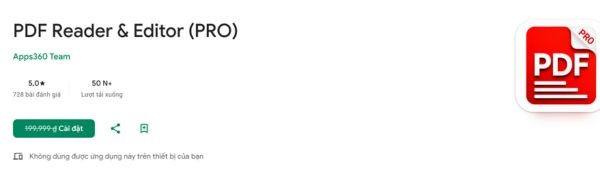
Step 3: Choose the correct app icon from a reputable developer and click the “Install” button (at this time the price 199,000 VND has been crossed out and replaced with a free download button).
Step 4: Wait for the system to download and automatically install in a few seconds, then open the application and you will permanently own the PRO version with all the most advanced features.
Conclusion
Own PDF editing application on Android The PRO version helps you save a significant amount of money while still having professional working tools. You will no longer have difficulty signing a contract or editing documents urgently while on the go. Download and enjoy premium amenities today.
Frequently Asked Questions (Q&A)
1. After downloading for free during this period, will I be charged again when the promotion expires?
Are not. Once you have successfully downloaded it during the promotion period for 0 VND, your Google account will record permanent ownership of this PRO version without incurring any additional costs afterward.
2. Does this application support converting PDF files to Word or Excel format?
Have. The PRO version integrates basic conversion support tools, helping you easily extract text content into popular office document formats quickly.
3. Does the application take up a lot of phone memory?
Are not. This is a well-optimized application in terms of installation capacity, operating very gently and smoothly even on mid-range or low-cost Android phones.