• Home
  • News
  • Software
  • Knowledge
  • MMO
  • Tips
  • Security
  • Network
  • Office
AnonyViet - English Version
  • Home
  • News
  • Software
  • Knowledge
  • MMO
  • Tips
  • Security
  • Network
  • Office
No Result
View All Result
  • Home
  • News
  • Software
  • Knowledge
  • MMO
  • Tips
  • Security
  • Network
  • Office
No Result
View All Result
AnonyViet - English Version
No Result
View All Result

Nanabox: Share self -delete files when someone has downloaded the file

AnonyViet by AnonyViet
February 20, 2025
in Tips
0

You are looking to share an important file with colleagues and relatives but do not want to use complex cloud storage platforms? You want a quick, easy to use and safe solution? Nanabox It is the answer for you! This application helps you share files simply and effectively, right on your computer without registering any account.

Join the channel Telegram belong to Anonyviet 👉 Link 👈

What is Nanabox? How to work?

Nanabox is a gentle, free and open source application for Windows. Simple, intuitive and extremely powerful, it eliminates the complexity of online storage services, allowing you to share files quickly and easily. You do not need to open the browser, do not need to create an account, just open the Nanabbox, select the file and immediately have a shared link.
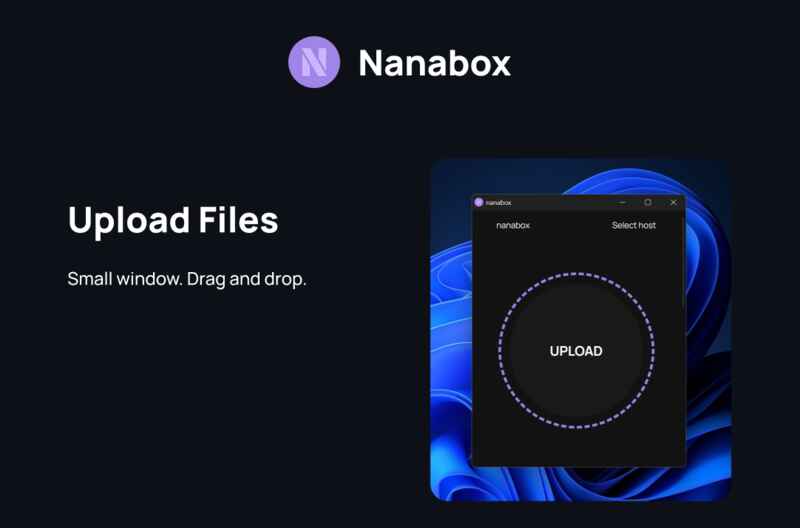
What is Nanabox? How to work?

Nanabox takes advantage of the file storage platform File.io To temporarily store your file. You can upload the file with a capacity of up to 2GB each time and the total capacity of up to 4GB per hour, meeting most of the usual sharing needs. After downloading, the file will automatically be deleted, ensuring privacy and safety for your data.

The mechanism of downloading only one time ensures that the sharing link will expire after being used, so you will not need to worry about the old files still on the internet.

See also: How to share large files with dashdrop

Nanabbox user manual

Step 1: Download Nanaboxi by link HERE
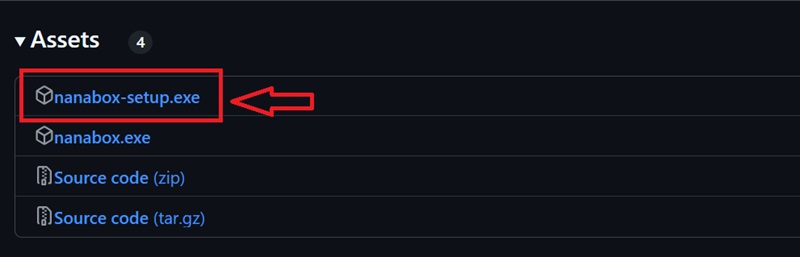
Download nanabox
Download nanabox

Step 2: Select the file you want to share. Nanabox will immediately create a download link.
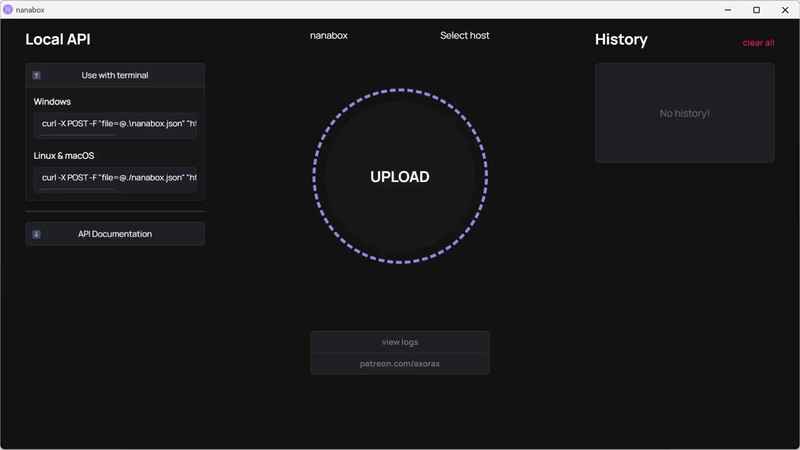
Select the file you want to share

Step 3: Share this link via email, message or social networking platforms. All operations are so simple.
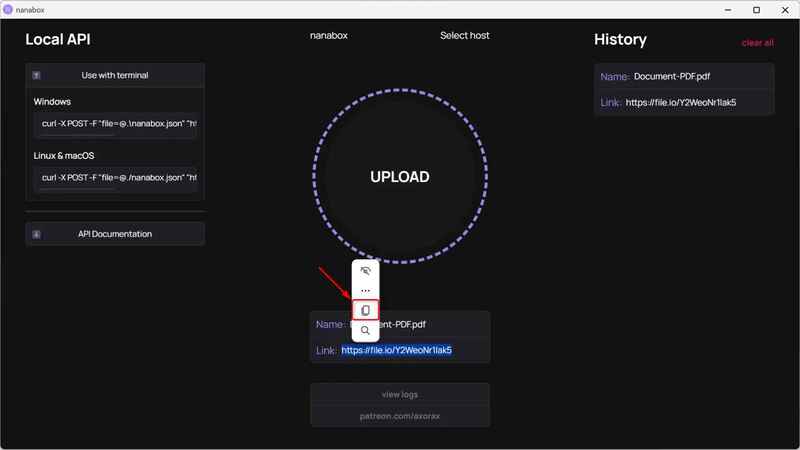
Share this link with others

The main features of Nanabbox

Nanabox not only helps to share files easily but also comes with many useful features to optimize the user experience:

  • No account: No registration requirements, time -saving.
  • File history storage: The application saves the history of all the files that you have shared, very convenient to find the link shared.
  • Drag and drop: You only need to drag the file into the interface of the application to upload.
  • Selecting service providers: You can set up other storage providers if you find the service more suitable, as long as they support compatible API.
  • Local API: Nanabox provides a local API for developers who want to integrate this feature into their own applications.

Note to remember

When sharing online files, you should pay attention to some security measures. Because Nanabox uses third -party services like file.io to store files, your files will follow the terms of use of these platforms.

Although the file.io is advertised as safe, I still recommend that you compress your sensitive files into a zip file with a password before sharing. Thus, even if someone has links, they cannot open the file without passwords. If you want to be more secure, you can also encrypt the file with specialized tools like Encrypto or Veracrypt.

Finally, note that Nanabbox depends on the operation of third -party storage services that it uses. If these services have problems, the application will be affected.

See also: How to share files between Android/iOS and computer No software

Conclusion

Nanabox is a simple, convenient and effective file sharing solution, helping you send files quickly without going to the browser or having to create an account. This is the ideal choice for those who want to save time and do not want to worry with the complex procedures of online storage platforms.


Tags: deletedownloadedfilefilesNanaboxShare
Previous Post

What is the new iPhone 16E? Configuration iPhone 16E has just launched 2025

Next Post

Create your own Google Ads coupon to run Google Adwords for free

AnonyViet

AnonyViet

Related Posts

7 other features of USB you may not know
Tips

7 other features of USB you may not know

February 14, 2026
Instructions for creating a photo holding a QR code to receive super cute lucky money for Tet
Tips

Instructions for creating a photo holding a QR code to receive super cute lucky money for Tet

February 14, 2026
How to overclock RAM – Overlock RAM helps speed up faster
Tips

How to overclock RAM – Overlock RAM helps speed up faster

February 13, 2026
Suggestions on how to name a good Facebook name – unique and impressive
Tips

Suggestions on how to name a good Facebook name – unique and impressive

February 13, 2026
Increase Laptop PIN usage time using Eco Mode on Windows 10
Tips

Increase Laptop PIN usage time using Eco Mode on Windows 10

February 12, 2026
How to create beautiful Tet photos with AI like professional studio photos
Tips

How to create beautiful Tet photos with AI like professional studio photos

February 12, 2026
Next Post
Create your own Google Ads coupon to run Google Adwords for free

Create your own Google Ads coupon to run Google Adwords for free

0 0 votes
Article Rating
Subscribe
Login
Notify of
guest

guest

0 Comments
Oldest
Newest Most Voted
Inline Feedbacks
View all comments

Recent News

7 other features of USB you may not know

7 other features of USB you may not know

February 14, 2026
Instructions for creating a photo holding a QR code to receive super cute lucky money for Tet

Instructions for creating a photo holding a QR code to receive super cute lucky money for Tet

February 14, 2026
How to see the package Viettel is using to avoid losing money unfairly

How to see the package Viettel is using to avoid losing money unfairly

February 14, 2026
How to overclock RAM – Overlock RAM helps speed up faster

How to overclock RAM – Overlock RAM helps speed up faster

February 13, 2026
7 other features of USB you may not know

7 other features of USB you may not know

February 14, 2026
Instructions for creating a photo holding a QR code to receive super cute lucky money for Tet

Instructions for creating a photo holding a QR code to receive super cute lucky money for Tet

February 14, 2026
How to see the package Viettel is using to avoid losing money unfairly

How to see the package Viettel is using to avoid losing money unfairly

February 14, 2026
AnonyViet - English Version

AnonyViet

AnonyViet is a website share knowledge that you have never learned in school!

We are ready to welcome your comments, as well as your articles sent to AnonyViet.

Follow Us

Contact:

Email: anonyviet.com[@]gmail.com

Main Website: https://anonyviet.com

Recent News

7 other features of USB you may not know

7 other features of USB you may not know

February 14, 2026
Instructions for creating a photo holding a QR code to receive super cute lucky money for Tet

Instructions for creating a photo holding a QR code to receive super cute lucky money for Tet

February 14, 2026
  • Home
  • Home 2
  • Home 3
  • Home 4
  • Home 5
  • Home 6
  • Next Dest Page
  • Sample Page

https://sun52.network

No Result
View All Result
  • Home
  • News
  • Software
  • Knowledge
  • MMO
  • Tips
  • Security
  • Network
  • Office

https://sun52.network

wpDiscuz
0
0
Would love your thoughts, please comment.x
()
x
| Reply