• Home
  • News
  • Software
  • Knowledge
  • MMO
  • Tips
  • Security
  • Network
  • Office
AnonyViet - English Version
  • Home
  • News
  • Software
  • Knowledge
  • MMO
  • Tips
  • Security
  • Network
  • Office
No Result
View All Result
  • Home
  • News
  • Software
  • Knowledge
  • MMO
  • Tips
  • Security
  • Network
  • Office
No Result
View All Result
AnonyViet - English Version
No Result
View All Result

Lesson 203: Count by OR condition in Excel

AnonyViet by AnonyViet
January 25, 2023
in Office
0

Count by condition in Excel can be complicated. But I will guide you in this article.

Join the channel Telegram of the AnonyViet 👉 Link 👈

Count by OR condition in Excel

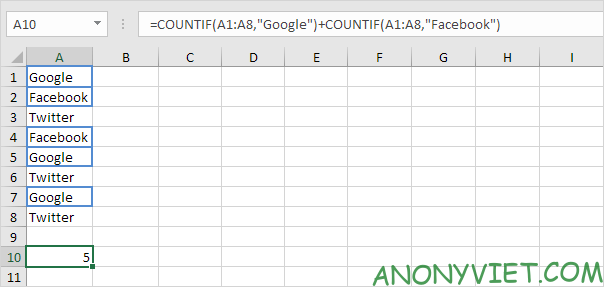
1. For example, we want to count the number of cells containing Google or Facebook (one column).
Lesson 203: Count by OR condition in Excel

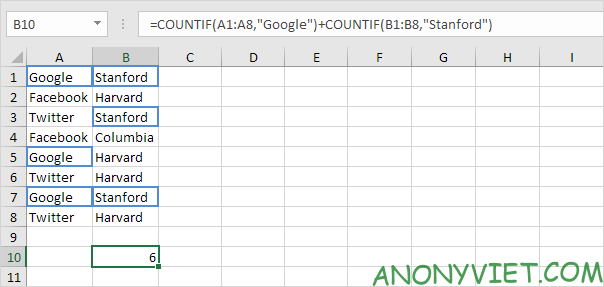
2 a. However, if we want to count the number of rows that contain Google or Stanford (two columns), we cannot simply use the COUNTIF function twice (see image below). Rows containing Google and Stanford are counted twice, but we want to count once and return 4.
Lesson 203: Count by OR condition in Excel 10

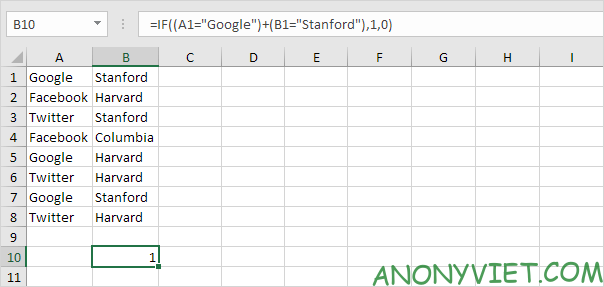
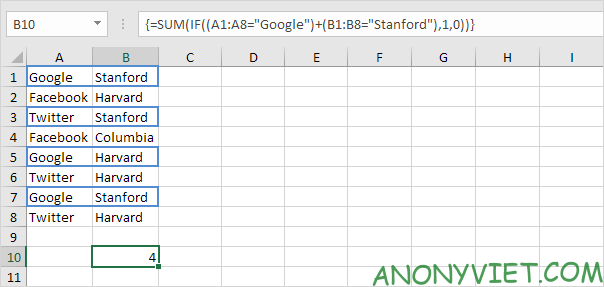
2b. What we need is an array formula. We use the IF function to check if Google or Stanford has a problem.
Lesson 203: Count by OR condition in Excel 11

Explanation: TRUE = 1, FALSE = 0. For row 1, the IF function gives the values ​​IF (TRUE + TRUE, 1.0), IF (2,1,0), 1. So the first row will be counted. For row 2, the IF function becomes IF (FALSE + FALSE, 1.0), IF (0,1,0), 0. So the second row will not be counted. For row 3, the IF function becomes IF (FALSE + TRUE, 1.0), IF (1,1,0), 1. So the third row will be calculated,…

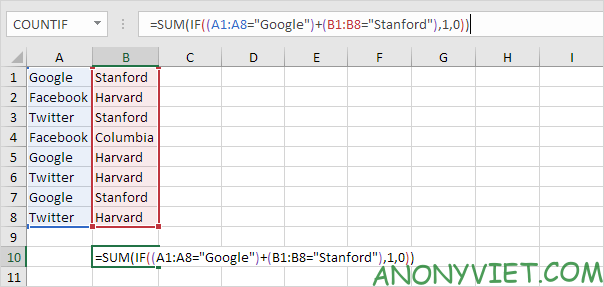
2 C. All we need is a SUM function that counts these 1s. I will add the SUM function and replace A1 with A1:A8 and B1 with B1:B8.
Lesson 203: Count by OR condition in Excel 12

2d. Finish by pressing CTRL + SHIFT + ENTER.
Lesson 203: Count by OR condition in Excel 13

Note: The formula bar indicates this is an array formula by enclosing it in curly braces {}. Don’t type these yourself. They will disappear when you edit the formula.

Explanation: The range (array constant) created by the IF function is stored in Excel’s memory, not in a range. The array constant looks like this:

{1;0;1;0;1;0;1;0}

This array constant is used as a parameter to the SUM function, which returns 4.

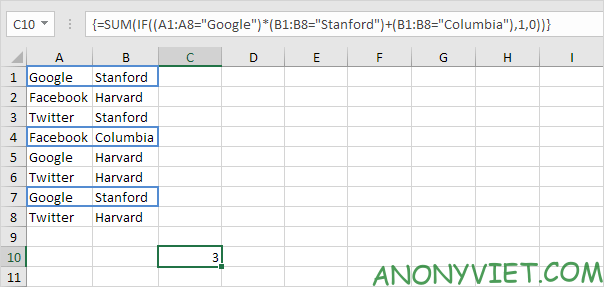
3. One more example: I want to count the number of rows that contain (Google and Stanford) or Columbia.
Lesson 203: Count by OR condition in Excel 14

In addition, you can also view many other excel articles here.

The article achieved: 5/5 – (100 votes)

Tags: conditioncountExcelLesson
Previous Post

Should I use a Phone Case?

Next Post

How to Use Alarm Clock in Windows 10

AnonyViet

AnonyViet

Related Posts

How to add Watermark to Google Docs to protect copyright
Office

How to add Watermark to Google Docs to protect copyright

April 19, 2026
Instructions on how to hide formulas in Excel to secure data
Office

Instructions on how to hide formulas in Excel to secure data

February 6, 2026
Top who creates the most beautiful presentation slide today
Office

Top who creates the most beautiful presentation slide today

September 23, 2025
Automatically check and correct spelling errors on Google Docs
Office

Automatically check and correct spelling errors on Google Docs

February 23, 2025
Instructions for downloading Google Docs files easily on any device
Office

Instructions for downloading Google Docs files easily on any device

December 18, 2024
Launching AI image creation feature on Google Docs
Office

Launching AI image creation feature on Google Docs

November 20, 2024
Next Post
How to Use Alarm Clock in Windows 10

How to Use Alarm Clock in Windows 10

0 0 votes
Article Rating
Subscribe
Login
Notify of
guest

guest

0 Comments
Oldest
Newest Most Voted
Inline Feedbacks
View all comments

Recent News

How to add Watermark to Google Docs to protect copyright

How to add Watermark to Google Docs to protect copyright

April 19, 2026
How to intercept traffic using Burp Suite to analyze HTTP/HTTPS

How to intercept traffic using Burp Suite to analyze HTTP/HTTPS

April 18, 2026
How to avoid Adblock detection on Youtube with 4 good tips

How to avoid Adblock detection on Youtube with 4 good tips

April 17, 2026
How to transfer ChatGPT data to Claude is extremely simple

How to transfer ChatGPT data to Claude is extremely simple

April 16, 2026
How to add Watermark to Google Docs to protect copyright

How to add Watermark to Google Docs to protect copyright

April 19, 2026
How to intercept traffic using Burp Suite to analyze HTTP/HTTPS

How to intercept traffic using Burp Suite to analyze HTTP/HTTPS

April 18, 2026
How to avoid Adblock detection on Youtube with 4 good tips

How to avoid Adblock detection on Youtube with 4 good tips

April 17, 2026
AnonyViet - English Version

AnonyViet

AnonyViet is a website share knowledge that you have never learned in school!

We are ready to welcome your comments, as well as your articles sent to AnonyViet.

Follow Us

Contact:

Email: anonyviet.com[@]gmail.com

Main Website: https://anonyviet.com

Recent News

How to add Watermark to Google Docs to protect copyright

How to add Watermark to Google Docs to protect copyright

April 19, 2026
How to intercept traffic using Burp Suite to analyze HTTP/HTTPS

How to intercept traffic using Burp Suite to analyze HTTP/HTTPS

April 18, 2026
No Result
View All Result
  • Home
  • News
  • Software
  • Knowledge
  • MMO
  • Tips
  • Security
  • Network
  • Office

wpDiscuz
0
0
Would love your thoughts, please comment.x
()
x
| Reply