• Home
  • News
  • Software
  • Knowledge
  • MMO
  • Tips
  • Security
  • Network
  • Office
AnonyViet - English Version
  • Home
  • News
  • Software
  • Knowledge
  • MMO
  • Tips
  • Security
  • Network
  • Office
No Result
View All Result
  • Home
  • News
  • Software
  • Knowledge
  • MMO
  • Tips
  • Security
  • Network
  • Office
No Result
View All Result
AnonyViet - English Version
No Result
View All Result

Instructions to receive ChatGPT Plus for free for 1 month with 100% success

AnonyViet by AnonyViet
December 19, 2025
in Knowledge
0

Get ChatGPT Plus 1 month free is a great opportunity for users to experience the maximum power of artificial intelligence without any cost. With this upgrade package, you will have access to advanced AI models, fast response speed and a series of exclusive features from OpenAI.

Join the channel Telegram belong to AnonyViet 👉 Link 👈

Benefits when upgrading to a ChatGPT Plus account

ChatGPT Plus is a premium version designed specifically for users with high needs in learning, programming, creating content or handling complex work. Unlike the free version, the Plus package provides access to more powerful models, ensures stability even during peak hours, and always has priority to experience the latest newly released features.

Currently, OpenAI is implementing a trial program in some specific countries such as Japan. The good news is that users in Vietnam can fully take advantage of this opportunity through a few small tricks.
Benefits when upgrading to a ChatGPT Plus account

How to receive ChatGPT Plus for free for 1 month worth 522,500 VND

Below is the detailed process you need to follow for successful activation:

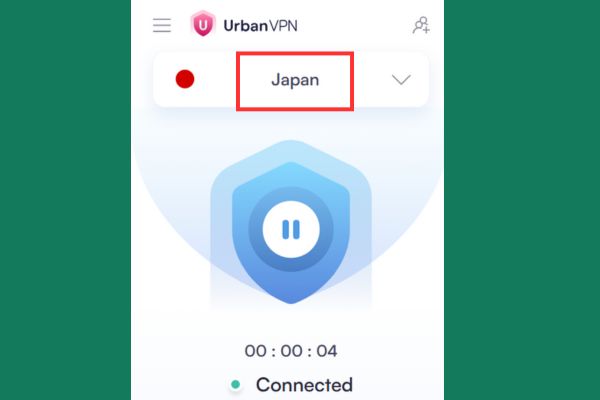
Step 1: Connect VPN to a valid area

Users need to open the VPN app and select the server at Japan (Japan) or South Korea (Korea). Ensuring that the VPN has successfully connected before opening the browser is key for the system to correctly recognize the promotion zone.
How to receive ChatGPT Plus for free for 1 month worth 522,500 VND

Step 2: Access and log in to your account

Use your computer’s web browser (such as Chrome, Edge, or Firefox) to visit the home page ChatGPT. Proceed to log in to your account Never signed up for Plus before.

Step 3: Choose to upgrade service package

At the main interface, look to the left corner of the screen and click on the avatar, then select “Upgrade” or “Upgrade“. A menu of service packages will appear.

Step 4: Check the offer display

If the VPN is working properly, the system will display the Plus plan with a price of $0 for the first month (with the words “Free trial 1 month”). On the contrary, if you still see the price displayed in Vietnam (about 522,500 VND), turn off the browser, check the VPN again and try again with an incognito tab.

Step 5: Set up payment information

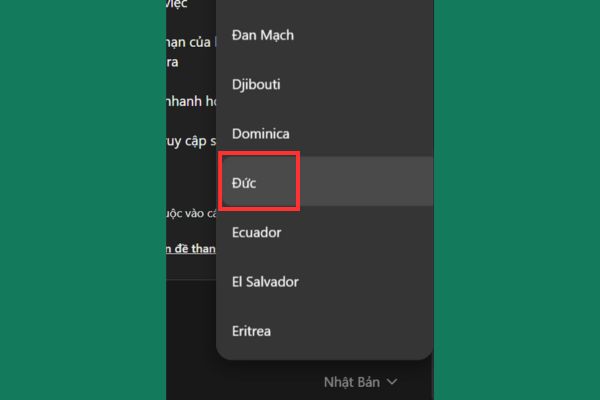
This is the most important step. In the payment country selection section, scroll down and select “Virtue“.
Select "Virtue"
Select “Germany”

This is to enable the payment via option PayPalmaking the process safer and easier. Then click “Redeem offers for free“.
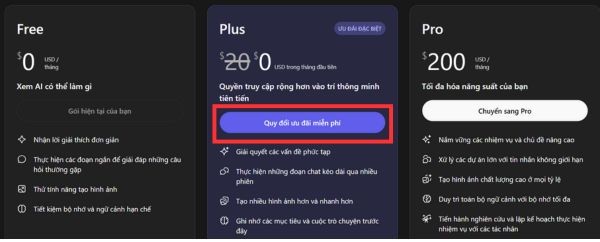
Select "Redeem offers for free"
Select “Redeem free offer”

Step 6: Complete registration

Select payment method as PayPal and fill in the necessary information. In the Postal code section (Zip code), you can fill in: 299-2100.
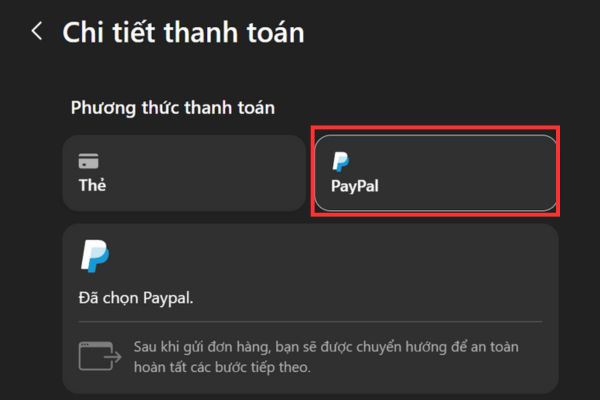
Select payment method as PayPal

Information about provinces and cities can be filled in randomly. Finally, press “Subscribe to Plus” to complete.
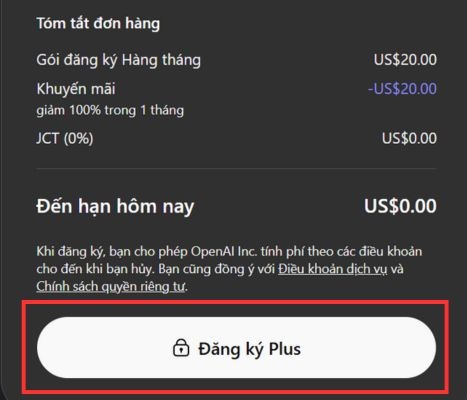
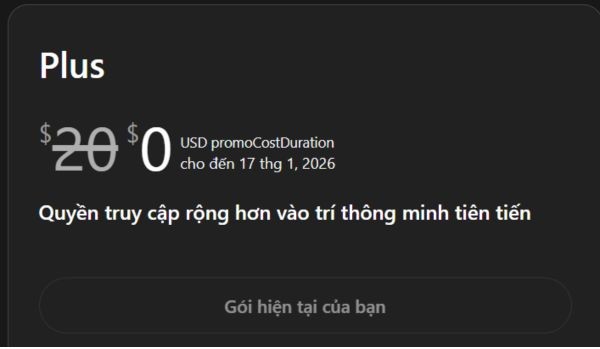
Press "Subscribe to Plus"
Click “Register Plus”
Instructions for successfully receiving ChatGPT Plus for 1 month for free

Important note

Although this is a free trial program, the system still requires payment method linking to authenticate real users. You will no deduction during the first month of experience.

However, after the 1-month trial ends, ChatGPT Plus will automatically renew and charge at the listed price. If there is no need to continue paid use, users need to proactively cancel the package before the expiration date.

Cancellation is very simple: Go to Settings -> Account -> Select Manage and press Cancel your subscription. This ensures you fully enjoy the offer without incurring unexpected costs.
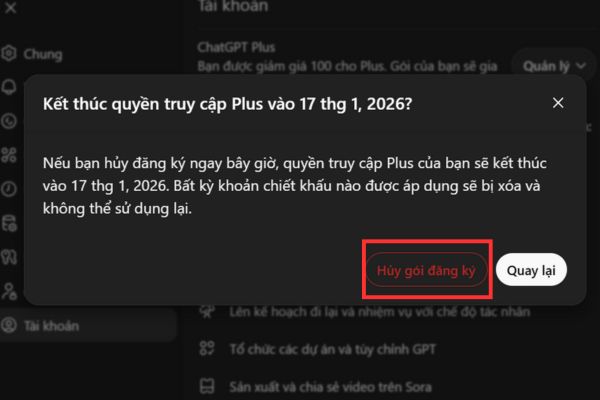
How to cancel your subscription

Conclusion

Applying the above tips will help you Get ChatGPT Plus 1 month free to serve work and explore the potential of AI in the most effective way. Remember to monitor your usage time to cancel your renewal promptly if you only want a short-term experience. Wish you success!


Tags: ChatGPTfreeInstructionsmonthreceivesuccess
Previous Post

How much RAM do you really need?

Next Post

What does “Run as Administrator” mean in Windows 10?

AnonyViet

AnonyViet

Related Posts

How to turn on Voice Isolation, which helps eliminate noise when calling on iPhone
Knowledge

How to turn on Voice Isolation, which helps eliminate noise when calling on iPhone

May 27, 2026
How to transfer files between Windows and Mac over LAN
Knowledge

How to transfer files between Windows and Mac over LAN

May 26, 2026
Snapvie: Tool to download 8K YouTube videos, no installation required
Knowledge

Snapvie: Tool to download 8K YouTube videos, no installation required

May 24, 2026
How to create your own Video AI App to use Omni, Nano Banana without API Key
Knowledge

How to create your own Video AI App to use Omni, Nano Banana without API Key

May 23, 2026
Top 6 websites for 2026 high school graduation mock test, close to real questions, standard with Ministry of Education
Knowledge

Top 6 websites for 2026 high school graduation mock test, close to real questions, standard with Ministry of Education

May 16, 2026
How to block pop-up ads on Safari without installing an app
Knowledge

How to block pop-up ads on Safari without installing an app

May 6, 2026
Next Post
What does “Run as Administrator” mean in Windows 10?

What does "Run as Administrator" mean in Windows 10?

0 0 votes
Article Rating
Subscribe
Login
Notify of
guest

guest

0 Comments
Oldest
Newest Most Voted
Inline Feedbacks
View all comments

Recent News

Instructions for receiving Lovable Pro 12 months for free

Instructions for receiving Lovable Pro 12 months for free

May 29, 2026
How to extract text from photos using Zalo is super simple

How to extract text from photos using Zalo is super simple

May 29, 2026
HONOR 600 in hand – High-end design, 200MP camera, not cheap price

HONOR 600 in hand – High-end design, 200MP camera, not cheap price

May 28, 2026
Instructions for getting 4 months of Adobe copyright for free

Instructions for getting 4 months of Adobe copyright for free

May 28, 2026
Instructions for receiving Lovable Pro 12 months for free

Instructions for receiving Lovable Pro 12 months for free

May 29, 2026
How to extract text from photos using Zalo is super simple

How to extract text from photos using Zalo is super simple

May 29, 2026
HONOR 600 in hand – High-end design, 200MP camera, not cheap price

HONOR 600 in hand – High-end design, 200MP camera, not cheap price

May 28, 2026
AnonyViet - English Version

AnonyViet

AnonyViet is a website share knowledge that you have never learned in school!

We are ready to welcome your comments, as well as your articles sent to AnonyViet.

Follow Us

Contact:

Email: anonyviet.com[@]gmail.com

Main Website: https://anonyviet.com

Recent News

Instructions for receiving Lovable Pro 12 months for free

Instructions for receiving Lovable Pro 12 months for free

May 29, 2026
How to extract text from photos using Zalo is super simple

How to extract text from photos using Zalo is super simple

May 29, 2026
No Result
View All Result
  • Home
  • News
  • Software
  • Knowledge
  • MMO
  • Tips
  • Security
  • Network
  • Office

wpDiscuz
0
0
Would love your thoughts, please comment.x
()
x
| Reply