If you use Windows 10surely you have seen the phrase “Run as Administrator” at least once. But what does “Run as Administrator” mean? In this article, I will explain why it is important, how it works, and when to use this perk.
| Join the channel Telegram belong to AnonyViet 👉 Link 👈 |

Administrator has full access to the system
There are two types of accounts in Windows: Standard user and Administrator account. The Admin account can configure system settings and access normally restricted parts of the operating system. (There is also a hidden account named “Administrator”, but any account can be Administrator).
The Admin’s role is to allow a normal account to change certain operating system settings.
If you own your own PC and it’s not managed by your company, you’re probably using an Administrator account. (You can check your admin status by going to Settings > Accounts > Your Info. You will see “Administrator” below your name if you are an administrator. If you have other accounts set up on Windows 10, you can go in Settings > Accounts > Family & other users to see if other accounts are administrators).
But even if you are using an Administrator account on Windows, not every application needs full Admin rights. In fact, it’s not good for security, for example your web browser should not have full access to your entire operating system. User Account Control (UAC) limits the permissions that applications have, even when you launch them from an Administrator account.
When you use “Run as Administrator”, UAC will not authenticate and the application will be run with full Admin rights and access to everything on your system.
So, when you run an app as Administrator, it means you are giving the app special permissions to access restricted areas of your Windows 10 system that would otherwise be limited. This brings potential security dangers, but is also sometimes necessary for some programs to function correctly.
When should you run an application with Run as Administrator?
If an application is not working as you expect, you can run it as Admin and see if that solves the problem. This can happen with utility programs that require deep access to perform diagnostics on the file system, configure storage devices, or change the settings of certain devices connected to your system.
Which applications can be run with Run as Administrator rights?
Only applications programmed for legacy Win32 and Win64 APIs can run as Admin. Traditionally, those are apps created for Windows 7 and earlier, but many modern Windows apps can still work. Applications UWP (Universal Windows Platform) — and apps downloaded from the Microsoft Store — cannot be run as Administrator (unless you are an Admin).
How to run the application with Administrator rights?
If you want to run a Windows 10 application as Admin, open the Start Menu and find the application. Right-click the application icon, then select “More” from the menu. In the “More” menu, select “Run as Administrator”.
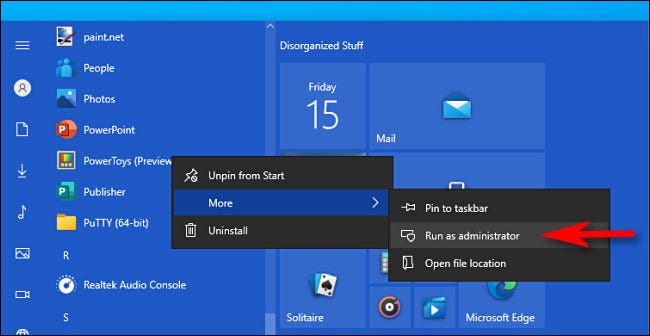
Additionally, if you want to always run the application as Admin, create a Shortcut to the application on the Desktop, Taskbar or in File Explorer. Right click on the shortcut and select “Properties”. In the Properties window, click the “Compatibility” tab, then select the “Run this program as an Administrator” section.
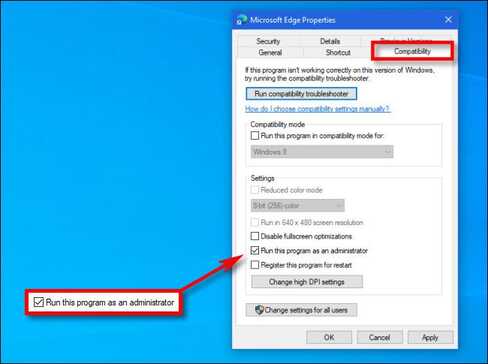
Then, close the Properties window. Now, every time you run an application from that Shortcut, you will always run that application with Administrator privileges.
You can also run the program as Admin from the “Run” box (opened by pressing Windows + R) if you press Ctrl + Shift + Enter when executing the application.
Frequently asked questions
What does it mean to run an application with “Run as Administrator” permission?
Running an application with “Run as Administrator” permission means giving it full access to the system, including those parts that are normally restricted to normal users. This allows applications to perform tasks that require administrative rights, but also pose security risks.
When should I use the “Run as Administrator” option?
You should use this option when an application requires administrative permissions to function correctly, such as installing software, changing system settings, or performing file system-related tasks.
How to run an application with “Run as Administrator” rights?
There are many ways: right click on the application, select “More” then “Run as administrator”; or create a shortcut and set the property “Run this program as an administrator”; or press Ctrl + Shift + Enter in the “Run” box.