• Home
  • News
  • Software
  • Knowledge
  • MMO
  • Tips
  • Security
  • Network
  • Office
AnonyViet - English Version
  • Home
  • News
  • Software
  • Knowledge
  • MMO
  • Tips
  • Security
  • Network
  • Office
No Result
View All Result
  • Home
  • News
  • Software
  • Knowledge
  • MMO
  • Tips
  • Security
  • Network
  • Office
No Result
View All Result
AnonyViet - English Version
No Result
View All Result

Instructions to increase WiFi signal 3 times stronger without spending money

AnonyViet by AnonyViet
February 19, 2023
in Tips
0

How to increase Wifi signal from familiar items, maybe just soft drink cans, beer cans that you will usually throw away after use.

Join the channel Telegram belong to AnonyViet 👉 Link 👈

Although it is not too far from your location to the wifi transmitter, you only get 2-4 bars of wifi. How to get wifi with the full spectrum (4 – 5 bars). The trick below will help you do this.

The location of the Wifi Router (wifi transmitter) is also very important. See how to set the best Wifi Router

First you need to prepare the following tools & materials to practice the tutorial:

  1. Beer cans or soft drinks cans.
  2. Pen
  3. Paper knives.
  4. Drag.
  5. 2 small pieces of cardboard.
  6. Double-sided tape or adhesive tape.

Tools and materials to prepare

These are readily available, easy-to-find ingredients, so it certainly won’t make it difficult for you. After preparing the materials, we start to make devices to help speed up Wifi waves.

Instructions on how to create homemade Parabola to increase Wifi signal

Step 1: Remove the can lid hook.

Remove the hook to pull the can lid

Step 2: Rinse cans to remove leftover soda or beer.

Wash the cans

Step 3: Use a pen to draw a circle around the bottom of the can, then use a paper cutter to cut the bottom of the can along the drawn line.

Cut off the bottom of the can

Step 4: With the top, you also cut the same but do not cut off but leave a piece about 2 to 3cm near the hole.

Cut the top, leaving 2 - 3 cm near the hole

Step 5: Use scissors to cut a line along the body of the can at the position farthest from the hole.

Cut 1 line along the body of the can at the position farthest from the hole

Step 6: Open the 2 wings, now you will get a 1-way Parabola.
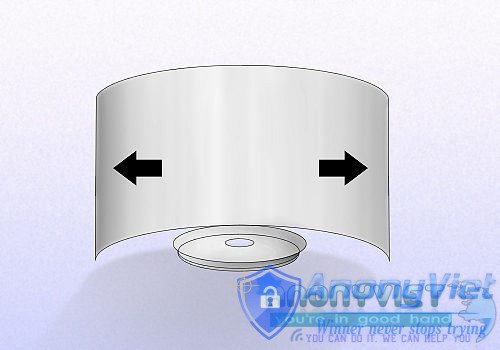
Open 2 wings

Step 7: Attach the Parabol to the wifi transmitter so that the antenna of the wifi transmitter is in the hole of the can. Use 2 small pieces of cardboard with double-sided tape or glue to stick the can on the wifi transmitter.

Finally, rotate the Parabola to the direction that you want better wifi signal when using it there.

Note: If your wifi transmitter has 2 beards, you should make 2 Parabolas for 2 beards (1 Parabol each), but try 1 Parabol to see if the wifi wave is “enough”.

Install Parabola on the wifi transmitter

Check if wifi signal is better before doing this trick?

Ben – AnonyViet

Synthesized from many sources

The article achieved: 5/5 – (100 votes)

Previous Post

Check Pass Facebook Latest October 2016

Next Post

How To Cool Down Your Computer

AnonyViet

AnonyViet

Related Posts

How to add sliders to Facebook Stories to easily rewind videos
Tips

How to add sliders to Facebook Stories to easily rewind videos

April 21, 2026
How to change the default font on Windows 10
Tips

How to change the default font on Windows 10

April 13, 2026
5 tips for using a Browser to replace an App (helps save RAM, time and money)
Tips

5 tips for using a Browser to replace an App (helps save RAM, time and money)

April 13, 2026
How to make funny MeMe photos without Photoshop within 10 seconds
Tips

How to make funny MeMe photos without Photoshop within 10 seconds

April 11, 2026
How to quickly design your own Logo without Photoshop
Tips

How to quickly design your own Logo without Photoshop

April 10, 2026
How to convert Website into App on Windows
Tips

How to convert Website into App on Windows

April 9, 2026
Next Post
How To Cool Down Your Computer

How To Cool Down Your Computer

0 0 votes
Article Rating
Subscribe
Login
Notify of
guest

guest

0 Comments
Oldest
Newest Most Voted
Inline Feedbacks
View all comments

Recent News

Instructions for looking up prescriptions on VNeID instead of paper medical books

Instructions for looking up prescriptions on VNeID instead of paper medical books

April 26, 2026
Tips to completely turn off CAPTCHA codes on iPhone and Mac are super simple

Tips to completely turn off CAPTCHA codes on iPhone and Mac are super simple

April 25, 2026
Compare Poco X8 Pro and Poco X7 Pro: A new step for the “king” of mid-range performance

Compare Poco X8 Pro and Poco X7 Pro: A new step for the “king” of mid-range performance

April 24, 2026
How to compress online videos for free without losing quality

How to compress online videos for free without losing quality

April 24, 2026
Instructions for looking up prescriptions on VNeID instead of paper medical books

Instructions for looking up prescriptions on VNeID instead of paper medical books

April 26, 2026
Tips to completely turn off CAPTCHA codes on iPhone and Mac are super simple

Tips to completely turn off CAPTCHA codes on iPhone and Mac are super simple

April 25, 2026
Compare Poco X8 Pro and Poco X7 Pro: A new step for the “king” of mid-range performance

Compare Poco X8 Pro and Poco X7 Pro: A new step for the “king” of mid-range performance

April 24, 2026
AnonyViet - English Version

AnonyViet

AnonyViet is a website share knowledge that you have never learned in school!

We are ready to welcome your comments, as well as your articles sent to AnonyViet.

Follow Us

Contact:

Email: anonyviet.com[@]gmail.com

Main Website: https://anonyviet.com

Recent News

Instructions for looking up prescriptions on VNeID instead of paper medical books

Instructions for looking up prescriptions on VNeID instead of paper medical books

April 26, 2026
Tips to completely turn off CAPTCHA codes on iPhone and Mac are super simple

Tips to completely turn off CAPTCHA codes on iPhone and Mac are super simple

April 25, 2026
No Result
View All Result
  • Home
  • News
  • Software
  • Knowledge
  • MMO
  • Tips
  • Security
  • Network
  • Office

wpDiscuz
0
0
Would love your thoughts, please comment.x
()
x
| Reply