• Home
  • News
  • Software
  • Knowledge
  • MMO
  • Tips
  • Security
  • Network
  • Office
AnonyViet - English Version
  • Home
  • News
  • Software
  • Knowledge
  • MMO
  • Tips
  • Security
  • Network
  • Office
No Result
View All Result
  • Home
  • News
  • Software
  • Knowledge
  • MMO
  • Tips
  • Security
  • Network
  • Office
No Result
View All Result
AnonyViet - English Version
No Result
View All Result

How to add sliders to Facebook Stories to easily rewind videos

AnonyViet by AnonyViet
April 21, 2026
in Tips
0

How to add sliders to Facebook Stories is a keyword that many users search for when they feel inconvenient because they cannot fast forward long videos on this platform. Having to rewatch a Story from the beginning just to capture the last few seconds is really frustrating and time-consuming to experience. AnonyViet will share a solution to help you completely control your video viewing time with an extremely convenient custom navigation bar.

📢 Join the channel Telegram belong to AnonyViet


👉 Go to Telegram AnonyViet

Update new articles, cool tools and IT tips fastest

Overview of the video rewind feature on Facebook

When surfing Facebook Stories On computers, users often encounter difficulties because the default interface does not provide a time bar (seekbar) for drag and drop. This means you can’t fast forward or rewind, and you also don’t know exactly how many seconds the video has left until it ends.

Realizing this inconvenience, the author Nguyen Trong Duc (DuckCIT) developed a compact but extremely useful script. This tool works by hiding Facebook’s native progress bar and replacing it with a custom seek bar, allowing users to drag and drop smoothly and accurately display the current time over the total video duration.

How to add sliders to Facebook Stories to easily rewind videos
Overview of the video rewind feature on Facebook

How to add sliders to Facebook Stories

To integrate this useful feature into the browser, users can choose between using Userscript or installing it as an extension.

Method 1: Use Userscript

This method is highly appreciated for its stability and speed, suitable for most common users.

Step 1: Users need to install the Tampermonkey utility into the browser Chrome or Edge from the online application store.

Install the Tampermonkey utility

Step 2: Once you have Tampermonkey, you just need to access the link HERE.

Step 3: Tampermonkey’s installation screen will appear, now you just need to press the button Install to complete the process of integrating the script into the browser.
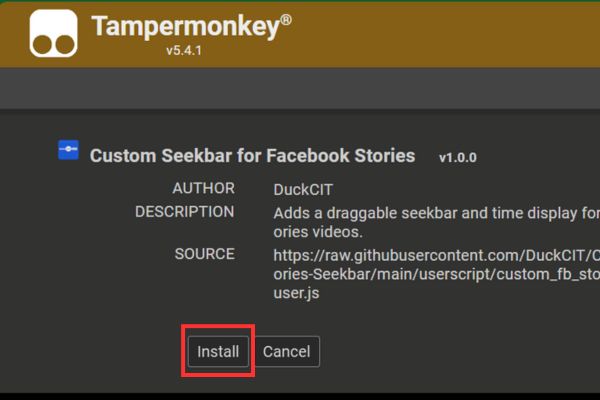
Click the Install button

Method 2: Install as an extension

If you do not want to use Tampermonkey, you can completely install this tool as a standalone extension through developer mode.

Step 1: Visit the Github page HERE > Tap the item Code > Select Download ZIP.
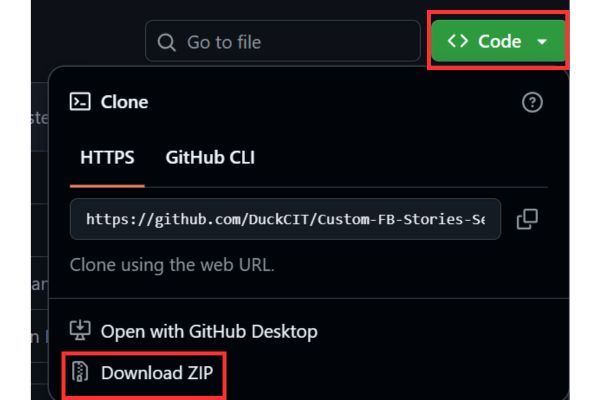
Select Download ZIP
Select Download ZIP

Step 2: Visit your browser’s add-ons management page (chrome://extensions) and turn on “Developer mode” (Developer mode) in the corner of the screen.

Step 3: Select item “Load unpacked” (Download the unpacked utility) and point the path to the folder containing the just downloaded manifest.json file to activate the tool.

Select item "Load unpacked"
Select “Load unpacked”

Frequently asked questions when using

1. Why sometimes when I drag the slider the video doesn’t respond?

Facebook operates under the Single Page Application (SPA) mechanism, meaning that the platform loads and displays multiple videos at the same time (including hidden videos or preview videos). As a result, the code can sometimes mistakenly identify the video that needs to be controlled. In this case, reloading the page (F5) will usually fix the problem.

2. Does the changed Facebook interface damage the tool?

The answer is possible. The script works by “sticking” to specific Facebook CSS classes to display the slider. If Facebook updates its interface and renames these classes, the tool may not be able to find a location to display.

Conclusion

Application how to add slider to Facebook Stories will completely change your social network surfing habits in a more proactive and positive direction. You will no longer have to wait patiently to rewatch an interesting moment or be confused about the length of the video. Hope this little trick helps your daily entertainment experience become more complete and comfortable than ever.


Tags: AddeasilyFacebookrewindslidersstoriesvideos
Previous Post

Reputable LG repair service in Hanoi & Ho Chi Minh City with LGservicecenter

Next Post

Decoding the problem of 4GB RAM and processing performance

AnonyViet

AnonyViet

Related Posts

How to change the default font on Windows 10
Tips

How to change the default font on Windows 10

April 13, 2026
5 tips for using a Browser to replace an App (helps save RAM, time and money)
Tips

5 tips for using a Browser to replace an App (helps save RAM, time and money)

April 13, 2026
How to make funny MeMe photos without Photoshop within 10 seconds
Tips

How to make funny MeMe photos without Photoshop within 10 seconds

April 11, 2026
How to quickly design your own Logo without Photoshop
Tips

How to quickly design your own Logo without Photoshop

April 10, 2026
How to convert Website into App on Windows
Tips

How to convert Website into App on Windows

April 9, 2026
Instructions for getting 3 months of Adobe Express Pro for free
Tips

Instructions for getting 3 months of Adobe Express Pro for free

April 9, 2026
Next Post
Decoding the problem of 4GB RAM and processing performance

Decoding the problem of 4GB RAM and processing performance

0 0 votes
Article Rating
Subscribe
Login
Notify of
guest

guest

0 Comments
Oldest
Newest Most Voted
Inline Feedbacks
View all comments

Recent News

Decoding the problem of 4GB RAM and processing performance

Decoding the problem of 4GB RAM and processing performance

April 21, 2026
How to add sliders to Facebook Stories to easily rewind videos

How to add sliders to Facebook Stories to easily rewind videos

April 21, 2026
Reputable LG repair service in Hanoi & Ho Chi Minh City with LGservicecenter

Reputable LG repair service in Hanoi & Ho Chi Minh City with LGservicecenter

April 21, 2026
Japanese Watch Week: Choose the color that suits your destiny, start the new year well at Mobile World

Japanese Watch Week: Choose the color that suits your destiny, start the new year well at Mobile World

April 20, 2026
Decoding the problem of 4GB RAM and processing performance

Decoding the problem of 4GB RAM and processing performance

April 21, 2026
How to add sliders to Facebook Stories to easily rewind videos

How to add sliders to Facebook Stories to easily rewind videos

April 21, 2026
Reputable LG repair service in Hanoi & Ho Chi Minh City with LGservicecenter

Reputable LG repair service in Hanoi & Ho Chi Minh City with LGservicecenter

April 21, 2026
AnonyViet - English Version

AnonyViet

AnonyViet is a website share knowledge that you have never learned in school!

We are ready to welcome your comments, as well as your articles sent to AnonyViet.

Follow Us

Contact:

Email: anonyviet.com[@]gmail.com

Main Website: https://anonyviet.com

Recent News

Decoding the problem of 4GB RAM and processing performance

Decoding the problem of 4GB RAM and processing performance

April 21, 2026
How to add sliders to Facebook Stories to easily rewind videos

How to add sliders to Facebook Stories to easily rewind videos

April 21, 2026
No Result
View All Result
  • Home
  • News
  • Software
  • Knowledge
  • MMO
  • Tips
  • Security
  • Network
  • Office

wpDiscuz
0
0
Would love your thoughts, please comment.x
()
x
| Reply