Instructions for looking up prescriptions on VNeID will help you easily manage your and your family’s medical history. This is an important step by the Ministry of Health and the Ministry of Public Security in the national digital transformation, bringing maximum convenience. Let’s find out in detail how to do it with AnonyViet.
📢 Join the channel Telegram belong to AnonyViet
Update new articles, cool tools and IT tips fastest
Electronic health book: A new step on VNeID
In an attempt to transform VNeID Becoming a super application serving people’s daily life, the National Population Data Center has continuously updated practical utilities. The most prominent among them is the birth of the “Electronic Health Book”, a result of strategic cooperation between the Ministry of Health and the Ministry of Public Security. This feature acts as a digital repository, comprehensively managing citizens’ health information.
Instead of having to maintain traditional paper medical records, people can now access their entire medical history, test results or previous diagnoses right on their phone. This is especially useful when you need to provide information quickly to medical staff during follow-up visits. According to Decision No. 2733/QD-BYT, data on VNeID has equivalent legal value and can completely replace paper books at both public and private medical facilities.

Digitalization roadmap and practical benefits
The application of technology in healthcare does not only stop at immediate convenience but is also a long-term roadmap. According to regulations, starting from 2026, all medical examination and treatment facilities nationwide are required to complete data interoperability.
Once the information is fully displayed on the system, the hospital will not be allowed to ask the patient to present a paper copy. To help people better understand this change, below is a table comparing the basic differences between the two forms of management:
| Criteria | Traditional paper medical examination book | Electronic health book on VNeID |
| Storage | Easy to tear, lose, difficult to preserve long term. | Permanently stored in the cloud, highly secure. |
| Convenient | Must bring it with you every time you go to the doctor. | Integrated on phone, view anytime, anywhere. |
| Look up | It’s difficult to find the old history if you replace the book with a new one. | Review the entire history by year easily. |
| Legal | Valuable when intact. | Equivalent legal value, recognized nationwide. |

Necessary conditions to use the feature
Before going into detailed operations, users need to note a prerequisite to enable this feature. You are required to own an electronic identity account in Level 2.
This is the highest level of security. It is not possible to self-register at home but requires citizens to go directly to the police agency of their residence to complete authentication procedures. After your account is successfully activated, you can access your personal health data warehouse.
Instructions for looking up prescriptions on VNeID
Below are instructions for looking up prescriptions on VNeID and medical examination and treatment history step by step:
Step 1: User needs to open VNeID application on your phone and log in to your electronic identity account.
Step 2: On the main screen, find the section “Service group“, continue to select “Health records” and click on the feature “Electronic health book“.
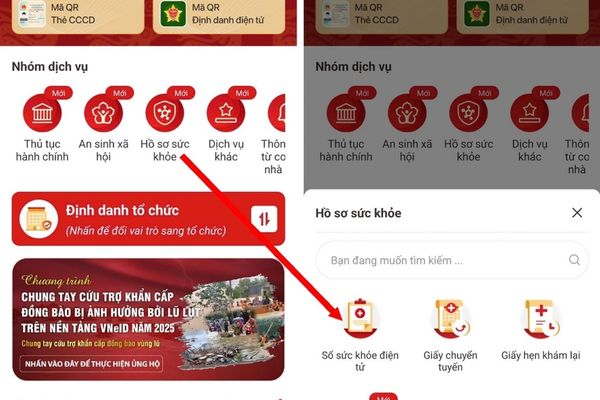
Step 3: The system will ask to enter a security code (passcode) to protect personal data. Please enter this code correctly to access inside.
Step 4: The interface will display a list of years, click on it year want to see.
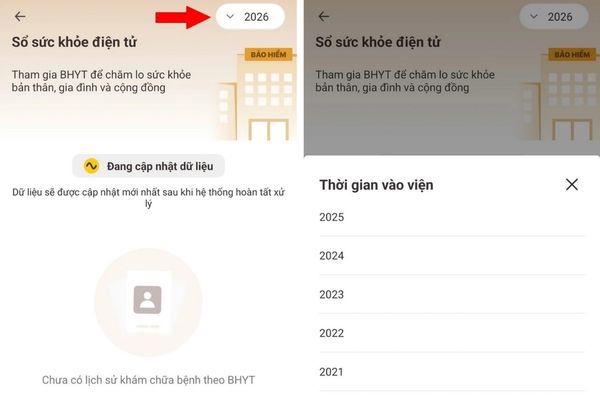
If you used your Health Insurance card for medical examination that year, detailed data will appear (if not, the system will say “Updating data”).
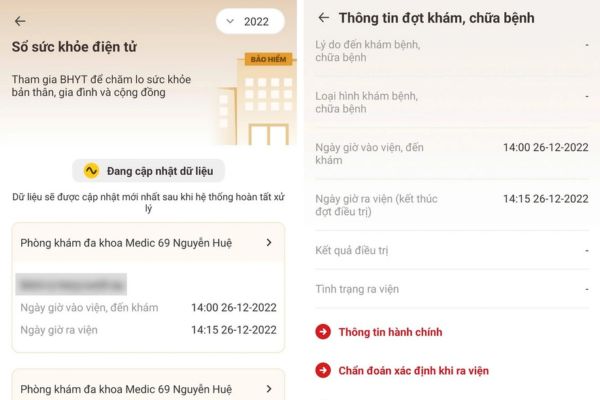
Step 5: You can carefully review each medical visit with full information about time, clinic location and diagnosis from the doctor.
Step 6: To view the prescription, select “Medicines have been treated, prescriptions have been prescribed“, here the list of drugs covered by health insurance will be clearly displayed.
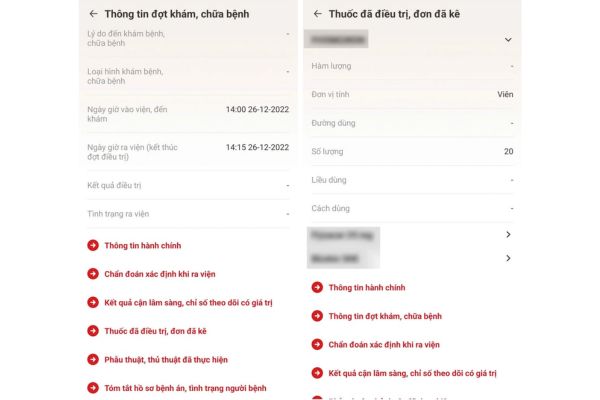
Understanding the instructions for looking up prescriptions on VNeID helps you be much more proactive in monitoring your treatment regimen. You can compare the drugs you have used, or provide the exact drug names to doctors at other hospitals if requested, to avoid duplicate prescriptions or unwanted drug interactions.
Frequently asked questions
1. I have a Level 1 VNeID account, can I view the electronic health book?
No, you are required to upgrade to a Level 2 eID account at the police agency to use this feature due to high medical information security requirements.
2. Does the health book on VNeID completely replace paper books when going to the doctor?
Yes, according to Decision 2733/QD-BYT, the VNeID application has the same legal value as a paper book and is accepted at both public and private medical facilities.
3. Why do I go to view my medical history but only see the message “Updating data”?
This message means that during that year you did not have any medical examinations using your Health Insurance card, so the system has no data to display.
Conclusion
Integrating the Electronic Health Book into VNeID is a great step forward, bringing maximum convenience to people in the health care process. Hope with Instructions for looking up prescriptions on VNeID that the article just shared, you can confidently manipulate and manage your medical records effectively.