• Home
  • News
  • Software
  • Knowledge
  • MMO
  • Tips
  • Security
  • Network
  • Office
AnonyViet - English Version
  • Home
  • News
  • Software
  • Knowledge
  • MMO
  • Tips
  • Security
  • Network
  • Office
No Result
View All Result
  • Home
  • News
  • Software
  • Knowledge
  • MMO
  • Tips
  • Security
  • Network
  • Office
No Result
View All Result
AnonyViet - English Version
No Result
View All Result

How to make funny MeMe photos without Photoshop within 10 seconds

AnonyViet by AnonyViet
April 11, 2026
in Tips
0

Memes are probably an indispensable thing in life with modern technology. It contributes to creating laughter for you and others. You can make fun for others with funny memes or really cool memes.

📢 Join the channel Telegram belong to AnonyViet


👉 Go to Telegram AnonyViet

Update new articles, cool tools and IT tips fastest

Usually, it will take you a long time to create a simple meme image such as: you have to find the original image, then delete text, add text, edit text… So today Anonyviet will guide you to create memes in your own style without knowing photoshop, how to do it in just a few seconds.

What is MeMe?

You have certainly seen the word meme on the internet. But if you’re not well-versed in internet culture, it can be difficult to find a clear explanation of what exactly a meme is.

Let’s take a look at the definition of memes, explore their uses, and look at some examples of both classic memes and those popular today.

You may be surprised to learn that the word meme did not originate on the Internet. In fact, author Richard Dawkins first used the word in his 1976 work The Selfish Gene. The book looked at the evolution and use of memes to describe an idea or behavior that spreads among people within a culture.

When someone says memes these days, they are probably referring to internet memes. This is the common usage we will discuss here and builds on Dawkins’ use of the term.

To get the meme definition as follows:

A piece of media, often humorous, that spreads rapidly over the internet.

With social networks like today, it’s no wonder memes spread so quickly. With just a little idea, you can create a funny meme photo, or a meme video to mock others…

Quickly create Meme images without Photoshop

First, please visit the page Imgflip – Create and Share Awesome Images so we can create memes.

This is a site that compiles famous original photo memes in the world. You don’t have to waste time searching Google for each photo according to your ideas. Here, you will be provided with many meme photos to make.
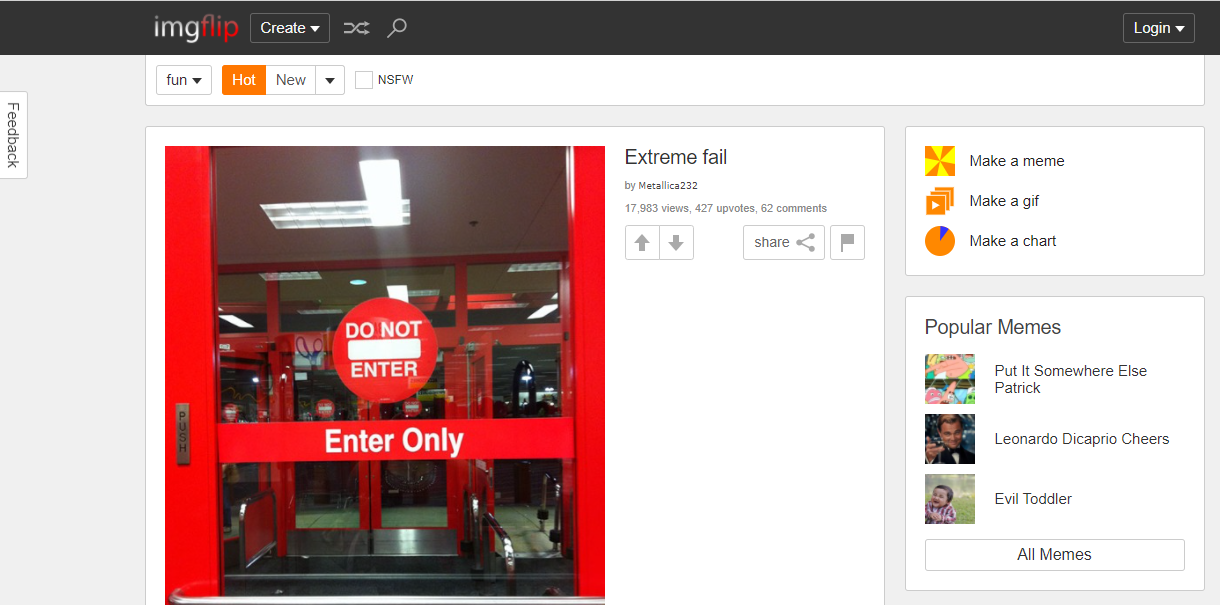
How to make funny MeMe photos without Photoshop within 10 seconds

Then you guys are in place Create select Make a Meme or choose Make a Meme on the right
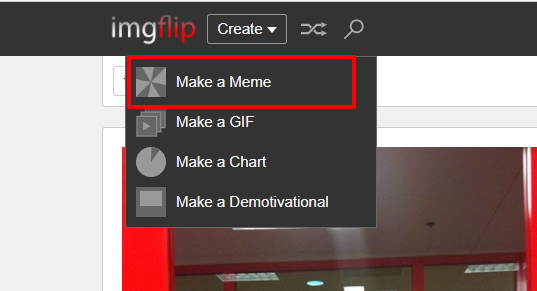
Make a Meme quickly edit meme photos

And this will be the meme selection interface with the function of adding text to the image
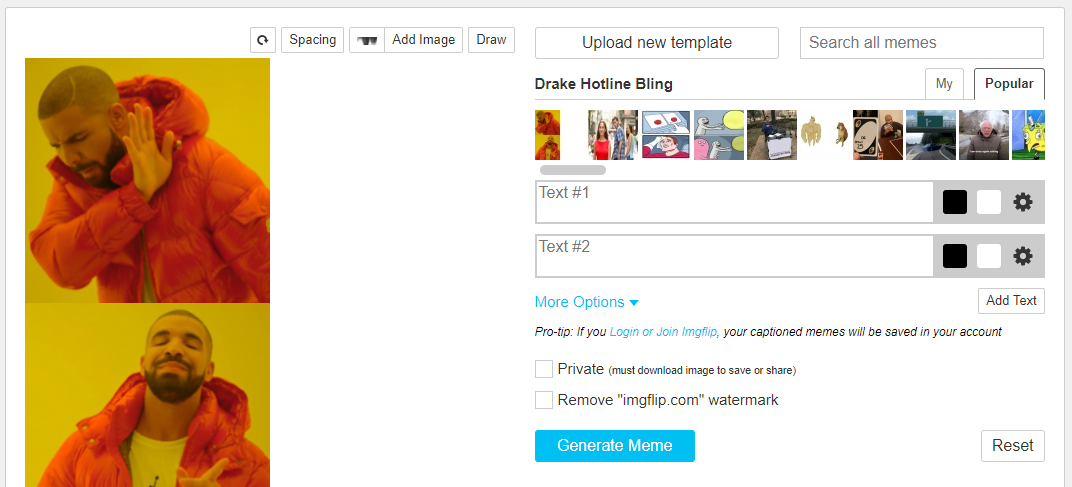
How to make funny MeMe photos without Photoshop within 10 seconds 8

In this frame, you will choose a meme template to create a photo, there are many famous original photos trending.

How to make funny MeMe photos without Photoshop within 10 seconds 9

In two cells Text #1 – Text #2 you fill in ideas for your meme.
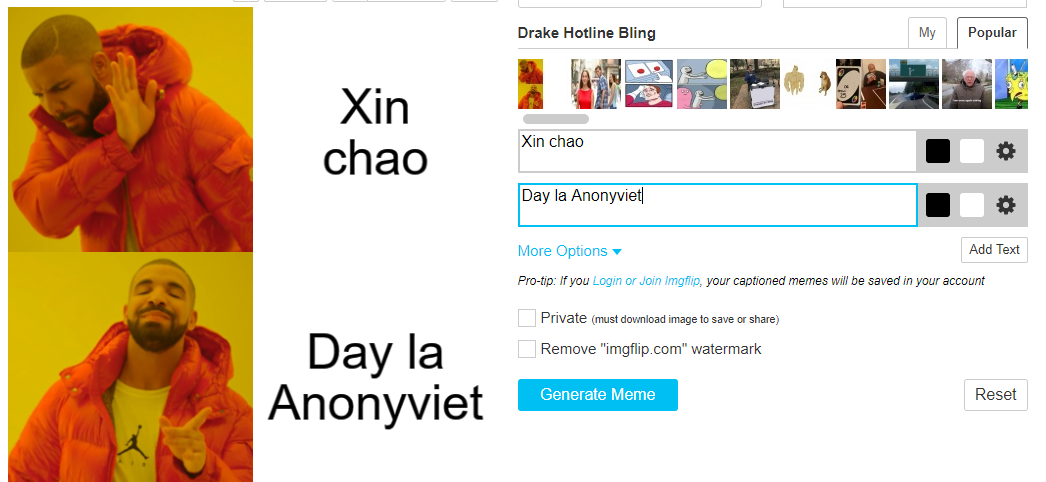
Fill in meme text quickly without photoshop

Then you click Generate Memes to create memes. If you want to remove the Watermark (logo) of imgflip, you can use the function screenshot without downloading.
Generate Memes

Then you click on the spot Goto Image Page

Goto Image Page

Then after that right click Already Save to your device and use it.

Summary

So I have guided you to make a super quick meme in just a few seconds and you’re done. Hopefully through this guide you can contribute more memes to the online community and bring laughter to everyone. See you in the next article.

Frequently asked questions

What is Imgflip and why should I use it to create memes?

Imgflip is an online website that allows you to create memes quickly and easily without the need for complicated photo editing software like Photoshop. It offers many popular meme templates and an intuitive interface, helping you create memes in seconds.

Can I remove Imgflip’s watermark (logo) from created memes?

You can screenshot the created meme to remove Imgflip’s watermark without having to download the image.

What if I can’t find the meme I want on Imgflip?

Imgflip has a huge meme library and is regularly updated. However, if you don’t find the meme template you want, you can search on other websites or create your own meme template using other photo editing tools.


Previous Post

4 ways to protect private photos on Mac to help you avoid information leaks

Next Post

Instructions on how to activate 120Hz for smooth Safari browsing

AnonyViet

AnonyViet

Related Posts

How to change the default font on Windows 10
Tips

How to change the default font on Windows 10

April 13, 2026
5 tips for using a Browser to replace an App (helps save RAM, time and money)
Tips

5 tips for using a Browser to replace an App (helps save RAM, time and money)

April 13, 2026
How to quickly design your own Logo without Photoshop
Tips

How to quickly design your own Logo without Photoshop

April 10, 2026
How to convert Website into App on Windows
Tips

How to convert Website into App on Windows

April 9, 2026
Instructions for getting 3 months of Adobe Express Pro for free
Tips

Instructions for getting 3 months of Adobe Express Pro for free

April 9, 2026
How to Copy multiple times without overwriting old data on Windows 10
Tips

How to Copy multiple times without overwriting old data on Windows 10

April 8, 2026
Next Post
Instructions on how to activate 120Hz for smooth Safari browsing

Instructions on how to activate 120Hz for smooth Safari browsing

0 0 votes
Article Rating
Subscribe
Login
Notify of
guest

guest

0 Comments
Oldest
Newest Most Voted
Inline Feedbacks
View all comments

Recent News

How to avoid Adblock detection on Youtube with 4 good tips

How to avoid Adblock detection on Youtube with 4 good tips

April 17, 2026
How to transfer ChatGPT data to Claude is extremely simple

How to transfer ChatGPT data to Claude is extremely simple

April 16, 2026
How to authenticate the owner’s SIM on VNeID from April 15

How to authenticate the owner’s SIM on VNeID from April 15

April 15, 2026
Speak Cells: Excel tool to read spreadsheets by voice very well

Speak Cells: Excel tool to read spreadsheets by voice very well

April 15, 2026
How to avoid Adblock detection on Youtube with 4 good tips

How to avoid Adblock detection on Youtube with 4 good tips

April 17, 2026
How to transfer ChatGPT data to Claude is extremely simple

How to transfer ChatGPT data to Claude is extremely simple

April 16, 2026
How to authenticate the owner’s SIM on VNeID from April 15

How to authenticate the owner’s SIM on VNeID from April 15

April 15, 2026
AnonyViet - English Version

AnonyViet

AnonyViet is a website share knowledge that you have never learned in school!

We are ready to welcome your comments, as well as your articles sent to AnonyViet.

Follow Us

Contact:

Email: anonyviet.com[@]gmail.com

Main Website: https://anonyviet.com

Recent News

How to avoid Adblock detection on Youtube with 4 good tips

How to avoid Adblock detection on Youtube with 4 good tips

April 17, 2026
How to transfer ChatGPT data to Claude is extremely simple

How to transfer ChatGPT data to Claude is extremely simple

April 16, 2026
No Result
View All Result
  • Home
  • News
  • Software
  • Knowledge
  • MMO
  • Tips
  • Security
  • Network
  • Office

wpDiscuz
0
0
Would love your thoughts, please comment.x
()
x
| Reply