

How to get white ticks on Facebook is a topic that many users are interested in recently. This is a brand new feature from Meta that helps you authenticate your account completely free of charge. Thanks to that, your personal page will become more reputable and secure. Let’s go together AnonyViet Discover the detailed steps now!
📢 Join the channel Telegram belong to AnonyViet
Update new articles, cool tools and IT tips fastest
What exactly is a white Facebook tick?
Recently, the online community is buzzing about a brand new feature called Facebook Verifiedor commonly known as white tick. Different from the luxurious green ticks for celebrities or the green ticks that have to be paid for every month, the white ticks were created for ordinary users like us.
The main purpose of this badge is to prove that you are a “real person with real things”. Thanks to that, it helps protect your account from bad guys who specialize in impersonating others to scam you. When you own this badge, your credibility in the eyes of your friends and online partners will increase significantly. T
According to information from Meta, this badge will appear in “front” areas such as Personal Page (Profile), Marketplace trading area, Facebook Dating lover feature and even in groups (Groups). Even in the near future, it is expected to display right on posts in the News Feed.

Detailed comparison table between white ticks and green ticks
Many of you are still quite confused and cannot distinguish between these two types of badges. Therefore, I have compiled an extremely easy-to-understand comparison table below for your convenience.
| Criteria | White Tick (Facebook Verified) | Green Tick (Meta Verified) |
| Expense | 100% Free | Collect periodic monthly fees |
| Purpose | Prove that the account is genuine, used by a real person | Upgrade your account protection layer, get support from Meta to resolve problems faster and confirm your reputation. |
| Authentication method | Record an extremely short selfie video directly on the app | Authenticate with images of valid personal documents (such as CCCD, Passport, Driver’s License…). |
| Applicable subjects | Regular personal account | Content creators, businesses, organizations |

Necessary conditions to apply the method of receiving white ticks on Facebook
Not every account can be registered immediately. To be eligible, apply to receive white ticks Facebookyour account must meet a few basic standards that Meta offers.
First, the account holder must Must be at least 18 years old or more. Next, your account must be in a normal operating state, obediently complying with the platform’s Community Standards. That means you must not have a “criminal record” of cheating, impersonating someone or having unusual behavior that is detected by the system. Instead, just use Facebook in a healthy way.
There is a small point to note that in this early stage, this cool feature is only open to users personal account usually. Many of you wonder if the method of getting white ticks on Facebook can be used for Fanpages or accounts that have turned on Professional Mode, the current answer is no.
Instructions on how to get free Facebook white ticks for newbies
If you are confident that your account qualifies, then don’t hesitate any longer and start working right away. To make the process go smoothly, just follow the correct way to receive white ticks on Facebook through the following extremely simple steps:
Step 1: First, open the Facebook application and access your Personal Page. Then you click on the icon Menuselect item Settings and privacycontinue to click Setting and find the section Account center.

Step 2: At the Account Center interface, scroll down a bit and select the item Passwords and security. Here, you will see options Verified selfie videoclick on it now.
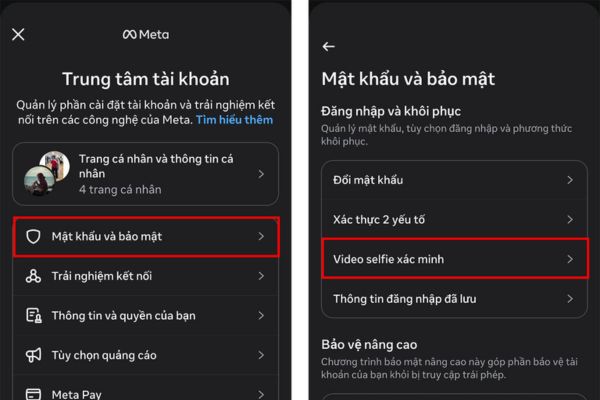
Step 3: The system will ask you to select the correct one personal page that you want to authenticate. Just choose your correct name and click Next and prepare yourself to Start recording selfie videos.

Step 4: At this time, the front camera will open. You just need to hold your phone at eye level and record a short selfie video directly on the app. Remember to follow the correct rotation angle instructions (turn your head left, right, look up, look down) that the system requires. Once completed, all you have to do is sit back and wait for Meta to approve and issue a badge to your account.

Conclusion
In short, How to get white ticks on Facebook Truly an extremely useful and practical feature. It doesn’t require complicated paperwork or force you to dig deep into your wallet. Thanks to that, everyone can protect their own cyberspace. If you don’t see this option in your device yet, don’t worry too much. Meta is rolling out this feature in batches, so please wait patiently for the next update.
Frequently Asked Questions (Q&A)
1. Does Facebook’s white tick cost monthly maintenance fees?
Absolutely not. According to an announcement from Meta, this badge is issued 100% free to individual users for identity authentication purposes.
2. Why don’t I see the selfie video verification section?
Meta is rolling out this feature in phases. Therefore, if you do not see this option, please patiently wait for the next updates of the application.
3. Can a sales fanpage register for white ticks?
Not currently. In the initial stages, this feature only applies to regular personal accounts, not yet supported for Fanpage or accounts with Professional Mode enabled.









