

How to delete hidden files on Samsung phones This is a trick that many users are looking for when their device keeps reporting full memory. This situation often happens even if you don’t download too many heavy applications or store games. So what is the real cause and how to completely fix it? Let’s go together AnonyViet Discover details in the article below.
📢 Join the channel Telegram belong to AnonyViet
Update new articles, cool tools and IT tips fastest
Why does Samsung phone quickly report full memory?
The situation where your phone constantly reports running out of space even though you haven’t downloaded too many heavy applications is actually not something that comes naturally. This problem often comes from the development of technology as well as our daily usage habits.
Camera quality increases file size
In fact, smartphone lines of Samsung Currently, the company is constantly upgrading the camera hardware to a very powerful level. Thanks to that, users can easily produce sharp photos or extremely vivid movies. However, the higher the quality, the larger the capacity of these photo and video files, thereby taking up a large portion of the device’s storage space.
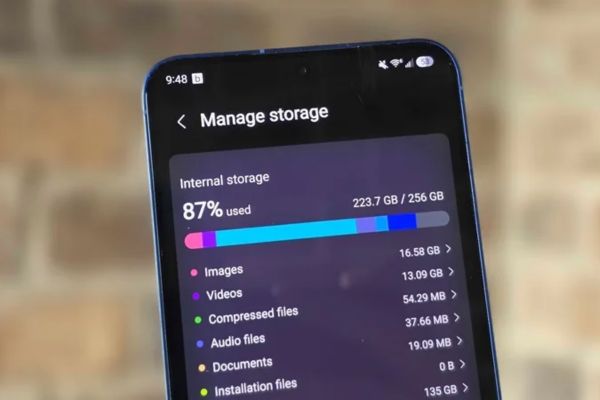
Photo editing creates backups
Besides, our usage habits are also a core cause. With a series of built-in smart post-production tools, users often tend to edit photos and collage videos directly in the Gallery application before showing off on social networks.
Notably, every time you make an edit, the system will automatically save a copy of the original file. The purpose of this is to help you easily restore the original state of the photo or video if you change your mind later.
Therefore, invisibly, your phone is having to “carry” a huge amount of hidden files. These temporary backup files keep accumulating day after day, causing memory to be wasted in a useless way, sometimes without you even knowing it.

Instructions on how to delete hidden files on Samsung phones
To completely solve this problem of wasting resources, the company was very thoughtful in equipping it with an extremely smart cleaning tool. Applying the method to delete hidden files above Samsung phones This tool will help you wipe out all temporary backup files of old photos and videos.
Below are steps to clean up memory space that you can apply immediately:
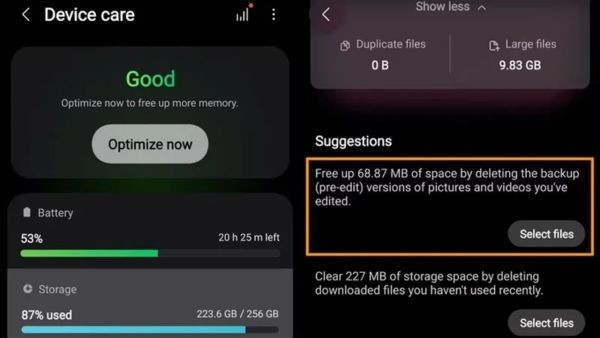
Step 1: First, please access the section Settings on the main screen, then scroll down the screen and select the item Device Care.
Step 2: At the new interface that appears, continue to click on the section Storage.
Step 3: At this point, you need to find the section where backup files are stored before editing, usually denoted (pre-edit). Note, on some different software versions, this section may be hidden deeper in the path: Settings > Device Care > Storage > Show More > Other Files.
Step 4: Next, you click the button Select files so that the system starts displaying the entire list of hidden backup media files.
Step 5: Finally, you can manually select each file you want to delete. Instead, to save time, click the button All (All) is in the top corner, then select command Delete to clean everything up.
With just the 5 simple steps above, the process of deleting hidden files on Samsung phones is complete, giving you a much more spacious and comfortable storage space.
What to do when you’ve cleaned but the device still says it’s full?
After you have successfully applied the method to delete hidden files on your Samsung phone and clean up the system, but the smartphone still continuously reports a lack of storage space, the problem may no longer lie in junk files.
In fact, this is a clear sign that your storage needs have exceeded your device’s hardware limits. Therefore, it’s time for you to consider upgrading to a new device with a larger ROM capacity, to best meet your work and daily entertainment needs.
Conclusion
Through the above information, you are sure to feel confident in doing so How to delete hidden files on Samsung phones right at home. Instead of struggling to delete each photo, this smart cleaning tool will completely solve the problem for you. Don’t forget to follow the next articles to update more cool technology tips!
Frequently Asked Questions (Q&A)
1. Why does photo editing waste phone memory?
Because when you edit a photo or video directly in Gallery, the system automatically creates and saves a copy of the original file so you can restore the original if needed.
2. Will deleting these hidden backup files cause important images to be lost?
Absolutely not. Samsung’s smart cleaning tool only scans and deletes temporary backup files of old photos and videos, without affecting your important original data.
3. What should I do if I have cleaned it but the device still says memory is full?
If you’ve deleted all the hidden files and your device still lacks storage space, this is a sign that you should consider upgrading to a new phone with larger memory capacity.








