How to get 20,000 Veo credits 3 Free is a topic that many users are interested in to optimize creative work and not have limited resources. Actually, this process involves activating an additional credit plan through the Google Workspace admin account. Let’s go together AnonyViet Discover detailed steps to upgrade your account and own more of this valuable AI resource!
| Join the channel Telegram belong to AnonyViet 👉 Link 👈 |
What is Veo 3 and why do you need more credits?
Veo 3 is a groundbreaking video generation AI model that allows users to turn ideas from text into high-quality video clips quickly and easily. With the power of Veo 3, content creators, marketers and businesses can produce promotional videos, short films or complex animation products without the need for professional film editing skills.
Each time you create a video, the system will consume a certain amount of credits, depending on the resolution and length of the video. Therefore, owning a large amount of credits, especially 20,000 additional credits, will open up limitless creative space, giving you the freedom to experiment and produce content without worrying about resource limits.

Instructions on how to get 20,000 Veo 3 credits for free
Step 1: First, please visit Flow page and click on the personal account avatar, usually located in the upper right corner of the screen.
The system will display an information table, including the initial credit balance, for example 25,000 credits, so you understand the starting point.

Step 2: To perform the upgrade, people with administrator rights need to log in to the official admin page at the address admin.google.com. At the main interface, click on the item Generative AI > AI Ultra > Select Additional AI credit line.
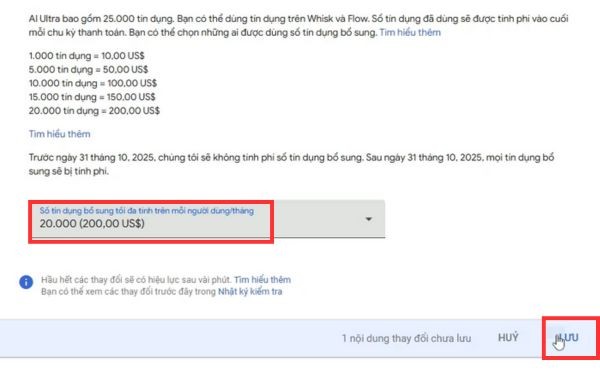
Here you will see an extremely important clause: Before October 31, 2025, all additional credits will not be charged.
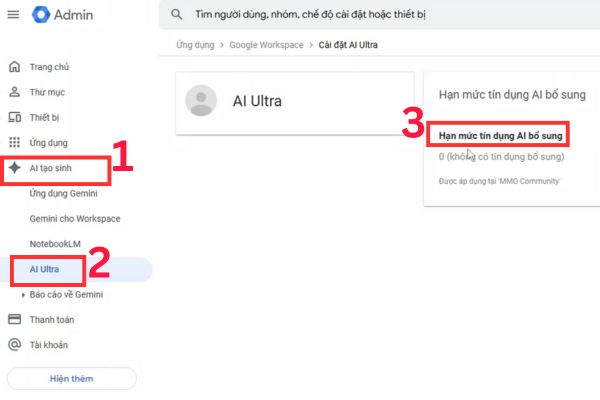
Step 3: A drop-down menu will appear, displaying credit plan options. Here you will see different credit packages, including the 20,000 credits at a cost of 200 USD. Click on it.
The price displayed is the fee that will be applied after the promotion period ends. During the promotion period, you will not be charged this fee.
Step 4: Press the button Save in the bottom right corner to confirm and complete.
Step 5: Finally, go back to the Flow page and F5 the page again. Then tap the avatar icon again to check the balance. At this point, you will see that the total number of credits has increased, for example from the original 25,000 plus the 20,000 just purchased, to 45,000 points credit, ready for you to use.
Conclusion
In short, owning more AI resources is completely feasible and free at the present time thanks to Google’s incentive program. Immediately contact your Google Workspace administrator to do so How to get 20,000 credits Veo 3 free before the program ends on October 31, 2025. Don’t miss this great opportunity!