• Home
  • News
  • Software
  • Knowledge
  • MMO
  • Tips
  • Security
  • Network
  • Office
AnonyViet - English Version
  • Home
  • News
  • Software
  • Knowledge
  • MMO
  • Tips
  • Security
  • Network
  • Office
No Result
View All Result
  • Home
  • News
  • Software
  • Knowledge
  • MMO
  • Tips
  • Security
  • Network
  • Office
No Result
View All Result
AnonyViet - English Version
No Result
View All Result

Instructions for bringing the Safari address bar to the top on iPhone iOS 26

AnonyViet by AnonyViet
October 15, 2025
in Knowledge
0

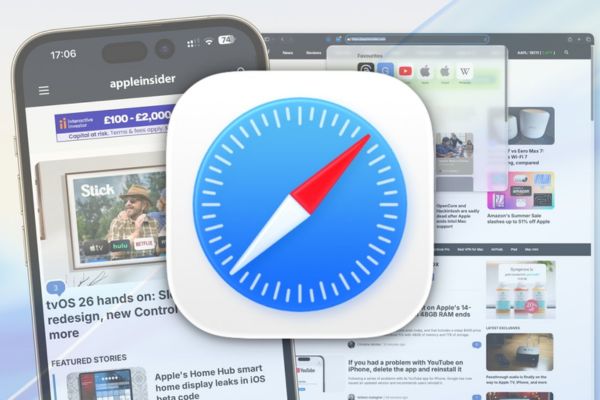
Bring the Safari address bar to the top on iOS 26 is a small trick but brings a more familiar and convenient web browsing experience. With the iOS 26 update, Apple introduced the unique Liquid Glass interface, but moving the address bar to the bottom of the screen confused many users. If you want to restore the habit of using Safari as before, AnonyViet will guide you how to do it in just a few simple steps.

Join the channel Telegram belong to AnonyViet 👉 Link 👈

Overview of changes on iOS 26

Apple has refreshed Safari on iOS 26 with modern design, focusing on convenience when operating with your thumb. The address bar is placed at the bottom of the screen to help users easily enter data on larger devices. However, this change causes inconvenience for those who are used to the traditional layout. Luckily, Apple retains the option that allows you to bring the Safari address bar to the top to maintain ease of use.
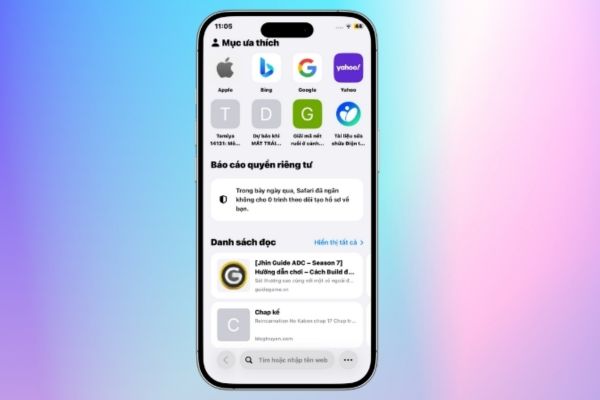
Overview of changes on iOS 26

Benefits of bringing the Safari address bar to the top

Adjusting the address bar position brings many significant advantages:

  • Longtime iPhone users won’t have to get used to the new layout.
  • The address bar at the top makes it easy to follow and switch between tabs as you browse the web.
  • The top position helps content appear clearly, especially when you have multiple tabs open at the same time.
  • For those who are familiar, entering the address or searching from the top will save more time.
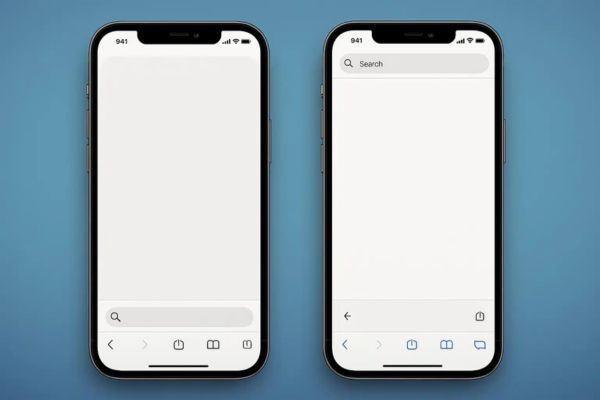
Benefits of bringing the Safari address bar to the top

Instructions for bringing the Safari address bar to the top on iOS 26

To bring the Safari address bar to the top on iOS 26, simply follow these steps:

  1. Access the application Setting on the iPhone home screen > Select Application.
  2. Scroll down the list and select Safari to enter browser settings.
  3. In section Tabtap options Top to move the address bar to its traditional position.

With just these three steps, the Safari address bar will return to its familiar location, helping you continue browsing without interruption.
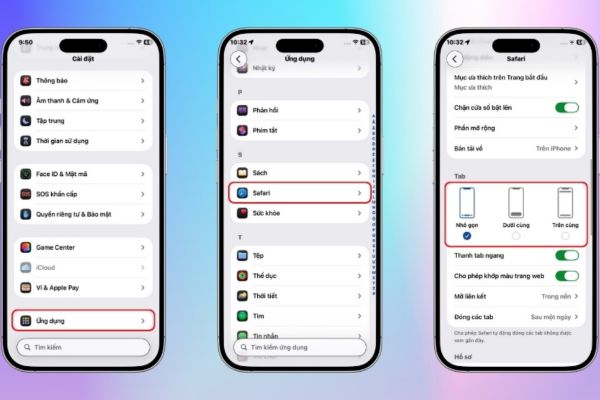
Tap the Top option
Tap the Top option

Some notes when customizing Safari

When making changes, you should check whether the interface suits your usage habits or not. If you use Safari with multiple tabs, the top position will help you manage better.
Some notes when customizing Safari

Conclude

Bring the Safari address bar to the top on iOS 26 is a simple way to get back to a familiar browsing experience. With just a few taps, you can customize Safari to suit your usage habits. Try this guide now to enjoy the new interface of iOS 26 while maintaining the inherent convenience!

Tags: addressbarbringingInstructionsiOSiPhoneSafariTop
Previous Post

AI Agents: New advances in chatbots and callbots in the era of intelligent communication

Next Post

Instructions on how to get 20,000 Veo 3 credits for free

AnonyViet

AnonyViet

Related Posts

How to turn off password suggestions on iPhone: Prevent Safari from auto-filling passwords
Knowledge

How to turn off password suggestions on iPhone: Prevent Safari from auto-filling passwords

April 27, 2026
Tips to completely turn off CAPTCHA codes on iPhone and Mac are super simple
Knowledge

Tips to completely turn off CAPTCHA codes on iPhone and Mac are super simple

April 25, 2026
How to compress online videos for free without losing quality
Knowledge

How to compress online videos for free without losing quality

April 24, 2026
Common errors when using Bosch products and how to fix them
Knowledge

Common errors when using Bosch products and how to fix them

April 22, 2026
How to avoid Adblock detection on Youtube with 4 good tips
Knowledge

How to avoid Adblock detection on Youtube with 4 good tips

April 17, 2026
How to transfer ChatGPT data to Claude is extremely simple
Knowledge

How to transfer ChatGPT data to Claude is extremely simple

April 16, 2026
Next Post
Instructions on how to get 20,000 Veo 3 credits for free

Instructions on how to get 20,000 Veo 3 credits for free

0 0 votes
Article Rating
Subscribe
Login
Notify of
guest

guest

0 Comments
Oldest
Newest Most Voted
Inline Feedbacks
View all comments

Recent News

How to turn off password suggestions on iPhone: Prevent Safari from auto-filling passwords

How to turn off password suggestions on iPhone: Prevent Safari from auto-filling passwords

April 27, 2026
Instructions for looking up prescriptions on VNeID instead of paper medical books

Instructions for looking up prescriptions on VNeID instead of paper medical books

April 26, 2026
Tips to completely turn off CAPTCHA codes on iPhone and Mac are super simple

Tips to completely turn off CAPTCHA codes on iPhone and Mac are super simple

April 25, 2026
Compare Poco X8 Pro and Poco X7 Pro: A new step for the “king” of mid-range performance

Compare Poco X8 Pro and Poco X7 Pro: A new step for the “king” of mid-range performance

April 24, 2026
How to turn off password suggestions on iPhone: Prevent Safari from auto-filling passwords

How to turn off password suggestions on iPhone: Prevent Safari from auto-filling passwords

April 27, 2026
Instructions for looking up prescriptions on VNeID instead of paper medical books

Instructions for looking up prescriptions on VNeID instead of paper medical books

April 26, 2026
Tips to completely turn off CAPTCHA codes on iPhone and Mac are super simple

Tips to completely turn off CAPTCHA codes on iPhone and Mac are super simple

April 25, 2026
AnonyViet - English Version

AnonyViet

AnonyViet is a website share knowledge that you have never learned in school!

We are ready to welcome your comments, as well as your articles sent to AnonyViet.

Follow Us

Contact:

Email: anonyviet.com[@]gmail.com

Main Website: https://anonyviet.com

Recent News

How to turn off password suggestions on iPhone: Prevent Safari from auto-filling passwords

How to turn off password suggestions on iPhone: Prevent Safari from auto-filling passwords

April 27, 2026
Instructions for looking up prescriptions on VNeID instead of paper medical books

Instructions for looking up prescriptions on VNeID instead of paper medical books

April 26, 2026
No Result
View All Result
  • Home
  • News
  • Software
  • Knowledge
  • MMO
  • Tips
  • Security
  • Network
  • Office

wpDiscuz
0
0
Would love your thoughts, please comment.x
()
x
| Reply