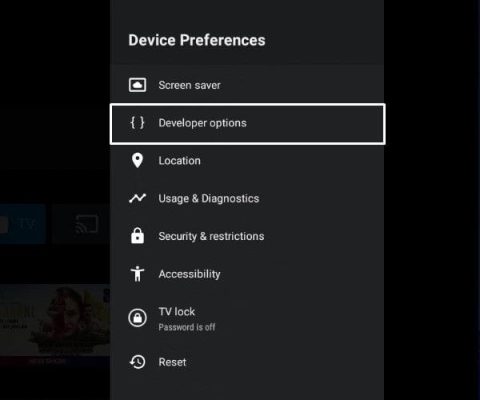
Text format on notepad No longer a distant dream of millions of Windows users. After nearly 4 decades of existence, this legendary notes application is having a spectacular makeover with advanced format features such as bold printing, italic printing and supporting Markdown. This is not just an update, but a rebirth, promising to completely change the way we draft on this familiar tool.
|
Join the channel Telegram belong to Anonyviet 👉 Link 👈 |
Notepad: From basic editor to versatile tool
Notepador electronic “handbook”, has been attached to Windows users from the first versions. Its role is very clear: A place for quick notes, editing configuration files, or writing simple code without the need for complex editing. The lightness, instant and non -cumbersome boot is the strong point that helped Notepad exist and be loved.
However, the technology world is constantly moving. The demand of users is increasing. The fact that Notepad only supports “plain text” (pure text) makes it gradually short of breath compared to modern competitors.
Realizing that, Microsoft started an ambitious upgrade journey for this “old village” application.
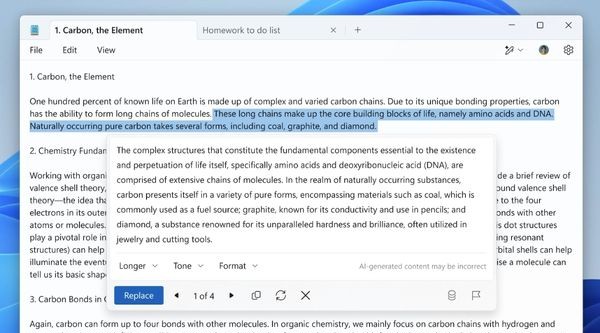
Everything begins with small but useful improvements as possible Open multiple tabs In a window, followed by features Check spelling and automatically correct errors. Most recently, everyone’s strength has been integrated to Summarize and edit grammar. And now, the biggest step has come: text format.
Text format features on new notepad
This is the focus of this historic update. Users will no longer be limited to a single text framework. Instead, you will have intuitive and strong format tools.
Bold, italic printing and more
The most basic formats but lack of long absence on Notepad have now officially appeared. You can easily highlight important ideas by:
- Bold printing: Using familiar keyboard shortcut ctrl + B.
- Ial printing: Using Ctrl + I. I.
- Brick legs: Using Ctrl + U.
The additional additions have turned Notepad from a simple notes tool into a gentle text editor, enough to meet the fast and basic drafting needs.
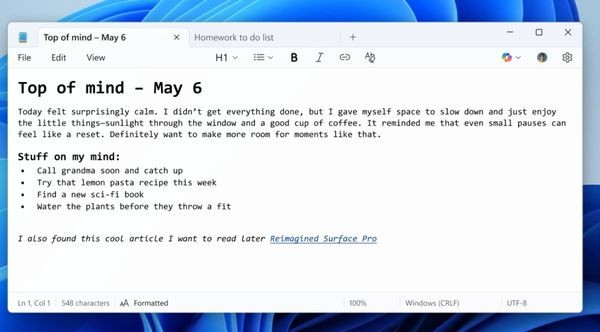
Markdown was available on Notepad
This is really the “star” of the update. The support of Markdown means that Notepad has now become an extremely powerful tool for writers, bloggers, programmers and anyone who regularly writes on the digital platform.
Markdown is a light marking language, allowing you to format text with simple, easy -to -read and easy -to -write syntax. For example, you only need to add a ## a line to turn it into a level 2 title, or wrap a word in the * seal to print it.
The great thing is that Notepad will automatically identify and convert the syntax Markdown This is a beautiful format (Rich Text) immediately. This opens a new horizon for drafting documents, blogging, technical notes or even preparing content for platforms like Github directly on Notepad.
How to experience these new features?
Currently, text format features on Notepad are in the testing phase. However, you absolutely can experience soon if desired. There are two main ways to do this.
Method 1: Join the Windows Insider program
This is the mainstream recommended by Microsoft. If you are a member of Windows Insider Program in Canary or Dev, you just need:
- Open Microsoft Store > Go to the section Library > Click on the button Get Updates.
- The system will automatically update your notepad application to the latest version that supports format.
Method 2: Install and activate manually (for ordinary users)
If you do not participate in the Insider program but still want to experience immediately, you can follow these steps.
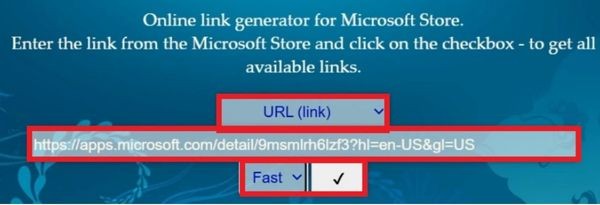
Step 1: Visit the website https://store.rg-adguard.net/. This is a tool to help download the installation packages directly from Microsoft Store.
Step 2: In the search box, paste the link of Notepad on the store:
https://apps.microsoft.com/detail/9msmlrh6lzf3?hl=en-us&gl=US
In the drop -down menu, select FAST And click on the tick.
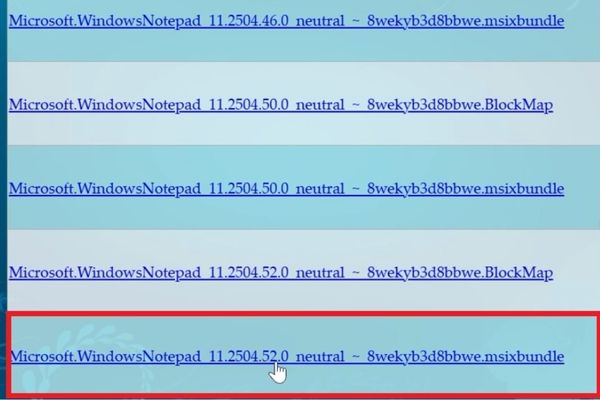
Step 3: Pull down to the bottom, find the file with the following name and download it:
Microsoft.windowsnotepad_11.2404.52.0_Neuutral_ ~ _8weyb3d8bbwe.msixbundle
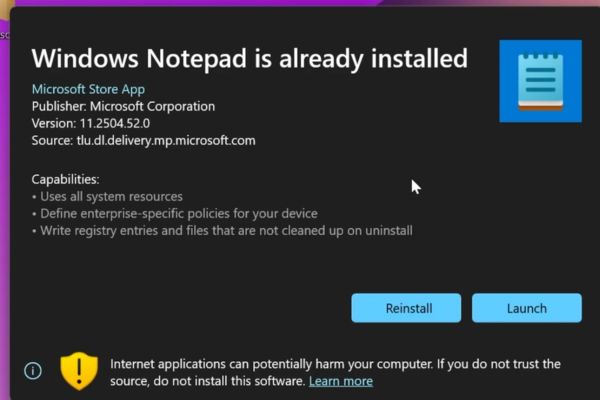
Run the downloaded file and choose Update To update Notepad.
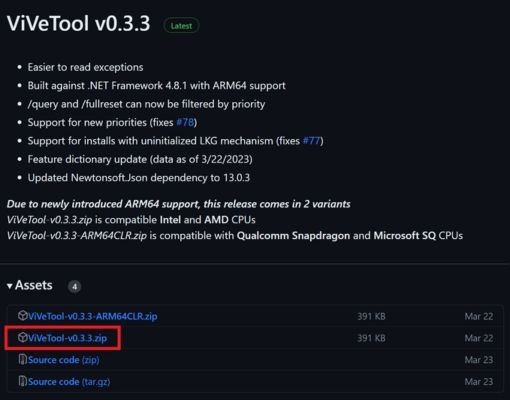
Step 4: Download tools Vivetool From the official github page> extract files Vivetool-v0.xxzip In any folder (for example: C: \ vivetool).
Step 5: Open Command Prompt (CMD) with administrative rights (Run as administrator).
Step 6: Navigate to the folder you just extracted Vivetool with the command:
CD “Your-Location”
For example: CD C: \ vivetool
Step 7: Run the following command to activate the format feature: Vivetool /Enable /ID: 41073112
Step 8: Restart the computer.
After restarting, open the Notepad and you will see the new text format options are ready for you to explore.
Conclusion
This update is not just a few more buttons. It is an affirmation from Microsoft: Notepad is still very important and is being invested to become stronger. Support text format on notepadespecially Markdown, has turned this classic application into a flexible and modern drafting tool to meet the needs of a large number of users.