• Home
  • News
  • Software
  • Knowledge
  • MMO
  • Tips
  • Security
  • Network
  • Office
AnonyViet - English Version
  • Home
  • News
  • Software
  • Knowledge
  • MMO
  • Tips
  • Security
  • Network
  • Office
No Result
View All Result
  • Home
  • News
  • Software
  • Knowledge
  • MMO
  • Tips
  • Security
  • Network
  • Office
No Result
View All Result
AnonyViet - English Version
No Result
View All Result

Instructions on how to block strange devices from accessing your home Wifi

AnonyViet by AnonyViet
July 25, 2026
in Software
0

How to block strange devices from accessing Wifi This is an important trick to help you regain your original network speed. Sometimes, the connection is slow not because of the network but because there are too many people using the temple. Let’s go together AnonyViet Discover this great treatment tip now.

📢 Join the channel Telegram belong to AnonyViet


👉 Go to Telegram AnonyViet

Update new articles, cool tools and IT tips fastest

Why is it necessary to control home network connection?

You know, controlling the devices connecting to your home Wifi network is an extremely good habit. Sometimes we mistakenly think that a slow network is due to broken cables or poor service provided by the network operator. However, the reality is much harsher when your home’s Wifi password has been revealed and your neighbors are carelessly “using it”.

When there are too many uninvited devices accessing the same device, the bandwidth will be divided. As a result, when you watch a movie, it rotates in circles, and when you play a game, your ping is sky-high. Not only is it a matter of speed, allowing strangers to access your internal network also poses a huge risk of leaking personal information.

Therefore, it is important to find a way to block access by strange devices Wifi is a wise step to protect your own rights. Instead of sitting and enduring frustration, we can completely proactively clean up the connection with just a smartphone.

Instructions on how to block strange devices from accessing your home Wifi
Why is it necessary to control home network connection?

Instructions on how to block strange devices from accessing Wifi

If your family is using FPT’s internet service, everything will become extremely simple. You don’t need to be tech-savvy or know how to log in to complicated modem configuration websites. Instead, the network operator has provided the extremely intuitive Hi FPT application.

Hi FPT application
Hi FPT application

Step 1: First, open it Hi FPT application has been pre-installed on your phone. Right at the home page interface, please look for and click on the item Device management.

At this point, a list of all phones and computers using your home network will appear. You just need to browse and select the name of the strange, suspicious device you want to “get rid of”.

Link to download the application for iOS

Link to download the application for Android
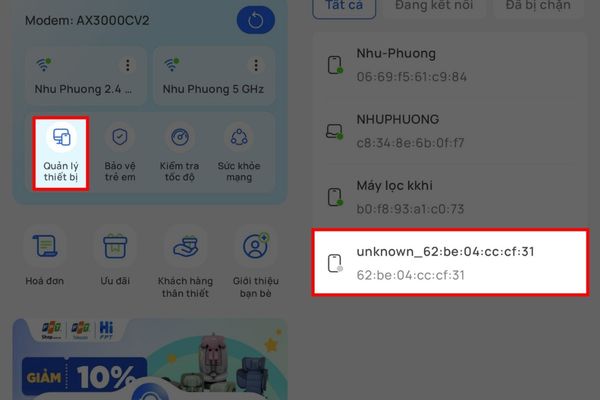
Click on Device Management

Step 2: After clicking on that strange device, the screen will display management options. Please feel free to click on the item Block Internet connection. The system will ask again to be sure, you just need to confirm blocking this device and you’re done.

With just two short steps like that, you have successfully done how to block strange devices from accessing Wifi. It’s really so quick and convenient, isn’t it?
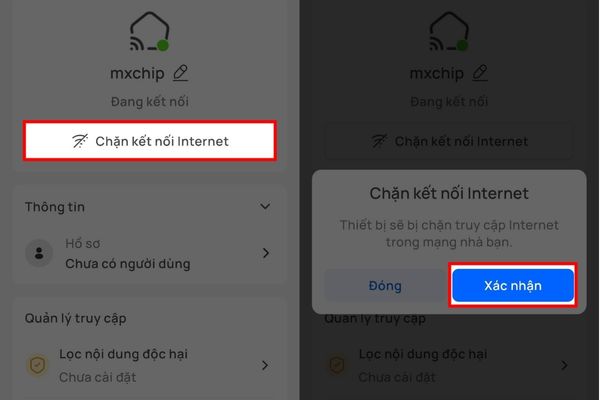
Instructions on how to block strange devices from accessing Wifi

Review your achievements and maintain your management habits

After completing the blocking operations, do not rush to turn off the device immediately. Please exit the main interface of the Hi FPT application to check the list again. At this point, you will see that the suspicious device has been blacklisted and can no longer access the internet through your home Wifi. Even if they know the password, the Wifi router will refuse to serve it.

Thanks to that, your family’s internet connection will immediately return to a stable state, and the bandwidth will be completely freed. Applying a way to block strange devices from accessing Wifi is not only a temporary solution but also a way for you to protect personal data against the risk of unauthorized intrusion from outside.
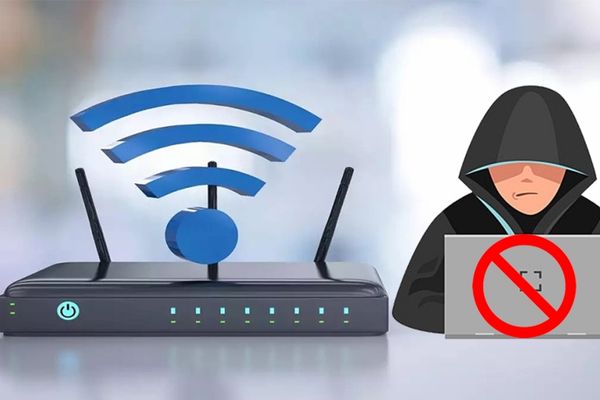
Review your achievements and maintain your management habits

Conclusion

Through this article, hopefully you have a clear understanding How to block strange devices from accessing Wifi right on your phone. Instead of enduring network lag, we can now proactively manage every connection. Wishing your family always have the most complete moments of entertainment.

Frequently Asked Questions (Q&A)

1. After blocking, will people know that I blocked them?

They will receive no notification at all. Their device still reports a successful Wifi connection but actually has no internet connection to surf the web or watch movies.

2. What should I do if I accidentally block a family member’s device?

You don’t need to worry, just reopen the Hi FPT application, go to the list of blocked devices and select “Unblock” and your family can use the network normally again.

3. Is there a fee to use the Hi FPT application?

Completely free. You just need to go to the App Store (if using iPhone) or Google Play (if using Android) to download and log in with the phone number registered with the network contract to use immediately.


Tags: accessingBlockdeviceshomeInstructionsStrangeWiFi
Previous Post

Microsoft announced the end of support date for Windows 10

Next Post

Instructions on how to get 1 year of VIP Hidely VPN for free

AnonyViet

AnonyViet

Related Posts

Instructions on how to get 1 year of VIP Hidely VPN for free
Software

Instructions on how to get 1 year of VIP Hidely VPN for free

July 25, 2026
Instructions on how to get Norton 360 Deluxe for 1 year for free
Software

Instructions on how to get Norton 360 Deluxe for 1 year for free

July 19, 2026
Is Xiaomi Redmi A7 a valuable choice in the popular smartphone segment?
Software

Is Xiaomi Redmi A7 a valuable choice in the popular smartphone segment?

July 14, 2026
Compact design, durable battery, excellent camera: Review of OPPO Reno 16 Pro 5G
Software

Compact design, durable battery, excellent camera: Review of OPPO Reno 16 Pro 5G

July 12, 2026
Download the free 3D Pinball Space Cadet game on the App Store now
Software

Download the free 3D Pinball Space Cadet game on the App Store now

July 12, 2026
Learn new skills with iPad 11 (A16) 128GB: when is enough, when should you upgrade to a higher level?
Software

Learn new skills with iPad 11 (A16) 128GB: when is enough, when should you upgrade to a higher level?

July 10, 2026
Next Post
Instructions on how to get 1 year of VIP Hidely VPN for free

Instructions on how to get 1 year of VIP Hidely VPN for free

0 0 votes
Article Rating
Subscribe
Login
Notify of
guest

guest

0 Comments
Oldest
Newest Most Voted

Recent News

Instructions on how to get 1 year of VIP Hidely VPN for free

Instructions on how to get 1 year of VIP Hidely VPN for free

July 25, 2026
Instructions on how to block strange devices from accessing your home Wifi

Instructions on how to block strange devices from accessing your home Wifi

July 25, 2026
Microsoft announced the end of support date for Windows 10

Microsoft announced the end of support date for Windows 10

July 24, 2026
Super cool way to turn photos and text into coloring pictures for kids

Super cool way to turn photos and text into coloring pictures for kids

July 24, 2026
Instructions on how to get 1 year of VIP Hidely VPN for free

Instructions on how to get 1 year of VIP Hidely VPN for free

July 25, 2026
Instructions on how to block strange devices from accessing your home Wifi

Instructions on how to block strange devices from accessing your home Wifi

July 25, 2026
Microsoft announced the end of support date for Windows 10

Microsoft announced the end of support date for Windows 10

July 24, 2026
AnonyViet - English Version

AnonyViet

AnonyViet is a website share knowledge that you have never learned in school!

We are ready to welcome your comments, as well as your articles sent to AnonyViet.

Follow Us

Contact:

Email: anonyviet.com[@]gmail.com

Main Website: https://anonyviet.com

Recent News

Instructions on how to get 1 year of VIP Hidely VPN for free

Instructions on how to get 1 year of VIP Hidely VPN for free

July 25, 2026
Instructions on how to block strange devices from accessing your home Wifi

Instructions on how to block strange devices from accessing your home Wifi

July 25, 2026
  • Home
  • Home 2
  • Home 3
  • Home 4
  • Home 5
  • Home 6
  • Next Dest Page
  • Sample Page

say88 tỷ lệ kèo nhà cái kèo nhà cái 5 febet

No Result
View All Result
  • Home
  • News
  • Software
  • Knowledge
  • MMO
  • Tips
  • Security
  • Network
  • Office

say88 tỷ lệ kèo nhà cái kèo nhà cái 5 febet

wpDiscuz
0
0
Would love your thoughts, please comment.x
()
x
| Reply