• Home
  • News
  • Software
  • Knowledge
  • MMO
  • Tips
  • Security
  • Network
  • Office
AnonyViet - English Version
  • Home
  • News
  • Software
  • Knowledge
  • MMO
  • Tips
  • Security
  • Network
  • Office
No Result
View All Result
  • Home
  • News
  • Software
  • Knowledge
  • MMO
  • Tips
  • Security
  • Network
  • Office
No Result
View All Result
AnonyViet - English Version
No Result
View All Result

Instructions for watching dual-subtitle Youtube videos to improve English proficiency

AnonyViet by AnonyViet
January 4, 2024
in Tips
0

Watch dual subtitle Youtube videos is one of the modern and interesting ways to learn English. You can choose any videos you like, from entertainment, education, culture, to science, and watch them with two types of subtitles: English and Vietnamese. This way, you will be able to improve your listening, speaking, reading and writing skills naturally and effectively.

Join the channel Telegram belong to AnonyViet 👉 Link 👈

How to watch dual subtitle Youtube videos

Step 1: First, you need to install an add-on called YouTubeâ„¢ dual subtitles to your browser. You can use Google Chrome or Microsoft Edge browser.

Watch dual subtitle Youtube videos
Install YouTubeâ„¢ dual subtitles

Step 2: After installing the utility, open the Youtube video you want to watch.
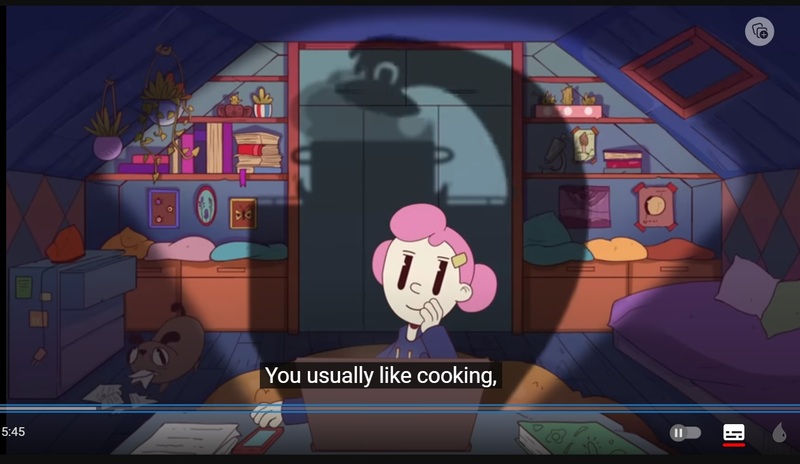
Watch dual subtitle Youtube videos
Subtitles without the utility installed

You will see an icon of the YouTubeâ„¢ dual captions widget in the right corner of the address bar. Click on this icon to set options for subtitles such as font, text color, etc.
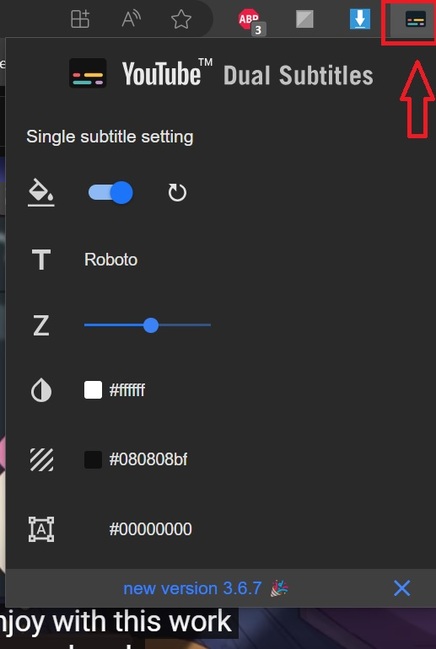
Watch dual subtitle Youtube videos
Set up subtitle options for font, text color, etc.

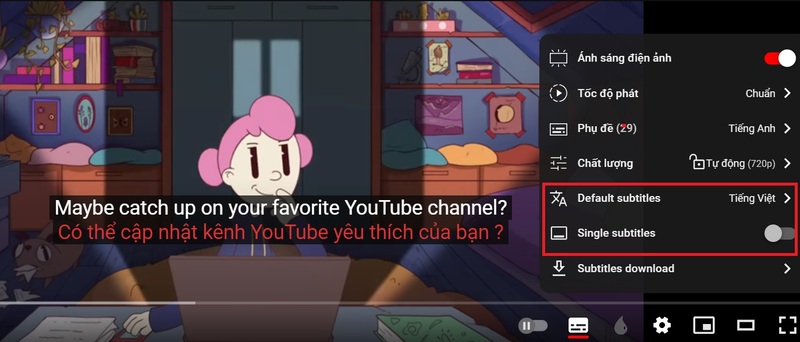
Step 3: Clicking the Setting button will display 3 new options, including:

  • Default Subtitles: You can choose any language as default subtitles.
  • Single Subtitles: When you enable this option, only the default subtitles will be displayed.
  • Subtitles Download: Download the video's subtitles.
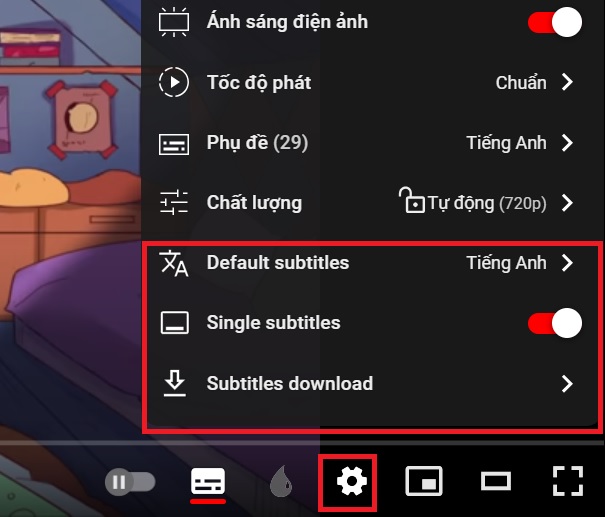
Watch dual subtitle Youtube videos
3 options

For example, if you want to watch the video in dual order, you can choose as follows:

  • Default subtitle: Vietnamese
  • Deactivate single subtitles
Watch secondary video to double
How to watch videos in dual order

Once setup is complete, return to the video and start watching. You will see bilingual subtitles appear at the bottom of the screen. You can move subtitles up or down by dragging the mouse.

Additionally, you can also download subtitles of any video Youtube what you want. Click the Setting icon > Select Subtitles download > Select the language and format for the subtitles and click the Download button.
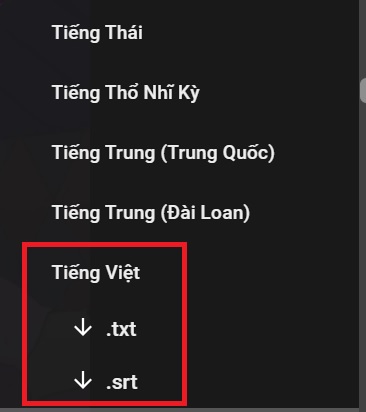
Watch dual subtitle Youtube videos
Download subtitles

You will get a subtitle file that can be opened with video viewing software such as VLC or Windows Media Player.

Epilogue

So you know how Watch dual subtitle Youtube videos – This is a very useful utility for those who want to learn foreign languages, understand the content of videos, or simply enjoy videos without language barriers. Good luck!


The article scored: 5/5 – (100 votes)

Tags: dualsubtitleEnglishimproveInstructionsproficiencyvideoswatchingYoutube
Previous Post

Get the license to COLOR projects 6 Pro – Professional image processing software

Next Post

How to blur photo background with Photos app on Windows 11

AnonyViet

AnonyViet

Related Posts

How to change the default font on Windows 10
Tips

How to change the default font on Windows 10

April 13, 2026
5 tips for using a Browser to replace an App (helps save RAM, time and money)
Tips

5 tips for using a Browser to replace an App (helps save RAM, time and money)

April 13, 2026
How to make funny MeMe photos without Photoshop within 10 seconds
Tips

How to make funny MeMe photos without Photoshop within 10 seconds

April 11, 2026
How to quickly design your own Logo without Photoshop
Tips

How to quickly design your own Logo without Photoshop

April 10, 2026
How to convert Website into App on Windows
Tips

How to convert Website into App on Windows

April 9, 2026
Instructions for getting 3 months of Adobe Express Pro for free
Tips

Instructions for getting 3 months of Adobe Express Pro for free

April 9, 2026
Next Post
How to blur photo background with Photos app on Windows 11

How to blur photo background with Photos app on Windows 11

0 0 votes
Article Rating
Subscribe
Login
Notify of
guest

guest

0 Comments
Oldest
Newest Most Voted
Inline Feedbacks
View all comments

Recent News

How to add Watermark to Google Docs to protect copyright

How to add Watermark to Google Docs to protect copyright

April 19, 2026
How to intercept traffic using Burp Suite to analyze HTTP/HTTPS

How to intercept traffic using Burp Suite to analyze HTTP/HTTPS

April 18, 2026
How to avoid Adblock detection on Youtube with 4 good tips

How to avoid Adblock detection on Youtube with 4 good tips

April 17, 2026
How to transfer ChatGPT data to Claude is extremely simple

How to transfer ChatGPT data to Claude is extremely simple

April 16, 2026
How to add Watermark to Google Docs to protect copyright

How to add Watermark to Google Docs to protect copyright

April 19, 2026
How to intercept traffic using Burp Suite to analyze HTTP/HTTPS

How to intercept traffic using Burp Suite to analyze HTTP/HTTPS

April 18, 2026
How to avoid Adblock detection on Youtube with 4 good tips

How to avoid Adblock detection on Youtube with 4 good tips

April 17, 2026
AnonyViet - English Version

AnonyViet

AnonyViet is a website share knowledge that you have never learned in school!

We are ready to welcome your comments, as well as your articles sent to AnonyViet.

Follow Us

Contact:

Email: anonyviet.com[@]gmail.com

Main Website: https://anonyviet.com

Recent News

How to add Watermark to Google Docs to protect copyright

How to add Watermark to Google Docs to protect copyright

April 19, 2026
How to intercept traffic using Burp Suite to analyze HTTP/HTTPS

How to intercept traffic using Burp Suite to analyze HTTP/HTTPS

April 18, 2026
No Result
View All Result
  • Home
  • News
  • Software
  • Knowledge
  • MMO
  • Tips
  • Security
  • Network
  • Office

wpDiscuz
0
0
Would love your thoughts, please comment.x
()
x
| Reply