• Home
  • News
  • Software
  • Knowledge
  • MMO
  • Tips
  • Security
  • Network
  • Office
AnonyViet - English Version
  • Home
  • News
  • Software
  • Knowledge
  • MMO
  • Tips
  • Security
  • Network
  • Office
No Result
View All Result
  • Home
  • News
  • Software
  • Knowledge
  • MMO
  • Tips
  • Security
  • Network
  • Office
No Result
View All Result
AnonyViet - English Version
No Result
View All Result

Instructions for using Copilot on Telegram

AnonyViet by AnonyViet
June 2, 2024
in Software
0

Recently, Microsoft introduced AI chatbot Copilot on Telegram as a new bot. This is a step forward in their “copilot-for-social” plan, with the goal of bringing generative AI technology to popular messaging apps like WhatsApp and Telegram. So how to use it? Copilot on Telegram how? Let's find out through the article below!

Join the channel Telegram belong to AnonyViet 👉 Link 👈

Benefits of Copilot on Telegram

Copilot AI is a Microsoft product, now available on the Telegram application. Powered by GPT-4 technology, Copilot AI promises to bring new interactive experiences to users on all platforms from Android, iOS, Web, Windows, to macOS.

Copilot on Telegram which is in beta testing can be used for a variety of purposes, including:

  • Helps find movies and travel destinations that suit your interests.
  • Provides advice on how to exercise effectively and improve gaming skills.
  • Create music playlists to suit your mood or personal activities,…
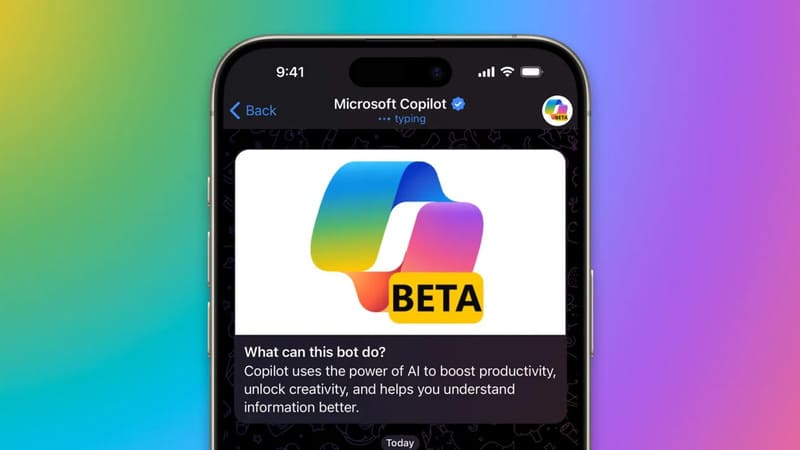
Benefits of Copilot on Telegram

How to use Copilot on Telegram

Step 1: Open the Telegram app/website on your phone or PC and log in to your account.

Step 2: Search for 'Microsoft' or 'Copilot' and then click on the Microsoft Copilot (@CopilotOfficialBot) result displayed on the screen.
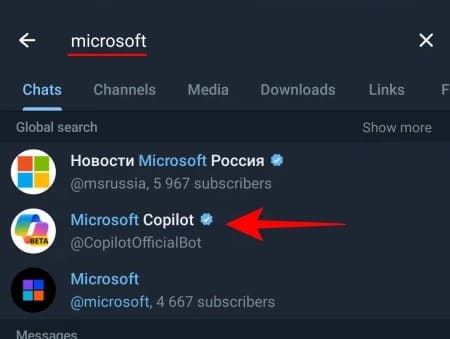
Click on the Microsoft Copilot result (@CopilotOfficialBot)

Or you can quickly click on the Copilot for Telegram page HERE > Click Try Now.

Click Try Now
Click Try Now

Step 3: Click Start > Click 'I accept' to agree to the terms.
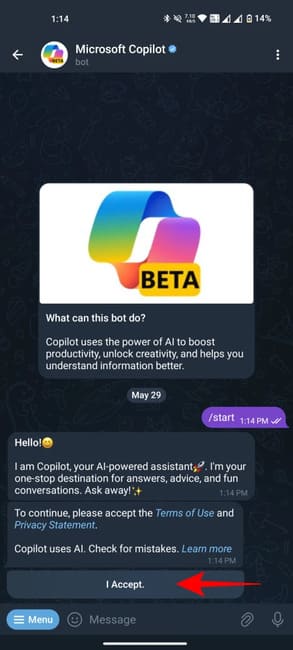
Click 'I accept'
Click 'I accept'

Step 4: Click 'Send my mobile number' to verify the phone number.

Step 5: Click 'Share contact' to confirm.
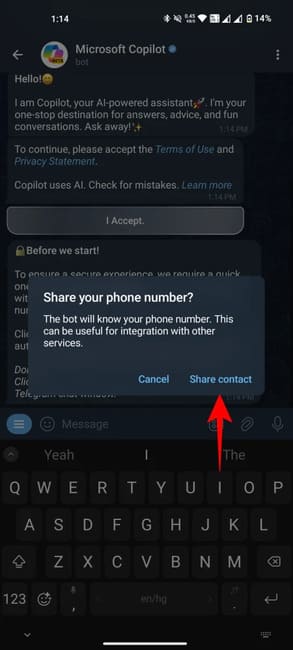
Click 'Share contact' to confirm

Once you're set up, you can start chatting with Copilot. The bot will suggest some topics to start with. You can choose from these suggestions or ask your own questions. Copilot will provide detailed answers, with reference links and Bing site suggestions.
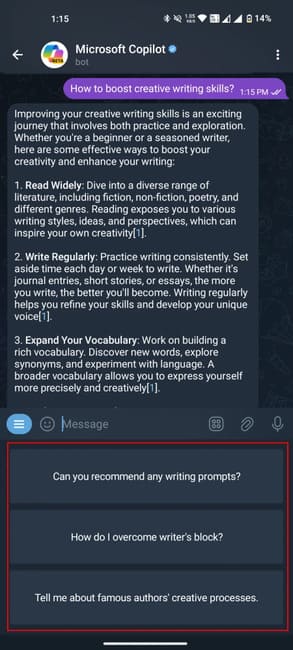
Start chatting with Copilot on Telegram

Popular Slash commands

Copilot supports Telegram slash commands, including:

  • Invite friends: /share
  • Restart the conversation: /restart
  • See function: /ideas

You can also find Slash commands by clicking the Menu button.
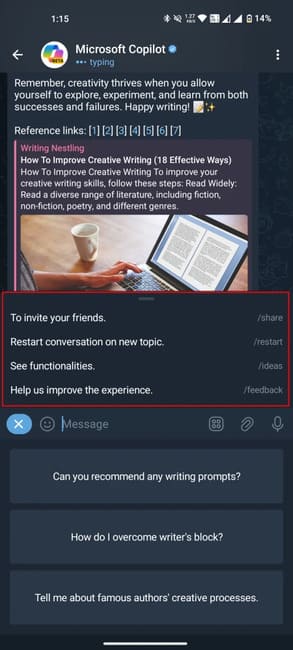
Popular Slash commands

Copilot limitations on Telegram

  • Only reply in text, no support for creating images like on the web.
  • Only deployed in regions such as the US, UK, and Asian countries. The system will automatically block bot access if it identifies a phone number from Europe.
  • The different response modes (Creative, Balanced and Precise) are not available for switching like when using Copilot on other platforms.
  • The number of messages sent daily is limited, not exceeding 30 messages.
Copilot limitations on Telegram

Epilogue

So, we have learned together how to use it Copilot on Telegram. With the simple steps presented, you can easily turn Telegram into an indispensable AI assistant in your daily life. Good luck!


Tags: CopilotInstructionsTelegram
Previous Post

Best Game Torrent Websites

Next Post

How to fix VNeID error message “Your device is not secure…”

AnonyViet

AnonyViet

Related Posts

TruyenDrive: Turn Google Drive into a professional manga reader
Software

TruyenDrive: Turn Google Drive into a professional manga reader

May 31, 2026
How to extract text from photos using Zalo is super simple
Software

How to extract text from photos using Zalo is super simple

May 29, 2026
HONOR 600 in hand – High-end design, 200MP camera, not cheap price
Software

HONOR 600 in hand – High-end design, 200MP camera, not cheap price

May 28, 2026
Instructions for getting 4 months of Adobe copyright for free
Software

Instructions for getting 4 months of Adobe copyright for free

May 28, 2026
The truth about the 7,000 mAh battery on Xiaomi 17T Pro: What benefits do users get?
Software

The truth about the 7,000 mAh battery on Xiaomi 17T Pro: What benefits do users get?

May 28, 2026
Instructions on how to turn text into stickers on Gboard
Software

Instructions on how to turn text into stickers on Gboard

May 26, 2026
Next Post
How to fix VNeID error message “Your device is not secure…”

How to fix VNeID error message "Your device is not secure..."

0 0 votes
Article Rating
Subscribe
Login
Notify of
guest

guest

0 Comments
Oldest
Newest Most Voted
Inline Feedbacks
View all comments

Recent News

How to record reaction videos with Android phones, no app needed

How to record reaction videos with Android phones, no app needed

June 1, 2026
Instructions on how to get Google AI Pro 1 year for free for new accounts

Instructions on how to get Google AI Pro 1 year for free for new accounts

June 1, 2026
Top free AI tools to help write, test and optimize content

Top free AI tools to help write, test and optimize content

June 1, 2026
TruyenDrive: Turn Google Drive into a professional manga reader

TruyenDrive: Turn Google Drive into a professional manga reader

May 31, 2026
How to record reaction videos with Android phones, no app needed

How to record reaction videos with Android phones, no app needed

June 1, 2026
Instructions on how to get Google AI Pro 1 year for free for new accounts

Instructions on how to get Google AI Pro 1 year for free for new accounts

June 1, 2026
Top free AI tools to help write, test and optimize content

Top free AI tools to help write, test and optimize content

June 1, 2026
AnonyViet - English Version

AnonyViet

AnonyViet is a website share knowledge that you have never learned in school!

We are ready to welcome your comments, as well as your articles sent to AnonyViet.

Follow Us

Contact:

Email: anonyviet.com[@]gmail.com

Main Website: https://anonyviet.com

Recent News

How to record reaction videos with Android phones, no app needed

How to record reaction videos with Android phones, no app needed

June 1, 2026
Instructions on how to get Google AI Pro 1 year for free for new accounts

Instructions on how to get Google AI Pro 1 year for free for new accounts

June 1, 2026
No Result
View All Result
  • Home
  • News
  • Software
  • Knowledge
  • MMO
  • Tips
  • Security
  • Network
  • Office

wpDiscuz
0
0
Would love your thoughts, please comment.x
()
x
| Reply