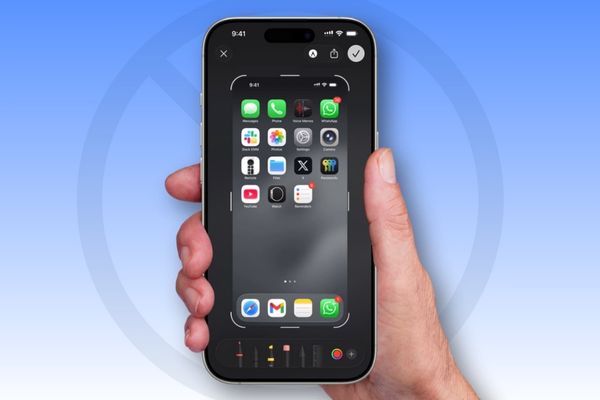
Turn off the iPhone screenshot As the need of many users after updating to the iOS 18 version. Instead of displaying a compact thumbnail at the corner of the screen as before, now every time you take a picture, the image automatically zoomed in the screen causes many troubles. Do not worry, this article Anonyviet will show you the extremely simple way to bring everything back.
| Join the channel Telegram belong to Anonyviet 👉 Link 👈 |
Why does screenshots automatically open the screen?
On versions from iOS 17 onwardsscreenshoting is a seamless experience: the photo will be reduced into a thumbnail in the lower left corner, allowing you to touch to edit or swipe away to skip. However, with the update iOS 18Apple has changed this mechanism.
Now, every screenshot will be defaulted to open in the full screen view. This change may be helpful for fast editing or using image lookup features (Visual look up), but becomes a big barrier. It interrupts the process when you need to take a lot of photos in a row or want to quickly share a picture without extra operation.
Very fortunately, Apple Understand this inconvenience and have provided an option for you to return to the familiar operating mechanism.
Instructions on how to turn off the iPhone screenshot
You can completely control the display of screenshots with just a few simple steps in the settings.
- Open application Settings On iPhone> roll down and select items General.
- Find and click on the line Screen Capture. Here, you will see an option is Full-Screen Previews. Cheat the switch next to this item to the position Turn off.
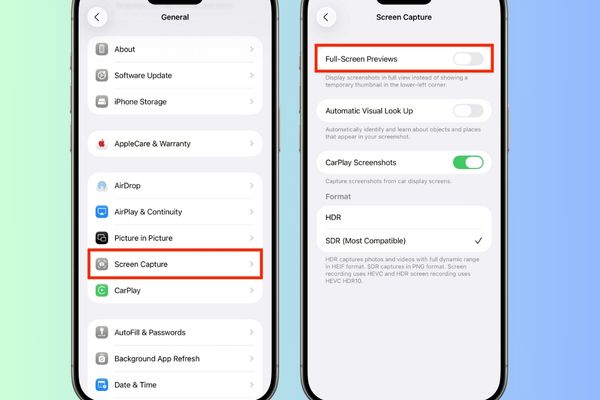
Just as simple as that! This settings will be applied immediately to all the next screenshots. To make sure everything has worked as you want, try taking a screenshot to check.
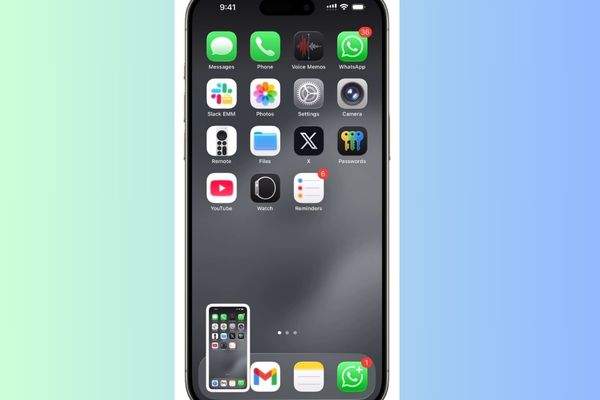
Now, instead of the full screen editing interface, you will see a familiar small thumbnail appearing in the lower left corner. This miniature image will display in the range 3 seconds Before automatically surfing from the screen and is saved to the photo application (Photos).
Conclusion
With just a few simple steps, you can Turn off the iPhone screenshot success. Now, you can freely take a lot of continuous photos without interrupting, returning to the familiar experience and inherent efficiency. Please share this helpful tip with your friends and relatives!