

Each network-connected device has a different MAC Address. MAC Address is a series of numbers that identify the device and no device has the same MAC. In network administration, MAC Address is often used in IP assignment and device management. One of the common examples is configuring a Wifi Router to only allow devices with the MAC address you allow to access the network. This article will guide you through the Instructions for Fake MAC Address – Fake MAC Address on Windows and MAC OS.
| Join the channel Telegram belong to AnonyViet 👉 Link 👈 |
Like making a fake ID card, your network card will have the MAC of another computer. You can Fake the MAC of the computer that accesses the Internet to your MAC. From there you can access the Internet freely.
Fake Mac Address on MAC OS
You can use LinkLiar on macOS…..Mojave, because Catalina causes some slightly annoying issues. So to check that LinkLiar Does it run well on Catalina, I tested it on macOS Catalina installed on Linux.
LinkLiar runs on macOS Sierra and above and there are basically 2 ways to install it:
- You can describe the zip file here, extract it and copy it to the /Applications folder.
- You can install it via Homebrew:
brew cask install linkliar

Once installed, open LinkLiar, click the app icon in the menu bar and select “Authorize“.
You will need to enter your computer Password.
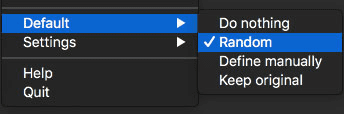
On first run, LinkLiar will not do anything. You will need to configure it to your liking. If you just want to use it and don’t care about anything else, go to the default and change it to random. But it would be a waste to ignore the other features:

- Do nothing – LinkLiar will not touch your MAC address.
- Random – Your MAC address will be randomly selected.
- Define manaually – You define the disk only MAC randomly.
- Keep original – It will reset your MAC address to original.
- Default – You set the default state. For example, if your default state is “Random” and you switch from Wi-Fi to ethernet, LinkLiar will automatically randomize the MAC address when you connect to ethernet.
Now let's see what the Settings section has to offer:
- Allow Rerandomization – Allows LinkLiar to randomize the MAC address every time you log out or put the MAC to sleep.
- Run in Background – If enabled, when you exit LinkLiar, the app will not actually exit and will be running in the background.
- Anonymize Logs – If you need to share your files, this option will allow you to do so without revealing your MAC address. You can view the logs by opening a terminal and typing:
/Applications/LinkLiar.app/Contents/Resources/logs
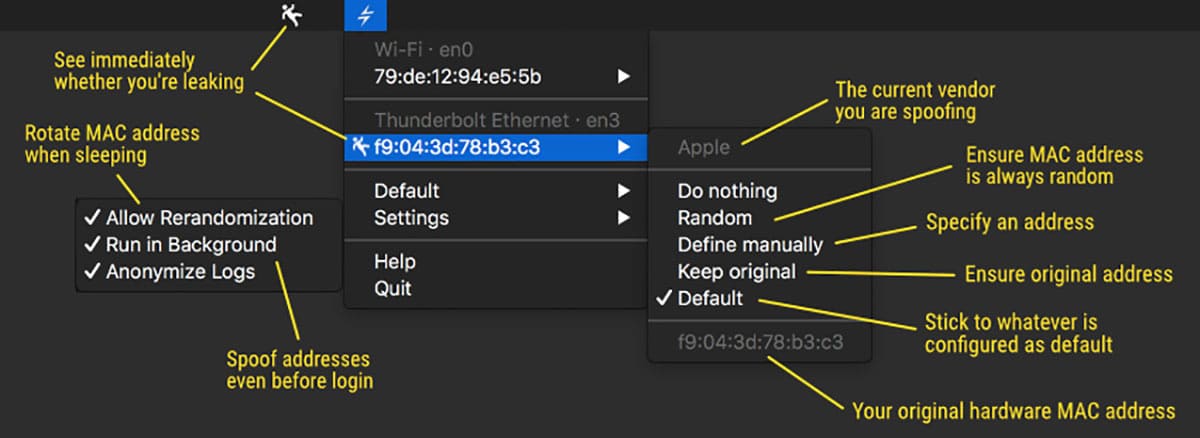
A few notes:
– When your Wi-FI is disabled, you cannot change the MAC.
– If you change the MAC while the interface is connected, you will lose connection quickly.
– If you quickly close and open your MacBook, the MAC address may change while the Wi-Fi connection is still there and you will lose the connection.
– Whenever you successfully change your MAC, your system preferences will still show the original MAC hardware address. This is normal and your actual network traffic using the new MAC has changed.
– Selecting “random vendor” will not be feasible for all vendors, some vendors popular.
– Macbooks 2018 and later generations cannot change MAC, because of these Reason unknown. You know, protecting user privacy, it's at the core of Apple…blah…blah or whatever bullshit Tim Cook says.
Change MAC Address on Windows
Fake MAC Address on Windows is much simpler than MAC OS. There are many software that help you change the MAC address of the network card. But the most famous is still TMAC. With the latest version TMAC supports IPv6. The features of TMAC are as follows:
- Automatic Update feature when new version is available.
- Download the latest network card vendor list (OUI) from IEEE.org .
- Quickly convert network configuration from IPv4 to IPv6 and vice versa.
- Command line options with full software functionality available. You can select a preset from the specified preset file to apply directly.
How to use TMAC to change MAC address
First you need Download TMAC latest and install on computer.
Step 1: You see a table listing all network cards on your computer.
Step 2: Select the Network Card you want to change the MAC Address for. You will get the details of your selection below.
Step 3: In tab Informationfind frame Change MAC Address. Enter the new MAC address in the field and click Change now!.
You can click the button Random MAC Address to fill in a randomly selected MAC address from the available vendor list.

Restore: To restore the original MAC address of the Network Card, select the Network Card, click Restore Original in the Change MAC Address frame.
NOTE: This tool cannot change the MAC Address of Microsoft Network Bridge. Network Bridge will automatically use the original MAC address of the first NIC added to the bridge with the first octet of the MAC address set to 0x02.









