• Home
  • News
  • Software
  • Knowledge
  • MMO
  • Tips
  • Security
  • Network
  • Office
AnonyViet - English Version
  • Home
  • News
  • Software
  • Knowledge
  • MMO
  • Tips
  • Security
  • Network
  • Office
No Result
View All Result
  • Home
  • News
  • Software
  • Knowledge
  • MMO
  • Tips
  • Security
  • Network
  • Office
No Result
View All Result
AnonyViet - English Version
No Result
View All Result

Instructions for Fake IP on computer without software

AnonyViet by AnonyViet
February 4, 2024
in Tips
0

For today's network users, Fake IP seems quite familiar. Sometimes you need to change or spoof your IP address for work. Normally we will use software to support this work. But today I would like to share with you how to Fake IP without using software.

Join the channel Telegram belong to AnonyViet 👉 Link 👈

Using 3rd party software to support Fake IP?

For me, this is not a very optimal and effective method? Because when using the software, you have to depend on a third party. Good Fake IP software often requires a fee to be used, so perhaps this is not an option for our students.

Another thing is that you will waste computer resources to install and use the software. There is also the risk of being infected with viruses from fake software with malicious code inserted. That is why you should be careful and consider choosing carefully when using 3rd party software.

Instructions for Fake IP without software

You can completely fake your IP address with the tips I show below. We're going to use something quite familiar called Proxy. Please follow the instructions below to Fake IP. First, please access Visit the website according to the link below to get quality IP and Proxy information.

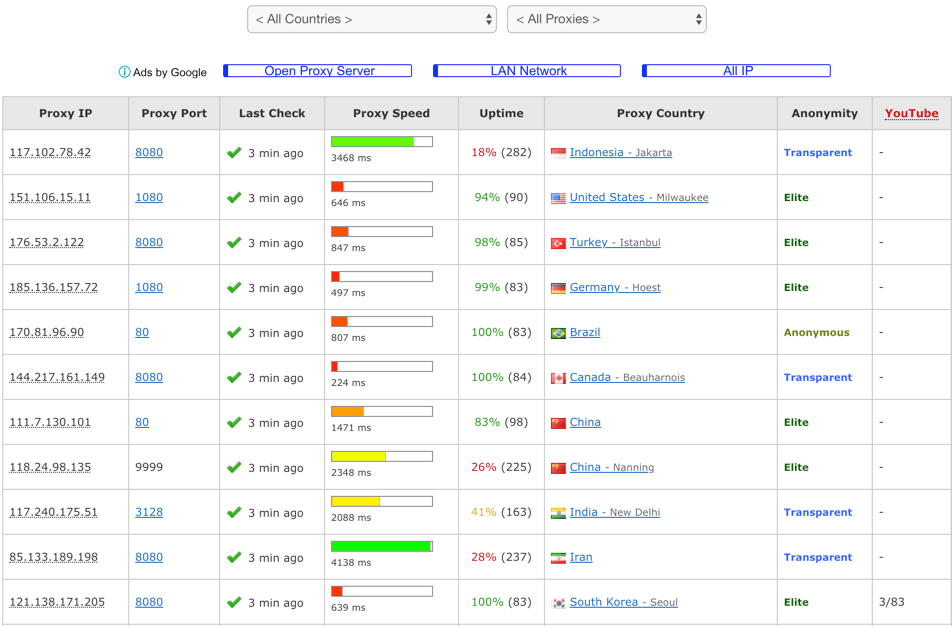
Here, you will see a very large and large data table listed.
Instructions for Fake IP on computer without software 7

At the top there will be a selection box so you can filter by the country you want. Now choose the country where you want to Fake IP (in each country there will be specific regions). In the example in this article, I will choose an IP in Vietnam for familiarity.

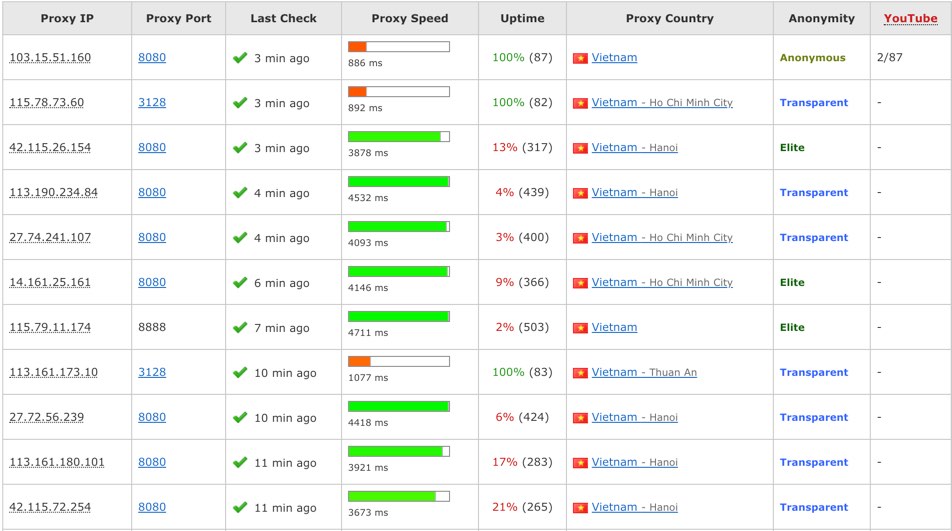
Now I will filter out IPs operating in Vietnam.
Instructions for Fake IP on computer without software 7

Instructions for Fake IP on computer without software 9

Next we will choose the address Proxy IP and Proxy Port in the first two columns of the table to use.

  • Proxy Speed will indicate the transmission speed.
  • Uptime is a measurement of data upload time and server response speed.
  • Anonymous is the level of security (anonymity) of the Proxy with different levels.

Choose the Proxy you feel most comfortable with and then use it according to the instructions below. Remember to save Proxy IP and Proxy Port selected for short-term use.

Use Proxy to Fake IP

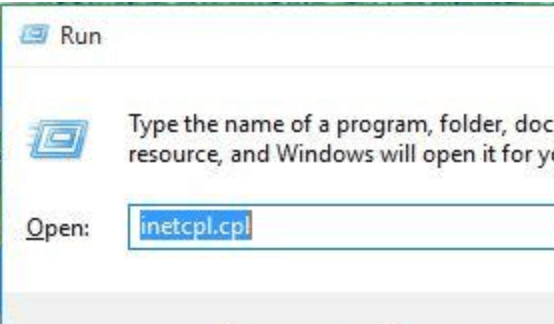
Use key combinations Windows + R to open the dialog box Run and type and keywords inetcpl.cpl
Instructions for Fake IP on computer without software 10

Then Press Enter.

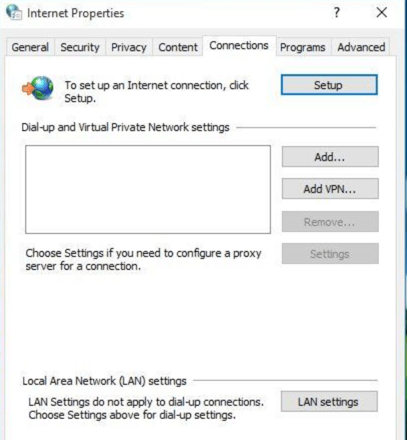
Next switch to Tab Connections -> select LAN Settings to enter network settings.
Fake IP

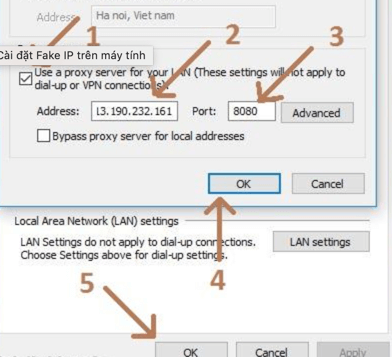
After entering LAN Settingswe proceed Fake IP by following the steps in the image below one by one.

  1. Select to use Proxy Server.
  2. Enter the Proxy IP address you selected earlier.
  3. Enter the selected Proxy Port.
  4. Click OK in the settings panel to save the settings.
  5. Click OK in the main panel to apply the settings.
Instructions for Fake IP on computer without software 11

You can check whether the IP is Fake or not at the website below.

https://www.whatismyip.com

The article scored: 5/5 – (100 votes)

Previous Post

Control iPhone iPad with head and facial expressions – Interesting and useful feature

Next Post

How to create QR images with AI on MoMo to receive lucky money in 1 minute

AnonyViet

AnonyViet

Related Posts

How to add sliders to Facebook Stories to easily rewind videos
Tips

How to add sliders to Facebook Stories to easily rewind videos

April 21, 2026
How to change the default font on Windows 10
Tips

How to change the default font on Windows 10

April 13, 2026
5 tips for using a Browser to replace an App (helps save RAM, time and money)
Tips

5 tips for using a Browser to replace an App (helps save RAM, time and money)

April 13, 2026
How to make funny MeMe photos without Photoshop within 10 seconds
Tips

How to make funny MeMe photos without Photoshop within 10 seconds

April 11, 2026
How to quickly design your own Logo without Photoshop
Tips

How to quickly design your own Logo without Photoshop

April 10, 2026
How to convert Website into App on Windows
Tips

How to convert Website into App on Windows

April 9, 2026
Next Post
How to create QR images with AI on MoMo to receive lucky money in 1 minute

How to create QR images with AI on MoMo to receive lucky money in 1 minute

0 0 votes
Article Rating
Subscribe
Login
Notify of
guest

guest

0 Comments
Oldest
Newest Most Voted
Inline Feedbacks
View all comments

Recent News

How to install the cute Bongo Cat mouse pointer for Windows

How to install the cute Bongo Cat mouse pointer for Windows

April 29, 2026
Tips for pinning the step counter to the iPhone screen to monitor your health

Tips for pinning the step counter to the iPhone screen to monitor your health

April 28, 2026
How to turn off password suggestions on iPhone: Prevent Safari from auto-filling passwords

How to turn off password suggestions on iPhone: Prevent Safari from auto-filling passwords

April 27, 2026
Instructions for looking up prescriptions on VNeID instead of paper medical books

Instructions for looking up prescriptions on VNeID instead of paper medical books

April 26, 2026
How to install the cute Bongo Cat mouse pointer for Windows

How to install the cute Bongo Cat mouse pointer for Windows

April 29, 2026
Tips for pinning the step counter to the iPhone screen to monitor your health

Tips for pinning the step counter to the iPhone screen to monitor your health

April 28, 2026
How to turn off password suggestions on iPhone: Prevent Safari from auto-filling passwords

How to turn off password suggestions on iPhone: Prevent Safari from auto-filling passwords

April 27, 2026
AnonyViet - English Version

AnonyViet

AnonyViet is a website share knowledge that you have never learned in school!

We are ready to welcome your comments, as well as your articles sent to AnonyViet.

Follow Us

Contact:

Email: anonyviet.com[@]gmail.com

Main Website: https://anonyviet.com

Recent News

How to install the cute Bongo Cat mouse pointer for Windows

How to install the cute Bongo Cat mouse pointer for Windows

April 29, 2026
Tips for pinning the step counter to the iPhone screen to monitor your health

Tips for pinning the step counter to the iPhone screen to monitor your health

April 28, 2026
No Result
View All Result
  • Home
  • News
  • Software
  • Knowledge
  • MMO
  • Tips
  • Security
  • Network
  • Office

wpDiscuz
0
0
Would love your thoughts, please comment.x
()
x
| Reply