Using files autorun.inf to run auto disk CD when inserted into the drive can help computer users save time when having to find the right openers, or it is also pre-configured at the user’s discretion.
| Join the channel Telegram belong to AnonyViet 👉 Link 👈 |
It will create a lot of convenience for customers if you are a business, want to send products as promotional CDs containing PDF, HTML, SWF files or presentations etc…. Or simply give your friends a piece of music. Which when they open it up it will automatically start without them having to try to find the right open file.
There are many software to help you create Autorun for disc CD/USB with a very user-friendly interface. File Autorun.inf will launch the file exe content prepared by you. However, within the scope of this article, you can create file Autorun.inf for disc CD/USB without those complicated tools. What you’ll need is a regular text editor and burning software.
1.Create Autorun for installing a program
Perhaps putting the CD / USB in the drive, waiting for about 5-10 seconds, will see the Setup.exe / Install.exe processes launch is a familiar image to all of us. Programming the initial autorun software CD makes program installation easier and quicker.
Steps to take
– Open Notepad by going to Start -> Run type “ notepad “
– When the notepad editor appears, type the following lines in:
[autorun]
open=Setup.exe
icon=Setup.ico
– Save that text file with the name: Autorun.inf (Note, when choosing to save the file, the “Save as type” below select “All files”) and files Autorun.inf will be in the root directory of the CD
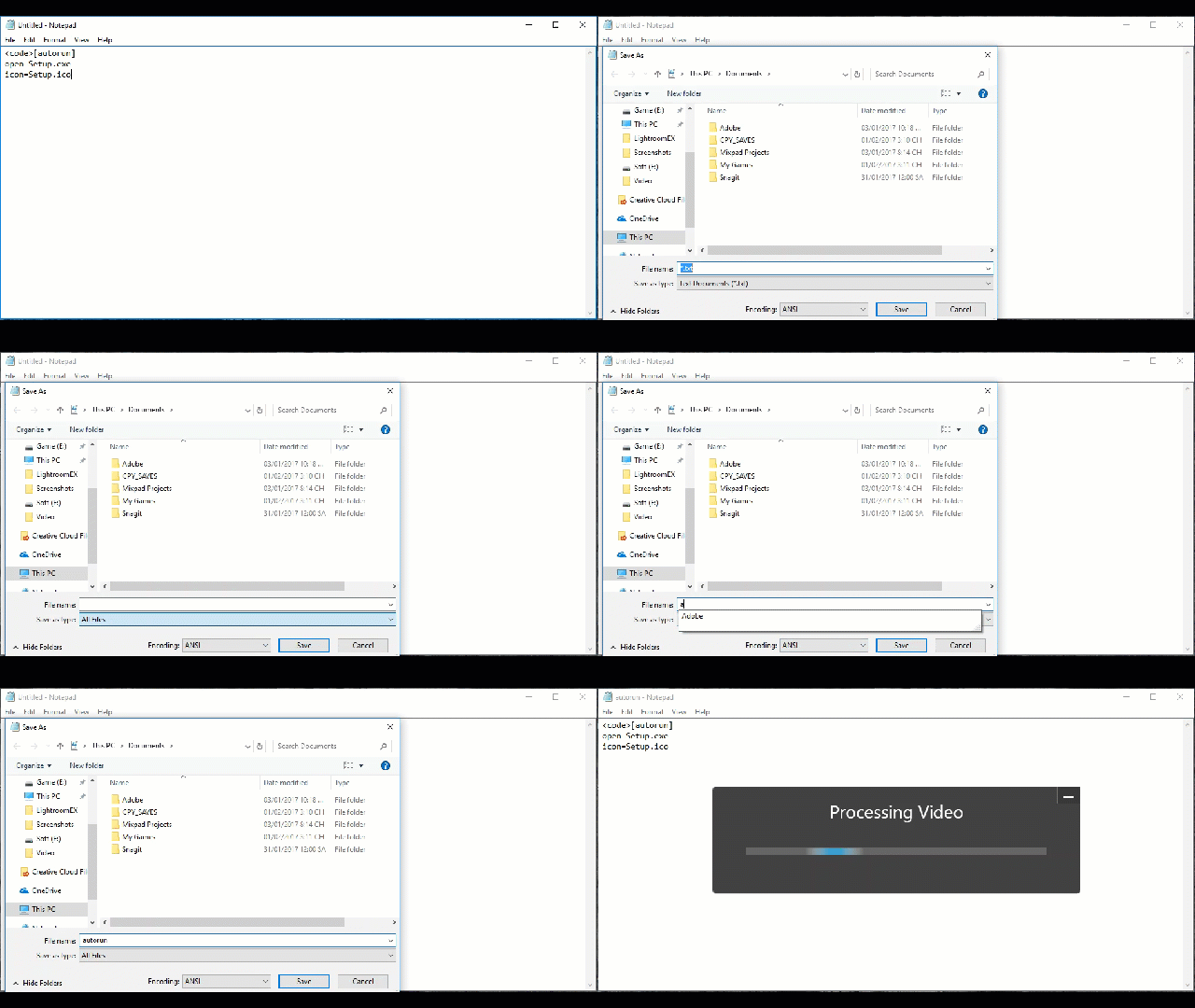
Here: Setup.exe is the name of the program you need to run and Setup.ico is the icon of that program. File *.ico It’s just a makeup feature, so yes or no. When there is no file Setup.ico in the CD folder, you don’t need it either icon=Setup.ico again.
2. Create Autorun for any file format
Your needs should not stop at creating Autorun for program installation, but can be any file format for conferences, corporate advertising, etc. In that case, you do as follows:
Also in the text editor – notepad, type the following content:
[autorun]
ShellExecute=xxxx.pdf
In there: xxxx is the file name you want to run Autorun
pdf is the file format, you can replace it with htm, ppt, swf,… or whatever file format you want.
Sometimes you see some CDs/USBs running Autorun through a file Batch(.*bat)in this case, the syntax is also very simple.
First you still create a script file inf with the same structure as above, but this time you need 1 more file *.bat. This file is responsible for activating the program to run.
Open Notepad and type the following:
[autorun]
open=autorun.bat
Note that the file name is “Autorun.inf“
Continue to open Notepad, type the following content
@echo Loading CD
@start Westlife.swf
@cls
@exit
Save with name: Autorun.bat
Suppose here I want to run a flash file named: Westlife, SWF file format. You should note that you should put 3 files: Autorun.bat, Autorun.inf, the program you want to run (specifically, Westlife.swf) in the same root directory in the CD.
3.Create Autorun for multiple files to run at the same time
This situation can be easily understood through the following example, you want to simultaneously when a CD runs Autorun, an image of a web page is displayed in the form of Html (index.htm page), a music track opens and the program is displayed. Acobat Reader will be installed simultaneously on the computer, can all programs run Autorun completely? this is completely doable, in theory it is possible to run “n” programs at a time, not just 3 programs as the example shows.
Here’s how to do it:
– You also open a text editor, the content is as follows:
[Autorun]
open=AutoRunPro.exe

[AutorunPro]
; Day la 1 vai vi du ve tap tin chay.Ban co the tuy bien theo yeu cau.
Run1=hoang/index.htm
Run2=thu2.htm
Run3=Calc.exe
Run4=ResourceHacker.zip
Run5=toiuu.pdf
Here Run1, Run2… RunN are the programs you want to run Autorun, the above illustration assumes running 5 different programs, in addition you can run as many programs as you want. Note that these programs should be in the same folder containing Autorunpro.exe and Autorun.inf.
File AutorunPro.exe you can download HERE
So you can manually create a CD / USB that runs automatically according to your needs without any complicated programs. And now try to use it to make a music CD for your friends.
AnonyViet Wish You Success !!