• Home
  • News
  • Software
  • Knowledge
  • MMO
  • Tips
  • Security
  • Network
  • Office
AnonyViet - English Version
  • Home
  • News
  • Software
  • Knowledge
  • MMO
  • Tips
  • Security
  • Network
  • Office
No Result
View All Result
  • Home
  • News
  • Software
  • Knowledge
  • MMO
  • Tips
  • Security
  • Network
  • Office
No Result
View All Result
AnonyViet - English Version
No Result
View All Result

Install TVOS 26 Developer Beta on Apple TV to sing karaoke with iPhone

AnonyViet by AnonyViet
June 18, 2025
in Knowledge
0

Are you a technology believers who always desire to touch the latest features from Apple? If the answer is yes, then work Install TVOS 26 Developer Beta on Apple TV It is the door that takes you to the future of home entertainment. The Beta version for this developer allows you to discover breakthrough improvements before they are officially released in the fall.

Join the channel Telegram belong to Anonyviet 👉 Link 👈

What is new TVOS 26 Developer Beta?

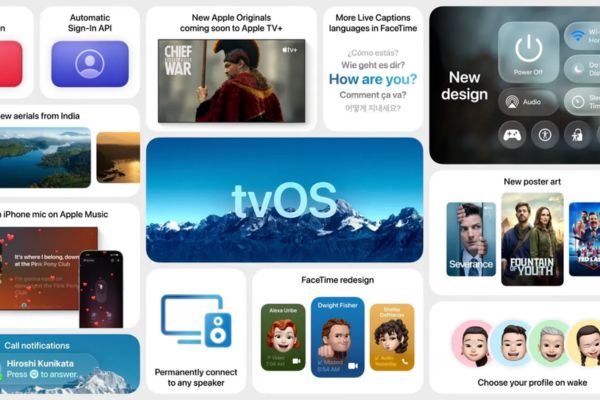
Each new TVOS version brings new breeze to the ecosystem Apple TVand TVOS 26 is no exception. This is not only a regular update, but a big step forward in the interface and features, promising to enhance your entertainment experience.
Why should you experience TVOS 26 Developer Beta?

The most notable highlight is Apple’s all -new “Liquid Glass” design language. Imagine a user interface with delicate reflection elements, creating a more shiny, deep and modern feeling than ever. All interactions, from surfing applications to menu navigation, becomes smoother and more vivid.

Besides, TVOS 26 also offers an extremely attractive feature for music followers: Turn the iPhone into a microphone Professional for karaoke sessions on Apple Music Sing. Now, friends will become more exciting and fun. In addition, this version also contains many improvements in performance and other small features waiting for you to explore.
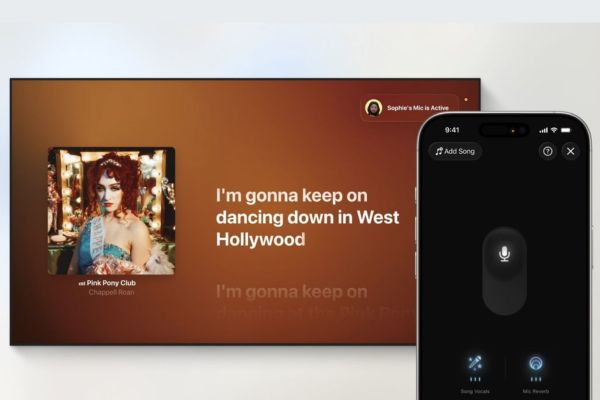
Turn the iPhone into a professional microphone

Things to note before starting

Before going into the instructions for installing TVOS 26 Developer Beta on Apple TV, there are some important things you need to know.

TVOS 26 supports machine models Apple TV HD (launched in 2015) and all samples Apple TV 4K (from 2017 onwards). If you are not sure about your device model, go to Settings> General Settings> Introduction To check.

This is a beta version for developer (Developer Beta), not an official release. This means that the operating system may contain errors, causing lag, poor performance or problems compatible with some applications. Consider and take risks that your experience may not be completely stable.

If you are ready to accept small challenges in exchange for a big experience, let’s start!

Instructions for installing TVOS 26 Developer Beta on Apple TV

You do not need to connect to the computer or perform complex operations. Just follow the following steps right on Apple TV:

  • From the main screen of Apple TV, find and open the application Settings.
  • Move to System, then choose Software Update.
  • Here, wait a few seconds. You will see a new option that appears called Get beta updates. Click on it.
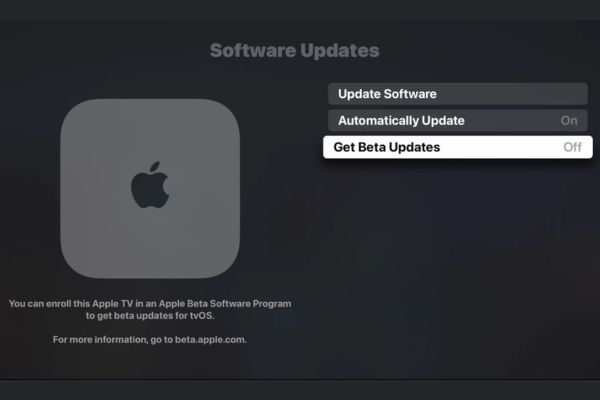
Select Get Beta Updates
  • A pop-up window will appear. Please choose TVOS 26 Developer Beta.
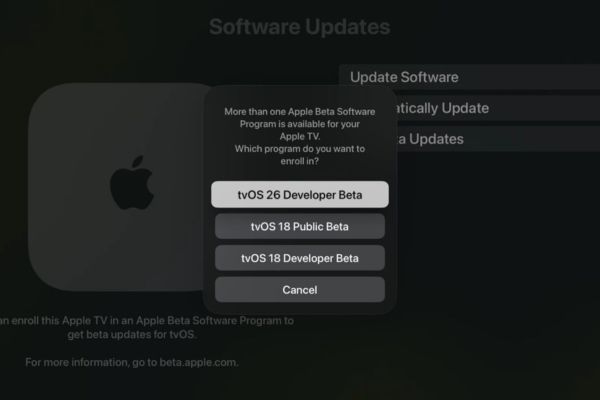
Select TVOS 26 Developer Bet

Note: When the Public Beta version is released around July, you can also choose it from this menu.

  • After selecting, click the button Download and Install.
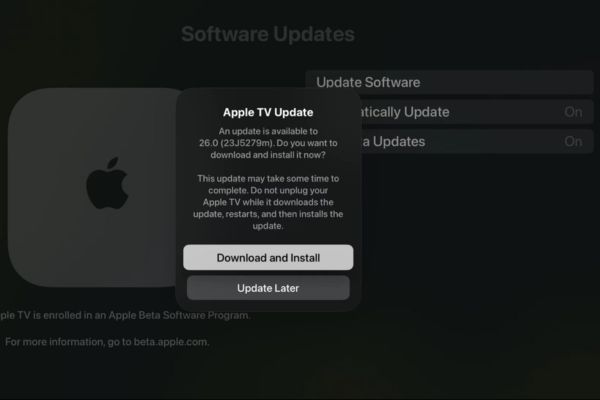
Click the Download and Install button

At this time, Apple TV will start the download process of TVOS 26 beta installation. You can continue using normal equipment while the download process takes place in the background. When the installation file is completed, Apple TV will automatically restart and proceed to install.
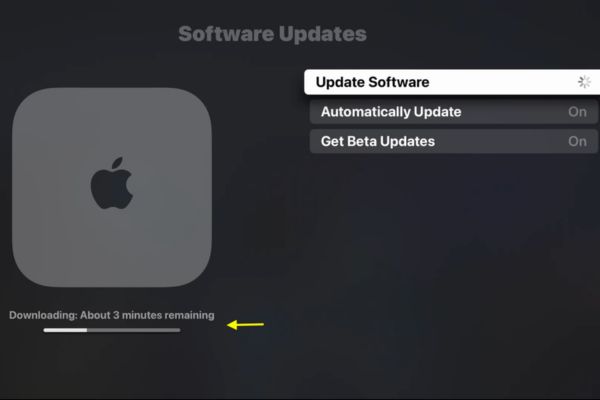
Apple TV will start the download process

What to do if you don’t see the beta update option?

Sometimes, the option “Receive Beta update” does not automatically appear. This happens because your Apple account has not been registered in Apple’s developer.

Please follow these steps:

  1. Use web browser on phones or computers, access THIS.
  2. Log in with the Apple ID account you are using on Apple TV.
  3. Follow the instructions to register for the Apple Developer Program (you can choose the free package).
  4. After successful registration, restart your Apple TV.
  5. Now, come back Settings> System> Software updateyou will definitely see the option to receive the beta update.
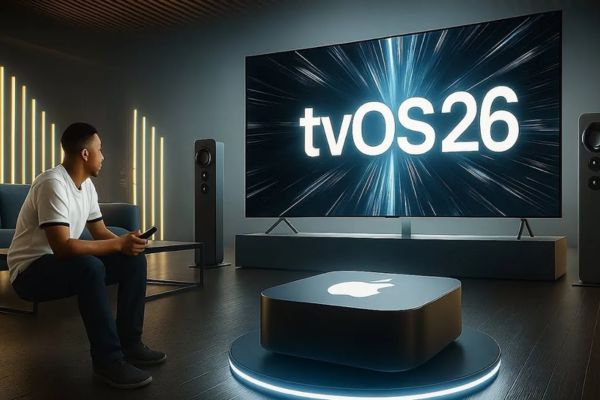
What to do if you don't see the beta update option?
What to do if you don’t see the beta update option?

How to return to the stable TVOS version

After a period of experience, if you feel the beta version is too many errors or simply want to return to stability, you can easily turn off the beta update mode.

  1. Enter Settings> System> Software Updates.
  2. Click on the item Get beta updates and choose Off.
Click the Get Beta Updates and select Off

Important note: This operation will not lower your equipment immediately. Instead, it will prevent Apple TV from receiving beta updates in the future. When Apple released the next stable TVOS version (for example, TVOS 26.0.1 or TVOS 26.1), your device will automatically download and install that version, bringing you back to the official update flow.

Conclude

Install TVOS 26 Developer Beta on Apple TV is an interesting experience for those who love technology and want to take one step ahead. Although there may be a few small errors, the exclusive features and the new interface you receive are absolutely worthy.


Tags: AppleBetaDeveloperinstalliPhonekaraokesingTVOS
Previous Post

From Ho Chi Minh City to London: How Global Investors Use Bow Miner to Efficiently Minine Cryptocurrencies

Next Post

How to lower the level from iOS 26 beta to iOS 18.5 does not lose data

AnonyViet

AnonyViet

Related Posts

How to check network speed on Apple TV when the image is jerky or lagging
Knowledge

How to check network speed on Apple TV when the image is jerky or lagging

June 3, 2026
How to turn off Gemini Nano on Chrome to free up 4GB of memory
Knowledge

How to turn off Gemini Nano on Chrome to free up 4GB of memory

May 30, 2026
How to turn on Voice Isolation, which helps eliminate noise when calling on iPhone
Knowledge

How to turn on Voice Isolation, which helps eliminate noise when calling on iPhone

May 27, 2026
How to transfer files between Windows and Mac over LAN
Knowledge

How to transfer files between Windows and Mac over LAN

May 26, 2026
Snapvie: Tool to download 8K YouTube videos, no installation required
Knowledge

Snapvie: Tool to download 8K YouTube videos, no installation required

May 24, 2026
How to create your own Video AI App to use Omni, Nano Banana without API Key
Knowledge

How to create your own Video AI App to use Omni, Nano Banana without API Key

May 23, 2026
Next Post
How to lower the level from iOS 26 beta to iOS 18.5 does not lose data

How to lower the level from iOS 26 beta to iOS 18.5 does not lose data

0 0 votes
Article Rating
Subscribe
Login
Notify of
guest

guest

0 Comments
Oldest
Newest Most Voted
Inline Feedbacks
View all comments

Recent News

How to check network speed on Apple TV when the image is jerky or lagging

How to check network speed on Apple TV when the image is jerky or lagging

June 3, 2026
Instructions on how to prevent acquaintances from seeing your Tiktok

Instructions on how to prevent acquaintances from seeing your Tiktok

June 2, 2026
How to record reaction videos with Android phones, no app needed

How to record reaction videos with Android phones, no app needed

June 1, 2026
Instructions on how to get Google AI Pro 1 year for free for new accounts

Instructions on how to get Google AI Pro 1 year for free for new accounts

June 1, 2026
How to check network speed on Apple TV when the image is jerky or lagging

How to check network speed on Apple TV when the image is jerky or lagging

June 3, 2026
Instructions on how to prevent acquaintances from seeing your Tiktok

Instructions on how to prevent acquaintances from seeing your Tiktok

June 2, 2026
How to record reaction videos with Android phones, no app needed

How to record reaction videos with Android phones, no app needed

June 1, 2026
AnonyViet - English Version

AnonyViet

AnonyViet is a website share knowledge that you have never learned in school!

We are ready to welcome your comments, as well as your articles sent to AnonyViet.

Follow Us

Contact:

Email: anonyviet.com[@]gmail.com

Main Website: https://anonyviet.com

Recent News

How to check network speed on Apple TV when the image is jerky or lagging

How to check network speed on Apple TV when the image is jerky or lagging

June 3, 2026
Instructions on how to prevent acquaintances from seeing your Tiktok

Instructions on how to prevent acquaintances from seeing your Tiktok

June 2, 2026
No Result
View All Result
  • Home
  • News
  • Software
  • Knowledge
  • MMO
  • Tips
  • Security
  • Network
  • Office

wpDiscuz
0
0
Would love your thoughts, please comment.x
()
x
| Reply