Shell Scripting is an open source computer program designed to be run by Unix/Linux shell. Shell Scripting is a program that writes a sequence of commands for the shell to execute. It can combine long and repetitive command sequences into a single and simple script that can be stored and executed at any time.
| Join the channel Telegram of the AnonyViet 👉 Link 👈 |
In this article, you will learn from the basics of Linux/Unix shell scripting to advanced concepts of Shell Scripting. The article is designed for beginners and experts who want to learn what is Shell Scripting? How shell scripting works, shell types and more.
What is Shell?
Shell is a UNIX term that refers to the interface between the user and the operating system service. The shell provides the user with an interface and accepts the commands the user enters into the system and executes those commands automatically, providing the results of the program in a shell script.
An operating system is made up of many components, but its two main components are:
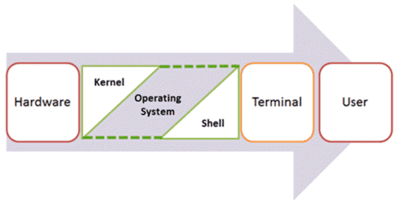
Kernel is the kernel of the computer. It enables the system to communicate between hardware and software. While the Kernel is the innermost part of the operating system, the shell is the outermost part.
The Linux shell takes input from the client side as a command, processes it, and then outputs the output. It is the interface through which the user can work on programs, commands and scripts. Shell is accessed by terminal.
When you run the terminal, the shell gives a command prompt (usually $), where you can type a command, which will then be executed when you press the Enter key. The output or result will then be displayed on the terminal.
The Shell wraps around the fragile interior of the Operating System, protecting it from accidental damage. Hence the name Shell.
Types of shells
There are two main types of shells in Linux:
- Bourne Shell: The prompt for this shell is $ and subshells include:
- POSIX shell also known as sh
- Korn Shell is also called sh
- Bourne Again Shell also known as bash (most common)
- C shell: The prompt for this shell is % and various types like
- C shell also known as csh
- Top C shell also known as tcsh
We will discuss shell scripting based on bash shell in this article.
How to write Shell Script in Linux/Unix
Shell Scripts are written using text editors. On a Linux system, open an editors program, open a new file to start typing a shell script or shell programming, then give the shell permission to execute the shell script and place your script where the shell can find.
Steps to create Shell Script:
- Create files with vi editor (or any other text editor). Name the script file with .sh . extension
- Start the script with #! /bin/sh
- Write a few lines of code
- Save the script file as filename.sh
- Execute the script file with the command bash filename.sh
“#!” is an operator called shebang that directs the script to the interpreter location. So if we use “#! /bin/sh”, the script will be redirected to bourne-shell.
Let’s create a small script:
#!/bin/sh
ls
Steps to create a Shell Script program in Linux/Unix:
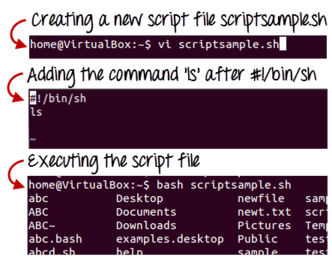
The ‘ls’ command is executed when we execute the sample.sh script.
Commenting is a very important element in any program. In shell programming, the syntax to add comments is, the content after the # will have no value, the purpose is to explain the author’s code.
#commentEg:
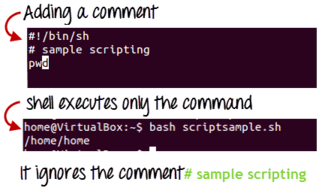
What is a variable in a shell?
As discussed earlier, variables store data in the form of characters and numbers. Similarly, shell variables are used to store information and they only work within the shell.
For example, create a shell variable and then print it out:
variable ="Hello"
echo $variable
Here is a small script that will use the variable:
#!/bin/sh
echo "what is your name?"
read name
echo "How do you do, $name?"
read remark
echo "I am $remark too!"
Steps to create and execute the script:
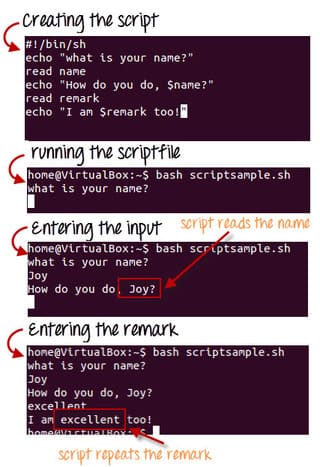
As you can see, the program has selected the value of the variable ‘name’ as ‘Joy’ and ‘remark’ as ‘excellent’.
This is a simple script. You can develop advanced scripts containing conditional statements, loops and functions. Shell Script will make your life and Linux administration easier.