Parents often manage their children accessing internet by seeing the browser history. But when they want people who do not know which website they have accessed, they often use an anonymous privacy mode (Incognito) to open the web. The anonymous mode is used to protect the privacy of the web surfers. Anonymous browser will not save cookies or browsing history. When you close the anonymous browser, history and cookies will automatically be deleted. You can still view web access history in anonymous mode. You can take advantage of the DNS mechanism on your computer to look up the websites that have been accessed on the browser.
|
Join the channel Telegram belong to Anonyviet 👉 Link 👈 |
See the websites accessed on anonymous
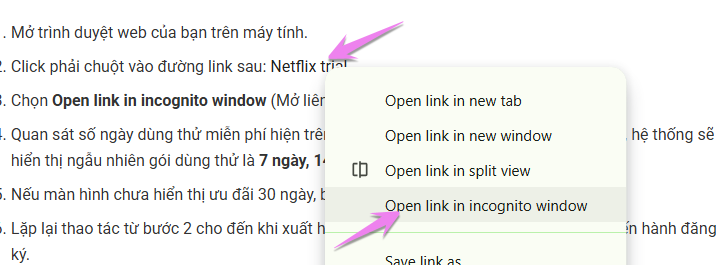
Open anonymous browser
You need to know, the anonymous mode is not completely anonymous. Although in private mode, browsing history will not be saved on the browser, on Windows, company server, ISP … or your own websites can still track your web browsing history. For example, you use Google to search and log in to Google with a private browser mode, previous searches are stored on the server but not in your browser history. Therefore, any seal you save while using a private mode will be stored on the server and you can access them even when you turn off your privacy browser. The safest way is to use VPN.
Anonymous browser or other names such as:
- Safari = Private Browsing
- Internet Explorer = Inprivate Browsing
- Microsoft Edge = Inprivate Window
- Google Chrome = Incognito Mode
- Firefox = private window
- Opera = private tab / private browsing
For chromium browsers, you open the anonymous browser with shortcuts Ctrl + Shift + N.
For Firefox, Edeg, use Ctrl + Shift + P.
See web access history in anonymous mode by DNS Cache
When accessing a web address, your computer will ask the way to the router, the router will ask the way to the Internet service provider, the Internet service provider will ask the road at a higher level. In the process of asking the road, there will be a service called DNS. The mission of DNS will resolve the domain name into an IP address. The resolution process will be temporarily saved in Windows (DNS Cache) so that when you visit the next time, you do not have to ask the road once half.
To see the web access history in anonymous mode, you need to display DNS cache. In DNS Cache will save all the website addresses you’ve ever visited in any browser. How to do it as follows:
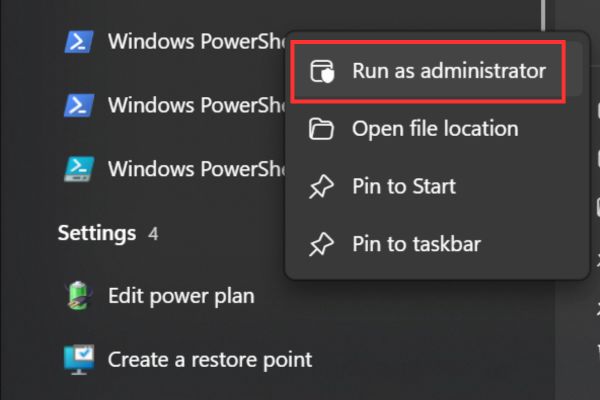
Step 1: Open CMD in Administrtor
Step 2: Type command: ipconfig /displaydns
In the CMD window will display a list of all websites you have accessed on your computer.

If the list is too long, you can export the file results by doing the following:
Type command: ipconfig /displaydns > C:\anonyviet.txt
In Drive C The file will appear anonyviet.txt Is the content of your web access history.

Delete web access history
Delete all the history accessed in the anonymous browser
To Delete DNS cache Where to store website query history, you open CMD typing instructions: ipconfig /flushdns
At this time, all the web history on Windows has been deleted. When you visit any website for the first time, will connect a little slower, because the cache has deleted and the DNS needs to query the address to save for the next time.

Delete all web access history on Chrome
When using a normal web surfing mode, Chrome will save all the websites you have accessed. There are 3 ways for you to open a history of access from Chrome:
- Press the key
Ctrl + H - Access to the address Chrome: // History/
- In 3 dots in the upper right corner, select History

The list of access websites will appear, you can choose any address to delete.

You can click on Clear Browsing Data To erase enhanced such as deleting all history, deleting cookies, deleting the saved password.

Software review web browsing history
To review the history of website access, in addition to the browser’s history function, you can use the 3rd party software. Although you do not see the web access history in the anonymous mode, the software is to help you arrange over time, website address, number of access times …
BrowsinghistoryView see the history of accessing all browsers
BrowsinghistoryView is a historical data reader of different web browsers (Internet Explorer, Mozilla Firefox, Google Chrome and Safari). The web browsing history list includes the following information: URL accessed, title, access time, visits, web browser and user records. BrowsinghistoryView Allows you to see the web browsing history of all user records in a running system, as well as to take the web browsing history from the external hard drive.
You can also export the web browsing history to CSV/Tab-Deliated/HTML/XML file from the user interface or from the command line.
Download BrowsinghistoryView

ChromehistoryView – See browsing history of the Chrome browser
ChromehistoryView is a small utility to read the historical data of the Google Chrome browser. The tool will display a list of all accessed websites. For each website that has been accessed, the following information will be displayed: URL, title, date/time of access, number of visits, the number of times the user accesses this address, Referrer and ID access.
You can choose one or more historical items and they become HTM /XML /CSV /text files or copy information into the temporary table and paste it into Excel.

Frequently asked questions
Is the anonymous mode (Incognito) really completely anonymous?
Are not. Anonymous mode does not save web browser history in the browser, but the Internet service provider (ISP) and websites can still track your activities.
How to see website access history when using anonymous mode?
You can see the history of access through the system’s DNS cache by command ipconfig /displaydns In Command Prompt (CMD) with admin rights.
How to completely erase access history, including history in DNS cache?
To delete DNS cache, use commands ipconfig /flushdns In CMD. To delete the browser history, use the browsing data to delete the browser data of the browser or specialized tools.