• Home
  • News
  • Software
  • Knowledge
  • MMO
  • Tips
  • Security
  • Network
  • Office
AnonyViet - English Version
  • Home
  • News
  • Software
  • Knowledge
  • MMO
  • Tips
  • Security
  • Network
  • Office
No Result
View All Result
  • Home
  • News
  • Software
  • Knowledge
  • MMO
  • Tips
  • Security
  • Network
  • Office
No Result
View All Result
AnonyViet - English Version
No Result
View All Result

How to update iOS 26 beta to try new features

AnonyViet by AnonyViet
June 11, 2025
in Software
0

Apple has just announced iOS 26 at the WWDC25 event, bringing a series of notable improvements such as smooth Liquid Glass interface, flexible customization and appearance of Apple Intelligence – the new generation artificial intelligence. If you are a technology believer and want to experience this version early, Anonyviet will guide in detail How to update iOS 26 beta Safe, fast on iPhone.

Join the channel Telegram belong to Anonyviet 👉 Link 👈

How to update iOS 26 beta super simple

To start the journey of experience iOS 26 Beta, you need to join the Apple Developer Beta program. This is a prerequisite to download and install the test version. Here are the specific steps:

Step 1: Open the browser, go to the link Join Developer Beta And log in with your Apple ID.

Step 2: Choose as shown> press Yes > Press Submit To complete.
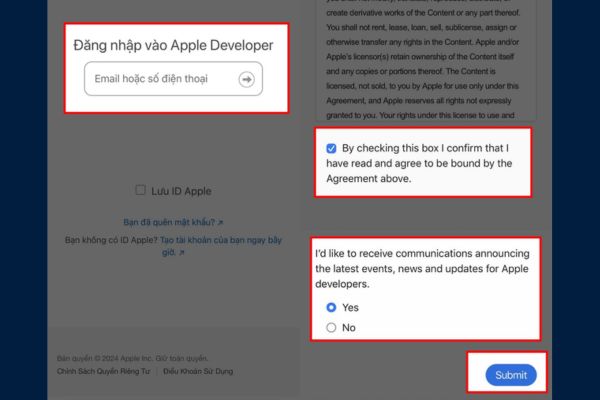
Join Developer Beta
Join Developer Beta

After successful registration, Apple will send confirmation notice via email. At this time, your iPhone is ready to receive iOS 26 beta updates.

The participation of this program is completely free and does not require you to be a professional developer. However, remember that beta versions may contain errors, so you should consider before installing.

After joining the Developer Beta program, you can proceed to install iOS 26 beta right on the iPhone. Follow the following steps to ensure the process goes smoothly:

Step 1: Open application Setting On iPhone> Select General installation > Software update.

Here, the system will check the updates available. If you have registered Beta, iOS 26 Developer Beta will appear in the list.
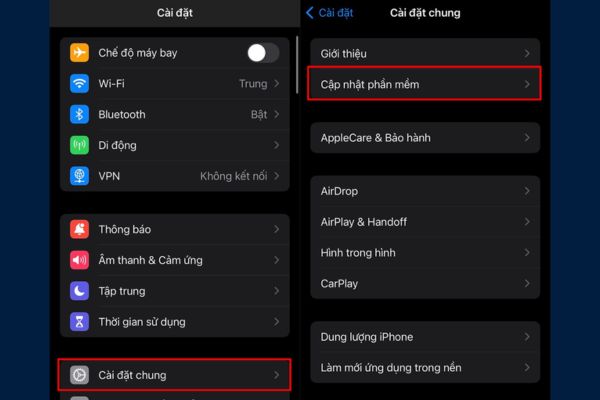
Select software update

Step 2: In the software update, click Beta update > Select iOS 26 Developer Beta From the list of available versions> go back to the screen first to start downloading.
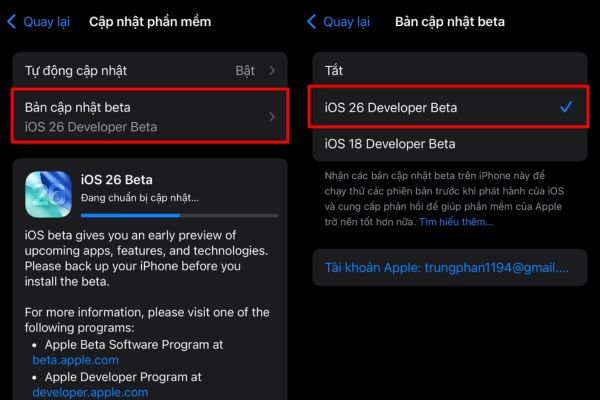
Select iOS 26 Developer Beta

Step 3: When iOS 26 beta displays, press Update now > Enter iPhone code if required.
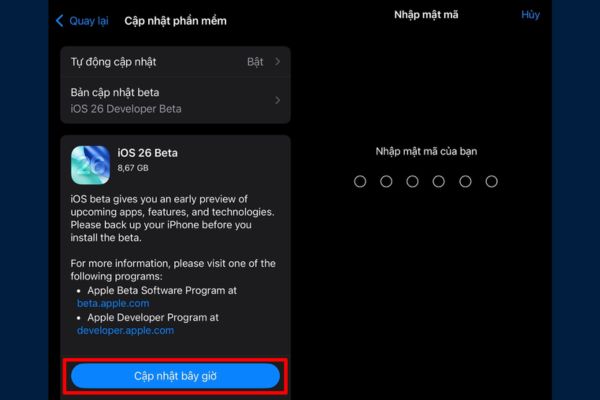
Click update now
Click update now

Make sure the iPhone is connected to a stable Wi-Fi and the battery is over 50% (or plugging in) to avoid interruption.

The download and installation process may be lost 10-30 minutes Depending on the network speed. Once completed, the iPhone will restart to apply the update.

Note: Before updating, back up data via iCloud or iTunes to avoid data loss risk in case of error occurred.

IPhone list support iOS 26

Not all iPhones can upgrade to iOS 26. Apple has announced a list of compatible devices, including:

  • iPhone 16 Series (iPhone 16, 16 Plus, 16 Pro, 16 Pro Max)
  • iPhone 15 Series
  • iPhone 14 Series
  • iPhone 13 Series
  • iPhone 12 Series
  • iPhone 11 Series
  • iPhone XS, XS Max, XR
  • iPhone SE (generations 2 and 3)

If you are using one of the above devices, you can experience iOS 26 beta. To check exactly, please enter Settings> General Settings> Introduction To confirm the model.
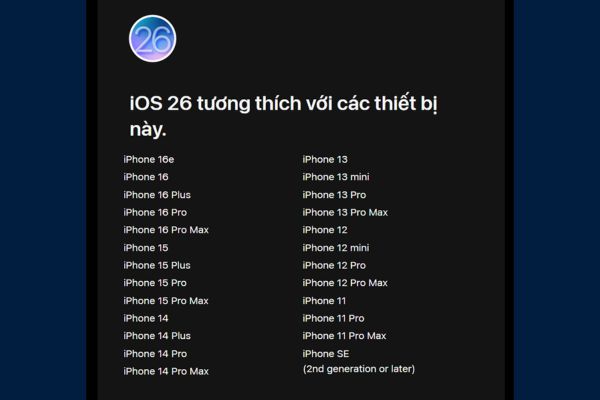
IPhone list support iOS 26

The highlights of iOS 26 beta

iOS 26 beta is not only a regular update but also brings breakthrough changes such as:

  • Liquid Glass interface: Smooth, visual design with vivid motion effects.
  • Apple Intelligence: Integrating AI helps optimize the user experience, from smart suggestions to handling tasks faster.
  • Advanced customization: Users can freely arrange the main screen, change the application icon and widget as they like.
  • Improve improvement: increase processing speed, extend battery life and improve multitasking.

However, because this is a test version, you may encounter some small errors such as incompatible applications or fast battery drain. If you use iPhone Make the main device, consider waiting for the official version.
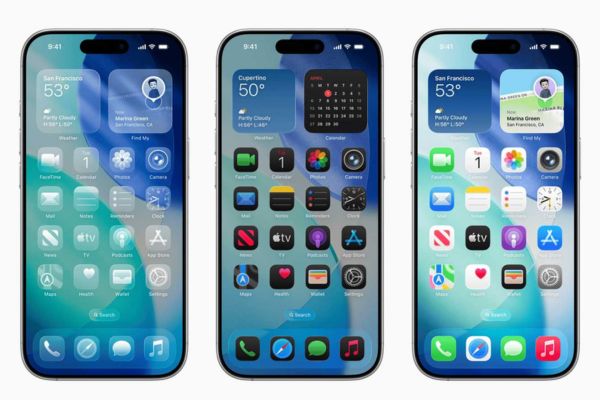
The highlights of iOS 26 beta

Conclude

How to update iOS 26 beta It is not complicated, but requires you to be careful in every step to avoid risks. With the new interface, outstanding AI features and unique customization, iOS 26 beta promises to bring a great experience for iPhone users. Check your device, join the Beta Developer program and start exploring today!


Tags: BetafeaturesiOSUpdate
Previous Post

8 free tools to security when programming software

Next Post

Guide to reducing transparency of Liquid Glass iOS 26

AnonyViet

AnonyViet

Related Posts

How to get 1 month of Super Duolingo for free
Software

How to get 1 month of Super Duolingo for free

February 13, 2026
Instructions to receive 9GB Data eSIM 4G for free
Software

Instructions to receive 9GB Data eSIM 4G for free

February 12, 2026
Instructions for setting up fake location on Zalo
Software

Instructions for setting up fake location on Zalo

February 8, 2026
Instructions for cloning Zalo groups super quickly
Software

Instructions for cloning Zalo groups super quickly

February 7, 2026
Share the latest iTop Easy Desktop PRO free key for 6 months
Software

Share the latest iTop Easy Desktop PRO free key for 6 months

February 6, 2026
Instructions for viewing lyrics without internet on Apple Music
Software

Instructions for viewing lyrics without internet on Apple Music

February 4, 2026
Next Post
Guide to reducing transparency of Liquid Glass iOS 26

Guide to reducing transparency of Liquid Glass iOS 26

0 0 votes
Article Rating
Subscribe
Login
Notify of
guest

guest

0 Comments
Oldest
Newest Most Voted
Inline Feedbacks
View all comments

Recent News

7 other features of USB you may not know

7 other features of USB you may not know

February 14, 2026
Instructions for creating a photo holding a QR code to receive super cute lucky money for Tet

Instructions for creating a photo holding a QR code to receive super cute lucky money for Tet

February 14, 2026
How to see the package Viettel is using to avoid losing money unfairly

How to see the package Viettel is using to avoid losing money unfairly

February 14, 2026
How to overclock RAM – Overlock RAM helps speed up faster

How to overclock RAM – Overlock RAM helps speed up faster

February 13, 2026
7 other features of USB you may not know

7 other features of USB you may not know

February 14, 2026
Instructions for creating a photo holding a QR code to receive super cute lucky money for Tet

Instructions for creating a photo holding a QR code to receive super cute lucky money for Tet

February 14, 2026
How to see the package Viettel is using to avoid losing money unfairly

How to see the package Viettel is using to avoid losing money unfairly

February 14, 2026
AnonyViet - English Version

AnonyViet

AnonyViet is a website share knowledge that you have never learned in school!

We are ready to welcome your comments, as well as your articles sent to AnonyViet.

Follow Us

Contact:

Email: anonyviet.com[@]gmail.com

Main Website: https://anonyviet.com

Recent News

7 other features of USB you may not know

7 other features of USB you may not know

February 14, 2026
Instructions for creating a photo holding a QR code to receive super cute lucky money for Tet

Instructions for creating a photo holding a QR code to receive super cute lucky money for Tet

February 14, 2026
  • Home
  • Home 2
  • Home 3
  • Home 4
  • Home 5
  • Home 6
  • Next Dest Page
  • Sample Page

https://sun52.network

No Result
View All Result
  • Home
  • News
  • Software
  • Knowledge
  • MMO
  • Tips
  • Security
  • Network
  • Office

https://sun52.network

wpDiscuz
0
0
Would love your thoughts, please comment.x
()
x
| Reply