• Home
  • News
  • Software
  • Knowledge
  • MMO
  • Tips
  • Security
  • Network
  • Office
AnonyViet - English Version
  • Home
  • News
  • Software
  • Knowledge
  • MMO
  • Tips
  • Security
  • Network
  • Office
No Result
View All Result
  • Home
  • News
  • Software
  • Knowledge
  • MMO
  • Tips
  • Security
  • Network
  • Office
No Result
View All Result
AnonyViet - English Version
No Result
View All Result

How to share many shortened links on Facebook without being deleted

AnonyViet by AnonyViet
February 16, 2023
in Tips
0

Yesterday, I introduced everyone to the service of making money online with VNURL. Currently, AnonyViet is also using VNURL’s link shortening service for web links. You can participate in shortening the link to make money online at VNURL.info

Join the channel Telegram belong to AnonyViet 👉 Link 👈

Details how to make money online fast with VNURL you see here.

Tips to share a lot of shortened links on Facebook without being deleted

After a day of activities, I received many responses from the members. Many of you shared many shortened links and were blocked by Facebook. So, in this article I will guide you to fix that!

Step 1: Go to VNURL.info website to create an account (if you don’t have one) and shorten it as usual.

Step 2: One thing you should know is that facebook does not block links to large note pages like notepad.com, GoogleDocs.

Please shorten your link, then write content on one of the 2 pages I mentioned above.

How to do with GoogleDocs to not be locked when sharing multiple links

Sign in to Google Docs with your Gmail account.

Sign in to Google Docs

Remember to skip the ad to support anonyviet!

Then check the box Go to Google Docs and sign in with your Gmail. Remember to sign in with which gmail you can use to manage documents later.
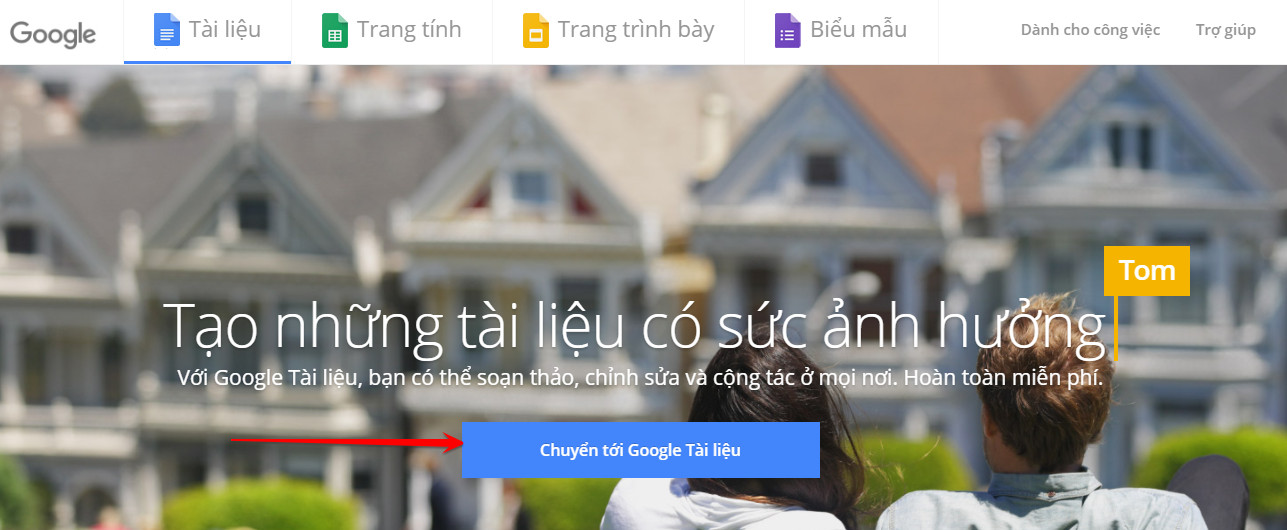
Tips to share many shortened links on Facebook without being deleted

Then click the plus sign in the lower right corner to create a new document.
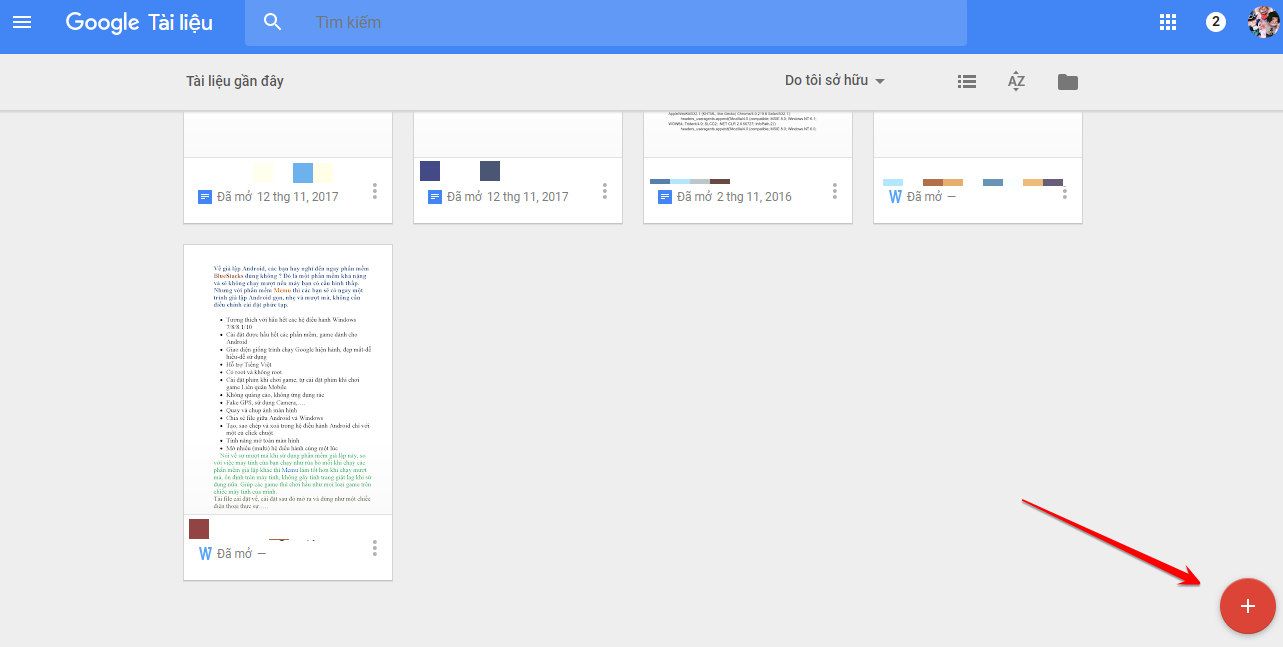
Tips to share many shortened links on Facebook without being deleted

Now follow what I recorded in the image below. This is also the way I often use to make money with shortened links on Facebook when I don’t have my own website. You can completely blog without building a website.
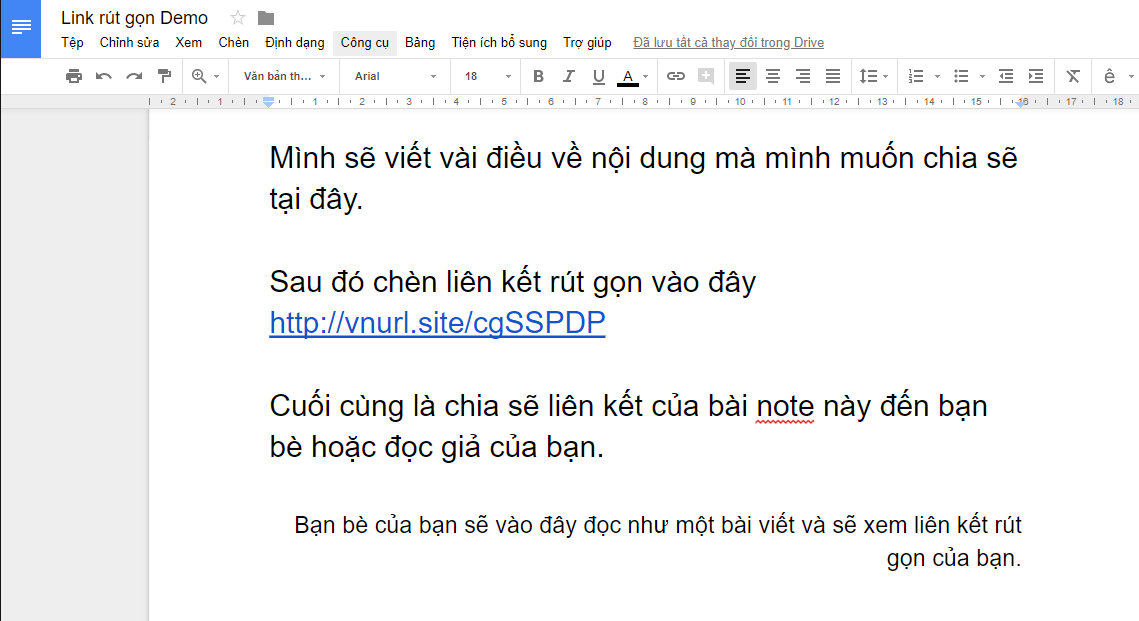
Tips to share many shortened links on Facebook without being deleted

After writing, click the Share button in the upper right corner.
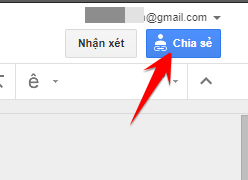
How to share many shortened links on Facebook without being deleted 10

Select “Anyone with the link can see” mode and copy (copy) the share link.
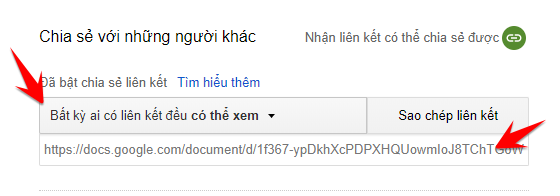
How to share many shortened links on Facebook without being deleted 11

You see, you don’t need to have a blog or a website. But it is still possible to create a complete article (with shortened link) and share it with everyone. This is how it can be said to be a double job!! An article you can write many issues and include many shortened links.

When you share on Facebook, users will see it as a Blog post and read it. During the reading process, they will be able to click on the links you have shortened.

If you want to grow stronger. Let’s create a Fanpage on Facebook and post these Blog posts on it.

Tips to share many shortened links without being deleted with Anotepad, Inotes

  • https://anotepad.com
  • http://notes.in
  • https://fnote.me

This is an online note-writing page that can be used for the purpose of sharing many shortened links without being deleted by Facebook. However, I often use Google Docs because its interface looks nicer and more professional. Okay, now I will show you how to use Anotepad!

You should register an account at anotepad to manage note files later. Just click the Register button in the upper right corner to proceed with registration.

How to share many shortened links on Facebook without being deleted 12

Fill out the form above if you want to register a new account. Sample article below if you want to login.
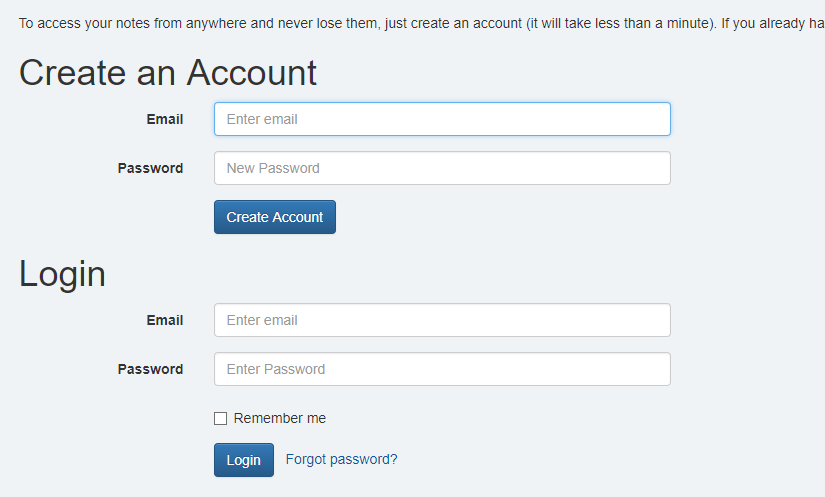
How to share many shortened links on Facebook without being deleted 13

After you have an account, you can proceed to log in and write notes.
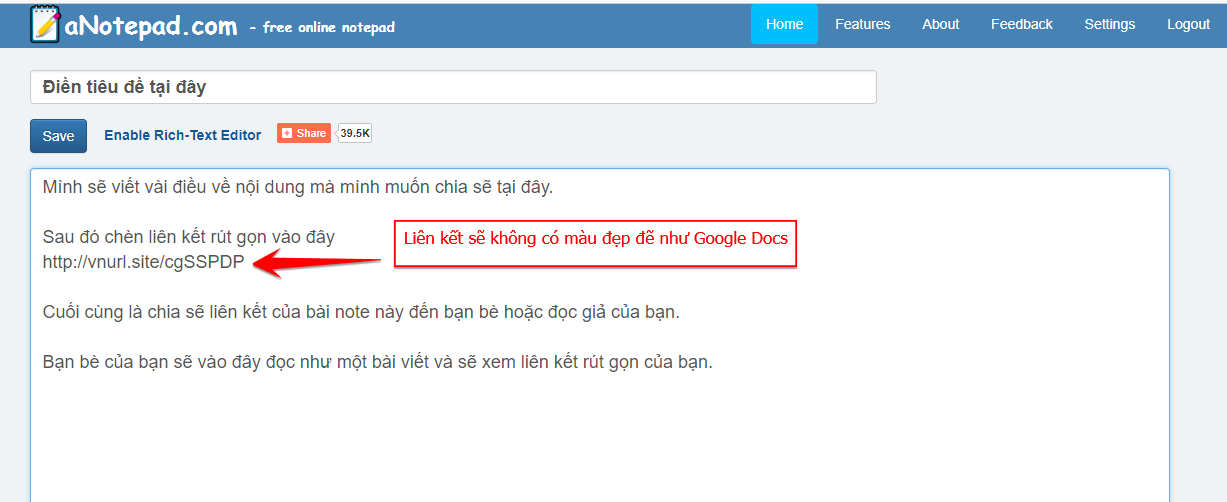
Tips to share many shortened links on Facebook without being deleted

After writing the content, click Save in the bottom corner.
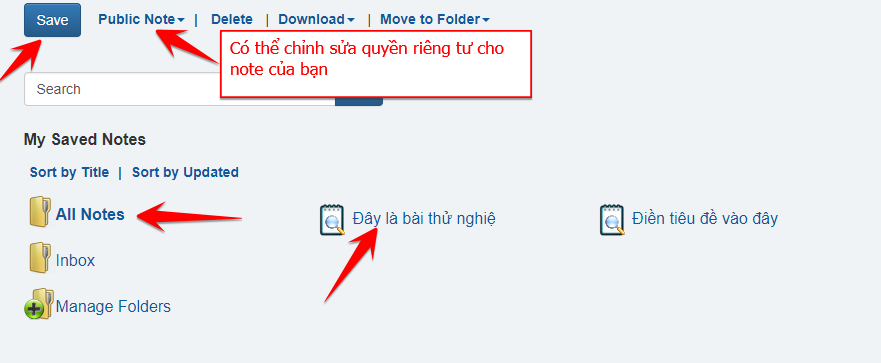
Tips to share many shortened links on Facebook without being deleted

You can manage your notes and edit the privacy of that note. However, I still prefer the beautiful interface and high security of Google Docs.

Finally, click on the post you want to share and copy the link and then send it to your friends.
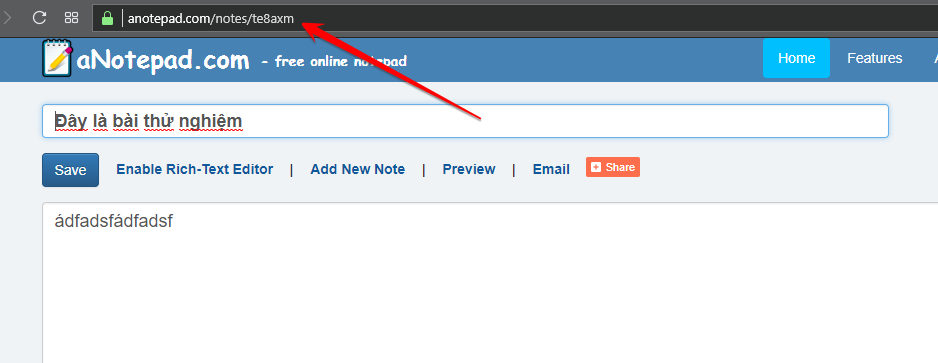
How to share many shortened links on Facebook without being deleted 14

Your friends can view and share to continue for more people.
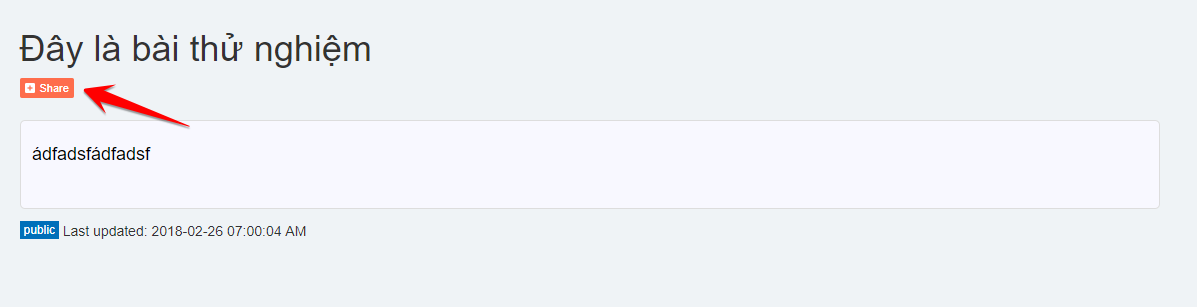
How to share many shortened links on Facebook without being deleted

Note

However, you still have to be careful not to share continuously for a short period of time. This way Facebook will know that you are spamming and block your comment feature. Therefore you must post the link in a valid way.

Rules for posting links so as not to be blocked

  • Trust account (long operation, interactive).
  • Links should be posted at least 10 minutes apart.
  • Each post should include different content.
    For example:
    First time – If you like to eat ice cream, come in…. that see.
    2nd – Interesting sharing for those who like to eat ice cream. Check out my post at….
    3 times – Check out my post…. Who likes to eat ice cream is addicted to it!!

Here are a few tips that can help you never get blocked from posting links. Apply it smartly!!!

If you want to invest bigger, make more money by shortening link. I recommend you to create a youtube channel or a website to fight!! This is what I said in the previous post. If you haven’t seen it yet, click the button below to watch it.

See previous post

Remember to skip the ad to support me!!

Good luck
Lmint.

The article achieved: 5/5 – (100 votes)

Previous Post

Share the cool Photoshop font set for Designers

Next Post

How to know if your Gmail when sending has been viewed or not

AnonyViet

AnonyViet

Related Posts

5+ prompts to create sparkling Christmas photos for mothers and babies at home
Tips

5+ prompts to create sparkling Christmas photos for mothers and babies at home

December 17, 2025
How to Clean Up Your Computer to Speed ​​Up Windows Faster
Tips

How to Clean Up Your Computer to Speed ​​Up Windows Faster

December 16, 2025
Share Snowfall Code for Website to celebrate Christmas
Tips

Share Snowfall Code for Website to celebrate Christmas

December 16, 2025
How to build web applications in just minutes with Youware
Tips

How to build web applications in just minutes with Youware

December 15, 2025
5 Free Adobe Illustrator Alternatives on Linux
Tips

5 Free Adobe Illustrator Alternatives on Linux

December 15, 2025
Review of Chongluadao utility – HieuPC’s new anti-fraud utility
Tips

Review of Chongluadao utility – HieuPC’s new anti-fraud utility

December 14, 2025
Next Post
How to know if your Gmail when sending has been viewed or not

How to know if your Gmail when sending has been viewed or not

0 0 votes
Article Rating
Subscribe
Login
Notify of
guest

guest

0 Comments
Oldest
Newest Most Voted
Inline Feedbacks
View all comments

Recent News

5+ prompts to create sparkling Christmas photos for mothers and babies at home

5+ prompts to create sparkling Christmas photos for mothers and babies at home

December 17, 2025
How to Clean Up Your Computer to Speed ​​Up Windows Faster

How to Clean Up Your Computer to Speed ​​Up Windows Faster

December 16, 2025
Share Snowfall Code for Website to celebrate Christmas

Share Snowfall Code for Website to celebrate Christmas

December 16, 2025
How to build web applications in just minutes with Youware

How to build web applications in just minutes with Youware

December 15, 2025
5+ prompts to create sparkling Christmas photos for mothers and babies at home

5+ prompts to create sparkling Christmas photos for mothers and babies at home

December 17, 2025
How to Clean Up Your Computer to Speed ​​Up Windows Faster

How to Clean Up Your Computer to Speed ​​Up Windows Faster

December 16, 2025
Share Snowfall Code for Website to celebrate Christmas

Share Snowfall Code for Website to celebrate Christmas

December 16, 2025
AnonyViet - English Version

AnonyViet

AnonyViet is a website share knowledge that you have never learned in school!

We are ready to welcome your comments, as well as your articles sent to AnonyViet.

Follow Us

Contact:

Email: anonyviet.com[@]gmail.com

Main Website: https://anonyviet.com

Recent News

5+ prompts to create sparkling Christmas photos for mothers and babies at home

5+ prompts to create sparkling Christmas photos for mothers and babies at home

December 17, 2025
How to Clean Up Your Computer to Speed ​​Up Windows Faster

How to Clean Up Your Computer to Speed ​​Up Windows Faster

December 16, 2025
  • Home
  • Home 2
  • Home 3
  • Home 4
  • Home 5
  • Home 6
  • Next Dest Page
  • Sample Page

trang chủ f168 nhà cái 78win https://www.qq8827.com/ https://go99.ae.org/ https://nohu90.bid/

No Result
View All Result
  • Home
  • News
  • Software
  • Knowledge
  • MMO
  • Tips
  • Security
  • Network
  • Office

trang chủ f168 nhà cái 78win https://www.qq8827.com/ https://go99.ae.org/ https://nohu90.bid/

wpDiscuz
0
0
Would love your thoughts, please comment.x
()
x
| Reply