Office 365 is a cloud office service from Microsoft. Similar to Office versions installed on computers, Office 365 includes programs such as Word, Excel, PowerPoint… The special feature is that you can use both Online and Offline. Besides, you will have 1TB of Online storage. Office 365 licenses are sold annually for $99. But AnonyViet will guide you Sign up for Office 365 for free within 1 year.
| Join the channel Telegram belong to AnonyViet 👉 Link 👈 |
How to register Office 365 for free for 5 users
Sign up for a Microsoft Dev account
Currently, Microsoft is having a program for programmers to experience its products for 1 year. Registering a Dev account is very easy, and there is no need to prove anything. You just create a Microsoft account and following the instructions below is possible Sign up for Office 365 for free.
Step 1: Visit Microsoft Website “Join the Office 365 developer program today”. You click the button JOIN NOW >

Step 2: Enter your Country and Company name. You can enter anything, this doesn’t need to be very precise. Then press the button next

Step 3: It requires you to declare your fields. Just check it, it won’t check, then click JOIN

Step 4: A notification will appear, click on it Close and press SET UP SUBSCRIPTION

Step 5: Fill in registration information in the box below.
You have to Remember this informationbecause This account is used to log in to Office 365
For example:
- Username: anonyviet
- Domain: anvvn (fill in anything)
Then your Office 365 login name will be: [email protected]
You have to memorize This login name and password!

Step 6: You need to enter your phone number to verify your account. Wait a few seconds to receive an SMS with a confirmation code.
 Step 7: Through this step, you already have a Microsoft Dev account. This page will record your expiration time. Office 365 term will be one year from the moment you register.
 Grant Office 365 permissions to the Dev account

Once you have a Dev account, you need to access it Admin page to grant Office 365 permissions to the account. Log in with the account you just created Step 5

Select User -> Active users -> Select the account name right frame.

In section Product licenses: No products have been assigned you choose to enter Edit
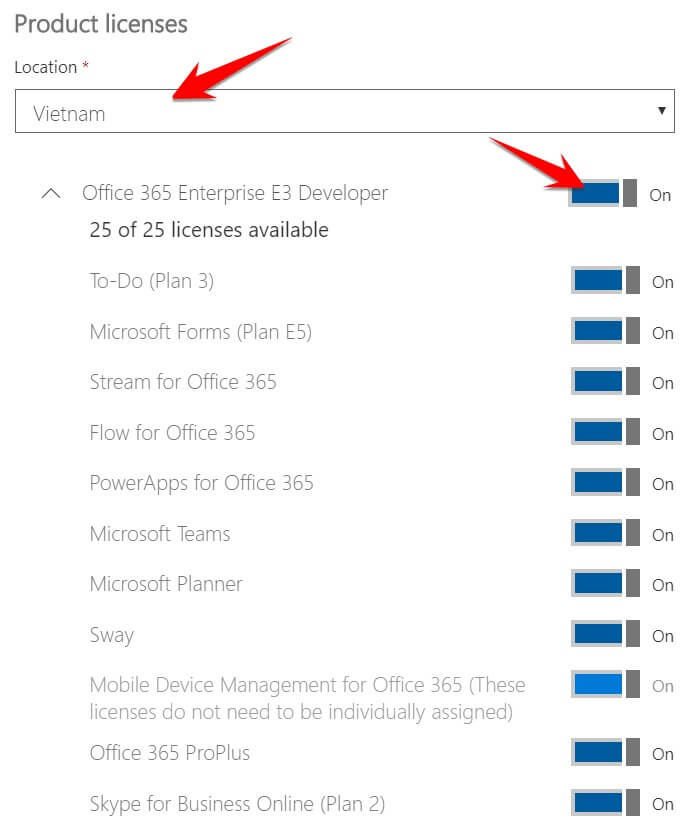
 Item Location: Vietnamyou turned on On in section Office 365 Enterprise E3 Developer. You will be granted 25 license due to the list of services below.
 Install Office 365 for computers

After authorizing your account, you are now able to Download Office 365 (choose the 32bit or 64bit version along with the version installed on your computer).
 After installation is complete, open Office on your computer. Click Sign in to get the most out of Office

Continue to log in with the account created here Step 5, So you already have a free Office 365 account to use for 1 year.
Recheck the item Account in Word or Excel you will see Office 365 ProPlus Active

So you have successfully registered for free Office 365.
Some notes when using Office 365:
- Office 365 account free for 1 year. After 1 year, you can re-register or use another account to register again.
- You can create more Users else to use Office 365 at Admin page for User management
- For each account, you can install up to 5 computers, 5 phones, and 5 tablets
- Should check account How many devices have you installed?